The phrase covers two jobs, and the pages make you find out which one by trying
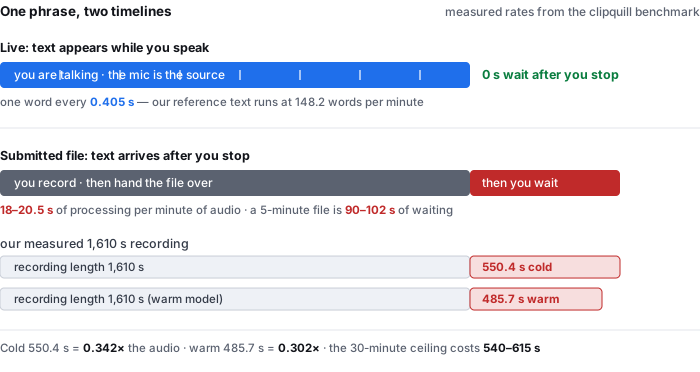
Think about what you do next in each case. If text appears while you speak, you are the microphone: the session lasts exactly as long as you talk, and the transcript cannot get ahead of you. If the tool takes a file, the recording has to exist before the text can, and the processing happens somewhere you are not.
Those are not two settings on one tool. They are two products with different failure modes, and the ranking pages mix them freely under one word:
- Live dictation. You are present, and the text keeps pace with you. Our reference set reads at 148.2 words per minute, which is about one word every 0.405 seconds — that is the rate the text has to produce to not fall behind a person talking normally.
- Submitted file. You stop, and then you wait. Our measured rate is 18 to 20.5 seconds per minute of audio, so a 5-minute recording is about 90 to 102 seconds of waiting after you have finished speaking — and a 30-minute one, at our ceiling, is 540 to 615 seconds.
- The tell is what the first screen asks you for. A box asking for permission to use your microphone is the live job. A box asking you to drag a file in is the other one. Both appear under the same phrase, and only one of them can be what you wanted.
The 148.2 words-per-minute figure is our reference text rate (229 words ÷ 92.7 s × 60) from wer-by-condition.csv and wer-by-sample.csv; 60 ÷ 148.2 = 0.405 s per word. The waiting figures are read off our live-site timings in timing-live-clipquill-com.csv: 1,610 s took 550.4 s cold and 485.7 s warm, and the 5-minute and 30-minute waits are that measured rate multiplied by the duration, not separate runs.
Two pages out of eight name the side of the line they are on
A reader wants to know one thing first: do I talk into this, or do I hand it a file? Here is what the eight readable pages actually say about that.
| page | what it takes as input | does it say which job it is? |
|---|---|---|
| speechtexter | microphone only | yes — “Can I upload an audio file and get the transcription? No, this feature is not available.” It then tells you to play your file out loud and let the mic capture it |
| audioconvert | file or built-in recorder | yes — “Does AudioConvert support real-time transcription? No. AudioConvert does not transcribe speech in real time.” |
| microsoft voice typing | microphone only | implicitly — it is a Windows dictation feature; there is no file box because there is no file job |
| speechnotes | microphone, plus a paid file service | partly — it says “Dictation works in real time. Transcription will get you results in a matter of minutes”, but the two are described on different parts of the page |
| soundtools | microphone or file | no — if you switch tabs “the browser may pause this tab… which ends processing”, which is the file job’s constraint, but nothing says the mic path differs |
| googlecloud | API, file or stream | yes, but as API vocabulary — “synchronous, asynchronous, and streaming”, which only a developer can map onto their own use |
| audiototext | file | no — upload box only; real time is never mentioned in either direction |
| soundwise | microphone or file | no — “Record or Upload Your Speech” in one line, then a single “processes your file in minutes” step for both |
| turboscribe | not read — HTTP 403 on every attempt across Chrome, Safari and Googlebot user agents, plus a shell request; excluded from all counts | |
| speecher | not read — HTTP 403 from an nginx front end on every attempt; excluded from all counts | |
Two of the eight answer the only question that matters at the top of a voice to text search, and they answer it in opposite directions: speechtexter cannot take your file, and audioconvert cannot work in real time. Both sentences are in an FAQ, near the bottom, after the reader has already clicked. Nobody puts the answer where the decision gets made.
- One page’s own advice is to fake the other job. speechtexter, which cannot accept a file, tells you how to transcribe one anyway: “Playback your file in any player and hit the ‘mic’ button… For better results select ‘Stereo Mix’ as the default recording device.” That is an honest workaround, and it is also the whole problem in one line — the reader has to know the difference before they can even build the workaround.
- The live keyboard is the one clue the pages do give. The tools that only dictate show a microphone button and a word counter; the tools that only transcribe files show a drag-and-drop box. A reader can usually guess from the first screen — but a guess is not a statement, and six of eight pages do not make one.
- The words that would let you check any of this appear zero times. Across the eight readable pages, test set, corpus, validation set, ground truth and sample size occur not once, while three pages print a percentage.
All quotations and counts are from the ten results read on 2026-10-09, counted over the eight that returned text; turboscribe and speecher returned HTTP 403 on every attempt and are excluded from every figure on this page. We did not upload a file to any of them and make no claim about whether their statements hold in practice.
What the two jobs cost, measured, and which one our pages are
The live job and the file job have different costs, and both are things we have timed rather than estimated.
| text appears while you speak | text arrives after you stop | |
|---|---|---|
| when your time ends | when you stop talking | when you stop talking, plus a wait |
| the wait after you stop | none — the text is already there | 18–20.5 s per minute of audio; 90–102 s for a 5-minute recording |
| how fast it has to run | faster than speech — about 1 word each 0.405 s | faster than you care to wait — 0.30–0.34× the audio length in our run |
| must you stay present | yes, for the whole session | no, after the file is handed over |
| what can go wrong | mic level, room noise, your own pauses | the file’s codec, channels and length ceiling |
Read the two rows together and the trade is clear. Live text is faster to have but costs you the whole session; a submitted file costs you a wait but frees you. Our own run put the file job at 550.4 s cold and 485.7 s warm on a 1,610-second recording — 0.342 and 0.302 times the audio length respectively — against a 30-minute ceiling that would cost 540 to 615 seconds.
- The waiting number is the one nobody prints. Every page in this family advertises speed — “instantly”, “in seconds”, “in minutes” — and not one states a rate you could use to plan. Ours is 18 to 20.5 seconds per minute of audio, and it is the reason the 30-minute cap is the real constraint here rather than a file-size one.
- Cache changes it more than anything else on the page. The same 1,610-second file took 550.4 s on a first visit and 485.7 s with the model already in the browser cache — 64.7 seconds back, 11.8% off. On our short 13-second clip the saving was 48.0%, so the cache’s value falls away as the job gets longer.
- Both jobs cost about the same memory here. A job peaks near a gigabyte of RAM — 1,128 MB on a first visit, 821 MB warm — whatever the input route was, because the cost is the model rather than the audio.
Timings are from timing-live-clipquill-com.csv (13 / 60 / 277 / 1,610 s clips, cold and warm) and memory from memory-peak.csv. The 5-minute and 30-minute waits are the measured per-minute rate applied to those durations, and are labelled as arithmetic rather than as separate runs. The 13-second saving is (45.2 − 23.5) ÷ 45.2 and the 1,610-second saving is (550.4 − 485.7) ÷ 550.4, both from the wall-clock columns.
Where your voice goes, which is the question the live job raises and the file job answers
A live session is a microphone pointed at a person, and that is a different privacy question from a file upload. Both appear under this phrase, and the pages handle them as if they were one.
- One page splits the two jobs and says exactly which one stays local. speechnotes writes: “For dictation, the recording & recognition is delegated to and done by the browser (Chrome / Edge) or operating system. So, we never even have access to the recorded audio… The results of the dictation are saved locally on your machine.” The same page’s file transcription is a paid service that uploads. It is the only readable page that draws the line between its two jobs rather than blurring it.
- Most of the rest either upload everything or do not say. audioconvert says files are “encrypted during upload and automatically deleted from our servers within 24 hours”, which is the server story. soundwise and audiototext say nothing about where the audio goes.
- Two pages run the model in the tab, and both pay for it in the first screen. soundtools writes “your audio is never uploaded to any server” alongside the cost — a one-time ~240 MB download and processing “roughly 1.5–2× real-time on desktop”. That is the fastest way to say both halves, and it is close to the number we measured for ourselves.
Our own tool is the file job, and it uses the same rule for both: the recognizer is downloaded into the tab and the audio is decoded there. The first visit is 78.4 MiB, 77,547,313 of those bytes being unquantised ONNX weights that compress poorly, and a job peaks near a gigabyte of RAM. Nothing about the file is sent anywhere, so there is no retention window to state — which you can watch in the network panel rather than take our word for.
The transfer and memory figures are from transfer-size-by-file.csv and memory-peak.csv. The quotations are from the eight pages read on 2026-10-09. We have not run a live microphone session and make no claim about dictation accuracy here.
What we measured on, because a percentage without that is not a number
Three of the eight readable pages print an accuracy percentage. None of them says what it was measured on. Here is our whole set, so the comparison is at least possible:
| acoustic condition | clips | reference words | default-tier WER | small tier |
|---|---|---|---|---|
| clean synthetic speech | 1 | 33 | 6.1% | 0.0% |
| real speech, no added noise | 2 | 28 | 10.7% | 7.1% |
| light background noise | 2 | 57 | 8.8% | 8.8% |
| heavy background noise | 2 | 89 | 34.8% | 16.9% |
| telephone band + echo | 1 | 22 | 22.7% | 0.0% |
| all eight clips | 8 | 229 | 20.1% | 9.6% |
| clean + light real speech only | 4 | 85 | 9.4% | 8.2% |
The set behind those rows is eight clips, 92.7 seconds and 229 reference words — two speakers, one noise type, and six of eight clips read aloud. That is the material a live dictation session would not look like, and saying so is the point: the 34.8% heavy-noise row is the one that would matter most to someone dictating in a room with a fan on, and it is 5.7× the 6.1% clean row on the same model.
- Our worst clip is published with the rest. The longest one, 29.4 seconds of heavily-noised real speech with 71 reference words, comes back at 40.8% at the default tier — 29 wrong words out of 71. It is the reason the all-eight figure is 20.1% rather than 6.1%.
- Small test sets move in big steps, and that is a property of the set. The shortest clip is 4.8 seconds / 11 words, where one wrong word shifts the result by 9.1 percentage points. Anyone quoting a two-digit accuracy has to have a set behind it; if the set is small, the second digit is noise.
- What we have not run is worth naming. We have not tested a live microphone session, and we have not tested a recording where two people overlap. Our set is two speakers taking turns.
All percentages are from wer-by-condition.csv and wer-by-sample.csv. WER is total errors divided by total reference words (weighted), not an average of per-clip percentages. The 229-word total is the scorer count after apostrophe splitting, documented in the repository README.
Questions this page answers
What is the difference between voice to text and transcribing a recording?
Two different jobs sharing one phrase. In live voice to text, text appears while you are still speaking and you are the microphone, so you must stay at the mic for the whole session. In recording transcription, you speak or record first, hand over a file, and the text arrives afterwards, so your time ends when the recording does. Our own measurements put the second job at 18 to 20.5 seconds of processing per minute of audio: a five-minute recording makes you wait around 90 to 102 seconds after you have stopped talking.
Can a voice to text tool transcribe both my voice and a file I already recorded?
Some can and some cannot, and the ranking pages rarely say which. Of the eight pages we could read, one answers plainly that it cannot: speechtexter’s FAQ says “Can I upload an audio file and get the transcription? No, this feature is not available” and tells you to play the file out loud and let the mic capture it. Another, audioconvert, says the opposite: “Does AudioConvert support real-time transcription? No.” Two pages out of eight state their side of the line; the other six leave the reader to discover it by trying.
How long does voice to text take compared with just typing?
For live dictation the text keeps up with you, because you are the source: our reference set reads at 148.2 words per minute, about one word every 0.405 seconds, and that is the rate text has to appear at to stay level with speech. For a submitted recording there is an additional wait after you stop. On a 1,610-second recording our own run took 550.4 seconds cold and 485.7 seconds warm — 0.342 and 0.302 times the audio length — and against our 30-minute ceiling the wait is 540 to 615 seconds.
Does voice to text run on your device or on a server?
Live dictation is the easier of the two to keep local, because the browser already owns the microphone capture. speechnotes states that for dictation “the recording & recognition is delegated to and done by the browser… we never even have access to the recorded audio”, while its file transcription is an upload. On our side both jobs run in the tab: the first visit is 78.4 MiB, of which 77,547,313 bytes are unquantised ONNX weights, and a job peaks near a gigabyte of RAM. A submitted file is decoded locally rather than sent anywhere, which you can watch in the network panel.
How accurate is voice to text, and accurate on what?
The number depends entirely on what it was measured on, and the ranked pages mostly do not say. Across the eight readable pages, test set, corpus, validation set, ground truth and sample size occur zero times, while three pages print a percentage. Our own set is eight clips, 92.7 seconds and 229 reference words, two speakers and one noise type; it scores 6.1% word error on clean synthetic speech and 34.8% under heavy background noise, a 5.7× spread on the same model that no single headline number can carry.
Where the raw data is
The timings, memory peaks, byte counts and per-condition error rates on this page come from the same published measurement run as the rest of this site.
- Raw data and the measurement scripts — github.com/supersophia8888-cloud/clipquill-asr-benchmark, including the raw model text behind every number, so the scoring can be redone under different rules.
- Archived copy with a DOI — 10.5281/zenodo.22826968, the concept DOI: that link always resolves to the newest version of this dataset, all versions.
- The same data as a dataset — huggingface.co/datasets/sophia8888/clipquill-asr-benchmark
- Cold versus warm, four durations — timing-live-clipquill-com.csv in the repository, from 13 s to 1,610 s.
- What a run costs in memory — memory-peak.csv, 821 to 1,128 MB.
- The wider phrase this one sits inside — audio to text, where the same word covers three file shapes.
- What an accuracy number means when it has no denominator — five pages make an accuracy claim, and not one says what it was measured on
- Whether a limit written in two units hides which wall you hit — eight pages publish a limit, and only one tells you which one you will hit
Run it on your own file
The transcriber is on the front page of this site, and it is the file job rather than the live one: you hand it a recording and the words come back, so you do not have to sit at a microphone. Expect the first run to spend about 78.4 MiB on the model download and roughly a gigabyte of RAM, and expect 18–20.5 seconds per minute of audio — a 5-minute file is about a minute and a half of waiting after you hand it over. The caps are 30 minutes of audio and 512 MiB per file, checked before any work starts.