Two walls, two units, and one page that connects them
We read the first page of results for audio file to text on 2026-10-04. Ten organic results, ten distinct domains. Bing and DuckDuckGo returned the same ten in the same order, which is not a second opinion — DuckDuckGo draws on Bing's index — so we counted them once. 9 of the 10 returned readable text; one answered HTTP 403 on every attempt. Every count below is out of those nine.
- The limits are everywhere, and they are in two currencies. 6 of 9 pages state a limit in bytes (100 MB, 25 MB, 5 GB, 200MB, or a promise that there is no size limit). 8 of 9 state one in time (5 min, about one hour, unlimited, 10 minutes). 5 of 9 print both numbers on the same page. The two are never put in the same unit.
- One page states no limit at all. It advertises 99% Accuracy Rate and All Audio Formats Supported, and its FAQ answers how long transcription takes with completed in minutes, depending on file length. No size, no duration, nothing a reader could check their own file against.
- One page connects the two, and it is worth quoting. Its FAQ answers Is there a file size or length limit? with the default cap of about one hour of audio per job, set by the processing timeout — and then adds: File size is not the real constraint — uploads stream directly to storage, so a 500 MB lossless recording works as long as it fits inside that time budget. That is the only sentence in the nine where a byte figure and a time figure are related. It is also a fair statement: 500 MB over an hour is 1,111 kbps, which is a plausible lossless rate.
- Not one page gives you the rate. 0 of 9 prints a bytes-per-second or bytes-per-minute figure. 1 of 9 mentions a bitrate at all, and it is an aside about a compressed MP3, not a conversion. Without a rate, a byte limit cannot be turned into a duration, which means the only number on the page that describes your file is the one number that is not about your file.
- The pairs that are printed imply a file that does not exist. Four pages print two numbers side by side. Read as one limit, they imply a rate: 25 MB and first 5 minutes is 667 kbps. 50 MB and up to 5 minutes is 1,333 kbps. 100 MB and up to 5 min is 2,667 kbps. A 500 MB and about one hour is 1,111 kbps. For scale, a 128 kbps MP3 is 0.128 Mbps and uncompressed 16-bit stereo WAV is 1.411 Mbps. Three of the four describe a file heavier than any normal recording, and the two numbers can only both be true for one bitrate.
Counted on 2026-10-04 from our saved copies of the results page for audio file to text. Every count is out of the nine pages that returned readable text. Each count was assigned by printing the full context of every match and reading it, not by tallying a regular expression — the method that caught false positives on this site on 2026-09-26, 2026-09-27, 2026-09-28, 2026-10-01 and 2026-10-03. A mention appearing only in a navigation bar, a footer, or a list of other tools was not counted.
The limits, in the pages’ own words
Here is every limit statement in the nine, as written. We are not naming the sites, because the point is what the nine do and do not say, not which one says it.
- “45+ audio formats (MP3, WAV, M4A, AAC, FLAC, etc.) with no file size limits” — a byte statement, and a negative one. The same page’s pricing answer gives the time wall: your first 10 minutes of AI transcription are free. So there is no size limit and there is a ten-minute allowance, and the page never says how many minutes ten megabytes of WAV would be.
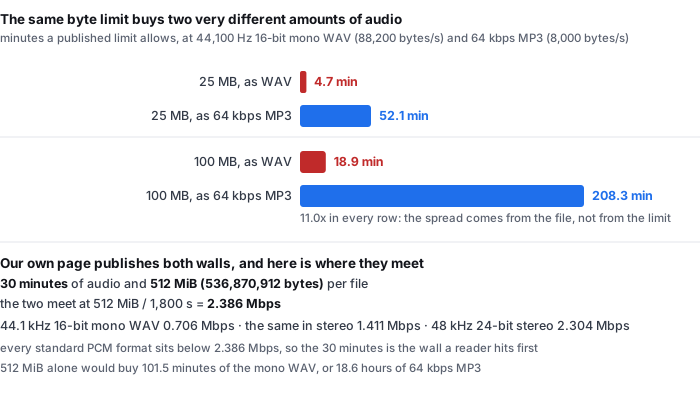
- “up to 5 min · 100 MB · free, no signup” — the most compressed version of the problem anywhere in the nine. Two numbers, one bullet, no unit in common. 100 MB of 44.1 kHz 16-bit mono WAV runs out at 18.9 minutes, so the five minutes stops you first. 100 MB of 64 kbps MP3 runs out at 208.3 minutes, so the 100 MB stops you first. Which wall you hit depends entirely on the file you brought, and the page presents the two as a single allowance.
- “Up to 25 MB” and “Up to 5 GB per file” and “First 5 minutes free” — one page, three limits, two currencies. The free tier carries 25 MB and a five-minute allowance together, which only agree at 667 kbps. For a 64 kbps MP3, 25 MB is 52.1 minutes, so the five minutes binds and the byte figure is ten times more generous than the sentence next to it.
- “200MB max file size (Premium)” and “Files up to 200 MB on Premium, 50 MB free” and “up to 5 minutes of audio per file for free” — the same shape again. 50 MB and five minutes together imply 1,333 kbps, which is close to uncompressed stereo. For the MP3s most people actually have, 50 MB is 104.2 minutes.
- “There’s no file length limit” and a comparison table row reading “File length limit — Unlimited” — a time statement, and a strong one, since the same page explains that long audio is processed in chunks. The page says nothing at all about bytes, and it is the page whose first visit downloads a model into the browser, which is a size the reader does pay.
- “No limit on file size or duration” — both currencies, both unlimited, on a free tier of three transcriptions a day. The constraint has simply moved to the count of jobs, which is a third unit again and one the page does state.
- “generate up to 5 minutes of automated transcripts per month” — a time limit with a fourth unit bolted on: per month, not per file. Nothing about size.
Read them together and the pattern is consistent. Every page has picked one unit, some have picked two, and none has done the arithmetic that would let a reader bring their own file to the answer. The question will my file work needs both numbers in one unit, and the first page for this phrase does not contain that operation anywhere except in one sentence.
All quotations are copied from our own saved copies of the pages, retrieved on 2026-10-04. We have not uploaded a file to any of them and make no claim about whether their limits are enforced as written — only that a limit stated in bytes and a limit stated in minutes are not the same limit.
The same two seconds of audio, saved seventeen ways
To turn a byte limit into a duration you need one number the nine pages never print: bytes per second. We have it, because our benchmark repository contains a matrix built for a different question — which containers a browser can decode — in which the same two seconds of audio was written out seventeen times. The sizes are the by-product, and they are the point here.
- WAV PCM, 44.1 kHz, 16-bit, mono: 176,478 bytes for 2.00 seconds. That is 88,200 bytes per second. It is also arithmetic rather than a measurement: 44,100 samples a second times 2 bytes a sample times one channel is 88,200, and the remaining 78 bytes of the file are its header. The same rate in stereo is 176,400 bytes per second. Nothing about the audio changes it.
- MP3: 16,526 bytes for 2.00 seconds, or 8,263 bytes per second. That is the size a fixed-bitrate mono MP3 at about 66 kbps would have, and a fixed bitrate does not depend on how simple the audio is, so the figure transfers to speech. For the rest of this page we use the round 8,000 bytes per second that 64 kbps implies by definition, which is within 4% of what our file actually measured.
- Ogg Vorbis: 6,913 bytes. AAC: 18,242 bytes for 2.04 seconds. Those two are variable-bitrate, and our source material is a 440 Hz test tone, which is the easiest thing there is for a modern codec to compress. So those two rows are floors, not typical speech figures, and the 25.5× spread between the smallest and the largest file in the matrix is an upper bound on the spread rather than an average. We are not going to headline it.
- The honest headline is the WAV-to-MP3 ratio: 88,200 against 8,000 bytes per second, which is 11.0×. Both ends of that ratio are trustworthy — one is arithmetic, the other is a definition — and it is the ratio that makes a byte limit ambiguous.
Put that ratio against the limits the nine pages publish and the ambiguity becomes a table.
| published limit | as 44.1 kHz 16-bit mono WAV (88,200 bytes/s) | as 64 kbps MP3 (8,000 bytes/s) |
|---|---|---|
| 25 MB | 4.7 minutes | 52.1 minutes |
| 50 MB | 9.4 minutes | 104.2 minutes |
| 100 MB | 18.9 minutes | 208.3 minutes |
| 200 MB | 37.8 minutes | 416.7 minutes |
| 5 GB | 15.7 hours | 173.6 hours |
Every row is the same 11.0×. A page that prints 100 MB has told you the size of the box. It has not told you whether your podcast fits in it, because your podcast is 19 minutes long if you exported it as WAV and three and a half hours long if you exported it as MP3.
The byte figures are read from container-codec-matrix.csv in the public benchmark repository, measured 2026-09-18 with a real Chrome window. The 88,200 bytes per second is arithmetic for 44.1 kHz 16-bit mono PCM; the 8,000 is the definition of 64 kbps. The table’s minutes are those two rates applied to the limits quoted from the nine pages above, and the assumption is a decimal MB of 1,000,000 bytes, since that is what the pages write. If they mean MiB, every figure is 4.9% larger and no conclusion changes.
Our own two walls, and which one stops you
This site publishes both numbers, so the same criticism applies to us until we say which one binds. It is not the one you would guess.
- The two walls are 30 minutes of audio and 512 MiB (536,870,912 bytes) per file. Both are checked before any work starts, and neither is a marketing number: they are what the model and the browser memory allow.
- They meet at one bitrate, and it is above every standard format. 512 MiB divided by 1,800 seconds is 298,262 bytes per second, or 2.386 Mbps. Below that rate the time wall binds; above it the byte wall binds. Uncompressed 44.1 kHz 16-bit mono is 0.706 Mbps, the same in stereo is 1.411 Mbps, and 48 kHz 24-bit stereo is 2.304 Mbps. All three sit under 2.386 Mbps.
- So on our page the 30 minutes is always the wall you hit. For every standard audio file the byte limit is unreachable, and the honest answer to how big can my file be is not 512 MiB — it is 158.8 MB, which is what 30 minutes of 44.1 kHz 16-bit mono WAV weighs, less than a third of the byte wall. Publish two numbers and you owe the reader the one that matters.
- And the byte wall alone would be very generous. 512 MiB buys 101.5 minutes of that mono WAV, or 18.6 hours of 64 kbps MP3. Neither is the 30 minutes we actually allow. The number that looks like the limit is not the limit, on our page as much as on theirs.
- What we cannot tell you is what your file weighs. Our own corpus is 8 clips and 92.619 seconds of audio, and the repository records their durations and their reference words but not their byte sizes. The bytes-per-second figures on this page come from the container matrix, which was built from two-second test tones. A real 20-minute recording is not in our published data at all, and we are not going to estimate one.
That is the asymmetry worth stating plainly. It is not that the nine pages are wrong about their limits. It is that a limit in bytes and a limit in minutes can both be true, both be accurate, and leave the reader with no way to check whether the file on their desktop will be accepted — and one of the nine noticed, wrote the sentence, and moved on.
The 30 minutes and 512 MiB are the limits this site states on its own front page and in its about page. The 2.386 Mbps tie point is 536,870,912 divided by 1,800 seconds; the format rates are sample rate times channels times bytes per sample, times 8. The corpus description is from data/README.md in the public benchmark repository.
The file that has nothing in it
There is a second thing the nine pages do not cover, and it follows from the phrase itself. An audio file can contain no speech.
- 0 of 9 says anything about it. Across all nine saved copies, not one contains a sentence about a silent file, a music-only file, an empty recording, an instrumental track, or what comes back when there are no words in the audio. There is no FAQ entry for it anywhere in the nine.
- It is not a contrived case. A voice memo left running, a meeting where the microphone was muted or pointed the wrong way, a file that turns out to be a song, a recording that is 40 minutes of room tone around two minutes of talking — every one of those is an audio file, every one of them passes a byte limit and a minute limit, and every one of them is a normal way to end up with nothing to transcribe.
- And we do not know either. Our published corpus is 8 clips, 92.619 seconds and 229 reference words, six of the eight are read speech, and every one of them contains speech. We have never run a file with no words in it. So we can tell you the gap exists in the nine pages, and we cannot tell you what is on the other side of it, because we have not looked. That is a measurement we owe the repository rather than a paragraph we owe this page.
The absence was checked on 2026-10-04 by searching all nine saved copies for silent, silence, no speech, no audio, no words, music only, instrumental, empty file and nothing to transcribe, and printing the context of every match. The only hits were on one page’s editing features, where removing awkward silences means cutting pauses out of a transcript that already exists. That is a different thing and was not counted.
Questions this page answers
My audio file is 100 MB. How many minutes is that?
It depends on the file, and that is the whole problem. At 44.1 kHz 16-bit mono, audio is 88,200 bytes per second, so 100 MB is 18.9 minutes. At 64 kbps MP3 it is 8,000 bytes per second, so 100 MB is 208.3 minutes — eleven times the audio in the same box. A page printing only 100 MB has told you the size of the box and nothing about what fits in it.
Why do some pages say no limit and others say 5 GB?
Because they are limiting different things. 6 of 9 state a byte limit, 8 of 9 state a time limit, 5 of 9 state both, and 1 of 9 relates the two. That one page answers its own size-or-length FAQ with about one hour of audio per job and then says file size is not the real constraint — uploads stream directly to storage, so a 500 MB lossless recording works as long as it fits inside that time budget. A second page says there is no file size limit and separately offers a ten-minute free allowance. A third says there is no file length limit and never mentions bytes.
How do I work out the bytes per second of my own audio file?
Divide the file’s size by its length in seconds. Our WAV is 176,478 bytes for 2.00 seconds, so 88,200 bytes per second once the 78-byte header is set aside. Then divide your tool’s byte limit by that rate to get the real duration cap, and compare it with the stated minute cap: the smaller is the wall you hit. For uncompressed WAV you do not need the file at all — sample rate × channels × bytes per sample is exact, so 44,100 × 1 × 2 is 88,200, and stereo doubles it. 0 of 9 pages gives any such figure.
Which limit will stop me first, the size one or the length one?
Whichever is smaller once both are in the same unit. Four of the nine print two numbers and never convert, and read together those pairs imply 667 kbps, 1,111 kbps, 1,333 kbps and 2,667 kbps. For scale, a 128 kbps MP3 is 0.128 Mbps and uncompressed 16-bit stereo WAV is 1.411 Mbps, so three of the four describe a file heavier than any ordinary recording. On this site the walls are 30 minutes and 512 MiB, meeting at 2.386 Mbps; every standard PCM format is below that, so the 30 minutes is always what stops you.
What happens if my audio file has no speech in it?
0 of 9 pages says, and neither can we — we have not run one. A voice memo left running, a muted microphone, a file that is a song: all ordinary, all pass both limits, all leave you with nothing to transcribe. Our published corpus is 8 clips, 92.619 seconds and 229 reference words, every one containing speech. The empty case is a measurement we owe the repository, not a paragraph we owe this page.
Where the raw data is
The bytes-per-second figures on this page come from the same published measurement run as the rest of this site. The reading of the nine results pages is the only new thing here.
- Raw data and the measurement scripts — github.com/supersophia8888-cloud/clipquill-asr-benchmark, including the raw model text behind every number, so the scoring can be redone under different rules.
- Archived copy with a DOI — 10.5281/zenodo.22826968, the concept DOI: that link always resolves to the newest version of this dataset, all versions.
- The same data as a dataset — huggingface.co/datasets/sophia8888/clipquill-asr-benchmark
- The seventeen file sizes — container-codec-matrix.csv in the repository, the same two seconds of audio written out in every container and codec we tested.
- Which containers the browser can actually read — the extension is not what it converts
- What a limit means when the audio is bad — five pages make an accuracy claim, and not one says what it was measured on
- The wall on the other side of the file — five pages ask where your recording goes, and all five answer “to us”
Run it on your own file
The transcriber is on the front page of this site. It reads the audio in the tab and writes the words from it, so the file does not leave your machine. Expect the first run to spend 78.4 MiB on the download and about a gigabyte of RAM, then 18 to 20.5 seconds of wall clock for every minute of audio after that. Accuracy is the 20.1% figure with the clips named — and if your recording is clean, read speech, the honest comparison is the 9.4% grouping, not the headline. The caps are 30 minutes of audio and 512 MiB per file, checked before any work starts, and for any standard audio file it is the 30 minutes that will stop you.