“Audio” is a category, and the page never asks which one you have
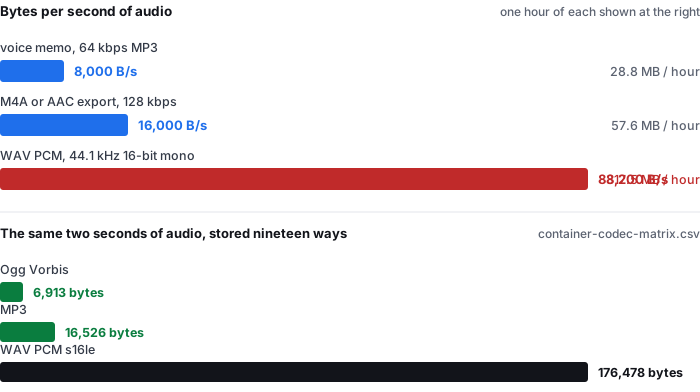
The other pages in this family can assume something. Someone searching mp3 to text has an MP3. Someone searching wav to text has a WAV. Someone searching audio to text has decided only that the thing they recorded contains speech and that they want it as words — and the file they are holding could be anything from a 28.8 MB hour to a 317.5 MB hour.
That is a real fork, not a technicality. The three shapes below are all ordinary, all produce the same recognition input once decoded, and all cost the reader a different amount of time and bandwidth to move:
- A compressed voice memo. A phone voice memo or a messaging-app export usually lands near 64 kbps, which is 8,000 bytes per second — 28.8 MB for an hour. Nothing about uploading it is a decision.
- An AAC/M4A export. The default from most recorders and from every Apple device is roughly 128 kbps, or 16,000 bytes per second — 57.6 MB an hour. Still an easy upload, 2× the voice memo.
- A PCM WAV. A field recorder set to 44.1 kHz 16-bit writes 88,200 bytes per second, or 317.5 MB an hour — 11.0× the voice memo. That is the one that meets a file ceiling.
Our container matrix (container-codec-matrix.csv, measured 2026-09-18 in a real Chrome window) stores the same two seconds of audio twenty ways and spans 6,913 bytes to 176,478 bytes, a 25.5× range. Every row in it is a file a reader of this phrase could plausibly be holding. And zero of nine pages ranking for the phrase name a single one of those numbers.
The bytes-per-second figures are the definition of each format (sample rate × bit depth × channels), and the 8,000 B/s and 16,000 B/s rates are the definition of 64 kbps and 128 kbps. The two-second byte figures are measured rows in container-codec-matrix.csv; the uncompressed WAV definition is 88,200 B/s against a measured 176,478 ÷ 2 = 88,239 B/s, a 0.04% difference. An hour is 3,600 s; MB is 106 bytes.
Every page asks the same question, and one of the nine numbers a denominator
A reader who types this phrase is asking how good is this, and how much can I put through it. So we read all ten results and counted what the nine readable pages actually answer.
| page | accuracy claim | what the number is measured on | bytes each second |
|---|---|---|---|
| happyscribe | “up to 99%” on the page, “up to 96%” in the FAQ | none — and the two numbers differ by three points | no |
| audiototext | “99% Accuracy Rate” | “handles accents, background noise, and multiple speakers with ease” | no |
| turboscribe | not read — HTTP 403 on every attempt; excluded from all counts | ||
| freeonlinetranscribe | “90% of cases” | not an accuracy figure at all; it is a use-case share | no |
| audioscribe | “high accuracy”, no number | none | no |
| elevenlabs | a bar chart, and the word benchmark | named as a benchmark, never identified | no |
| soundtools | no percentage on the page | the two model sizes, ~240 MB and ~180 MB | no |
| snipsound | 88 / 95 / 98 / 99 in one section | by language — French ~88%, clean-speech benchmark ~95%, Pro ~98%, and it explicitly refuses 99% | no |
| veed | “99.9%” | none | no |
| any2text | “98% accuracy on clean audio” | a qualifier, no denominator | no |
One of the nine puts a number behind a number. snipsound publishes a language table — English and Spanish around 100%, Chinese and Japanese ~100% content-accurate, French around 88% — and then adds the sentence the other eight are missing: “On a standard clean-speech benchmark that is roughly 95%; the Pro model (Whisper large-v3) is around 98%. Real-world audio with background noise, music, strong accents or overlapping speakers is harder for any model, so accuracy there is lower — we never claim 99%.” It is the only page in nine that names the model behind the number and declines the top of the range.
- The words that would make the other eight checkable appear zero times. Across all nine pages, test set, corpus, validation set, ground truth and sample size occur not once. Two pages use benchmark (elevenlabs, snipsound) and three use trained on to describe the model, which is a fact about training, not about the tool being measured.
- happyscribe publishes two numbers and they disagree. The page says “up to 99% accuracy” next to the upload box; its own FAQ says “Our AI transcription achieves up to 96% accuracy on clear audio in common languages” and reserves 99% for a human transcription service. Both sentences sit on the same URL, and the higher one is the one on the first screen.
- Zero of nine says what share of a recording is speech. An hour of meeting, lecture or podcast is not an hour of words: there is room tone before the first sentence, music under the intro, and gaps between turns. Not one page states that ratio, which means the one number a reader can verify against their own file — how much text came out — has nothing on the page to compare to.
All quotations and counts are from the ten results read on 2026-10-08, counted over the nine that returned text; turboscribe returned HTTP 403 on every attempt and is excluded from every figure on this page. We did not upload a file to any of them and make no claim about whether their accuracy statements are accurate.
What we can put on the other side: a denominator, and the honest word count
This site publishes its own numbers with the material they were measured on, so the comparison is possible. Here is the whole set:
| acoustic condition | clips | reference words | default-tier WER | small tier |
|---|---|---|---|---|
| clean synthetic speech | 1 | 33 | 6.1% | 0.0% |
| real speech, no added noise | 2 | 28 | 10.7% | 7.1% |
| light background noise | 2 | 57 | 8.8% | 8.8% |
| heavy background noise | 2 | 89 | 34.8% | 16.9% |
| telephone band + echo | 1 | 22 | 22.7% | 0.0% |
| all eight clips | 8 | 229 | 20.1% | 9.6% |
| clean + light real speech only | 4 | 85 | 9.4% | 8.2% |
The set behind those rows is eight clips, 92.7 seconds of audio and 229 reference words — small, and published as small. Read the reference rate out of it and it is 148.2 words per minute, which is what a person talking normally produces. An hour of that speech would be roughly 8,900 words, and the 20.1% across all eight clips is 46 wrong words in 229, or about one error every five words.
- The narrowness is the point, and it is where our number and their number stop being comparable. Our set holds two speakers, one noise type (pink noise), and six of eight clips are read aloud. A page that claims 99% for meetings and podcasts is claiming it for material that looks nothing like our set — and, on the evidence of the nine, has never said what its own material looked like either.
- Our worst clip is the honest one. The longest clip, 29.4 seconds of heavily-noised real speech with 71 reference words, comes back at 40.8% at the default tier — 29 wrong words out of 71. We publish it, and it is the reason the all-eight figure is 20.1% rather than the 6.1% the cleanest clip scores. A page that headlines one number has to choose which of those seven rows to show; we show all seven.
- Two of our clips are 5.9 and 4.8 seconds long. On the shorter one, 11 reference words means a single wrong word moves the number by 9.1 percentage points. That is a property of small test sets, not of the model, and it is exactly the effect that makes an unqualified “98%” impossible to check.
All percentages are from wer-by-condition.csv and wer-by-sample.csv in the public benchmark repository. WER is total errors divided by total reference words (weighted), not an average of per-clip percentages. The 229-word total is the scorer count after apostrophe splitting, documented in the repository README; the 148.2 words/min figure is 229 ÷ 92.7 × 60. The missing-word counts are the base_error_words column of wer-by-sample.csv.
What changes the number, and what only changes the file
Two variables get mixed together on every page in this family, and only one of them is a variable at all.
| choice | what it changes | what it does not |
|---|---|---|
| which container the audio sits in | the bytes on disk — 6,913 to 176,478 for the same two seconds | the decoded samples: every one of our eight containers measures 2.00 s / 1 channel / 44,100 Hz |
| the acoustic condition of the recording | the word error rate — 6.1% clean to 34.8% under heavy noise at one tier | nothing about the file; same model, same scorer, same 229 words |
| the model tier | the error rate again, differently — 20.1% default against 9.6% small across all eight clips | the upload, the decode, the export |
| adding a second speaker | whether you can tell who said what | the WER, which counts words, not turns |
On our own decode table the container row is the one to look at twice. mp3, wav, ogg, m4a, mp4, mov, webm and aac all decode to the same 2.00 seconds, 1 channel, 44,100 Hz — the recognizer receives samples, not a file. So the 11.0× gap between a voice memo and a WAV is entirely a cost you pay in upload and storage, and none of it is accuracy.
- Five of nine pages sell speaker labels; one of them admits what its engine cannot do. audiototext offers to “identify and label different speakers”, audioscribe says multi-speaker audio is “automatically split by speaker”, elevenlabs offers up to 32 labeled speakers, any2text says the system “automatically separates the lines of different speakers”. Against that, snipsound writes plainly: “Speaker diarization (‘who said what’) — not supported by Whisper-tiny.”
- We are on snipsound’s side of that line. Our reference set has two speakers and no diarization, and our pages do not offer to label voices. If your recording is a panel where people talk over each other, this is the limit to know before you upload, not after.
- The condition that breaks every page is the one nobody quantifies. freeonlinetranscribe is the only readable page that names the failure mode in the reader’s own terms — “Heavy background music, whispered speech, and recordings where several people talk over each other are where you will see accuracy drop” — and it gives the direction without a magnitude. Our own heavy-noise row is the magnitude, and it is 34.8% against 6.1% on the clean clip, a 5.7× spread on the same model.
The decode figures are rows from decode-format-support.csv; the WER rows are from wer-by-condition.csv. The diarization quotations and the five-of-nine count are from the nine pages read on 2026-10-08. Our decode table was run on one 2-second mono tone per container, so identity of duration and channel count is measured, but nothing on this page is claimed for hours of multi-channel audio, which we have not run.
Where the audio goes
This phrase gets searched by people holding a meeting recording, and that is the recording with someone else’s voice on it. So the last question is the one worth answering plainly: what the pages do with the file, and what we do with it.
- Most of the nine are server-side, and say so. audiototext: files “encrypted during processing and automatically deleted”. freeonlinetranscribe: the file streams to temporary storage and runs on a GPU worker, and it states it never uses your audio to train models. elevenlabs accepts “Audio or video, up to 300MB”, which is a limit only a server can impose.
- Two of the nine run the model in the tab, and both say it in the first screen. soundtools writes “OpenAI’s Whisper AI runs entirely on your device — your audio is never uploaded to any server” and warns that the tab must stay open because “if you switch tabs or let your device sleep, the browser may pause this tab or close it to free memory, which ends processing”. snipsound writes “Audio stays on your device” and names its cost: the model downloads once at ~75 MB.
- One page contradicts itself between its own sections. audioscribe answers “Is my file stored anywhere?” with “No. Your file is sent for transcription and is not retained on our servers” — the first clause grants the upload, the second only promises deletion. The same page also caps the free tool at 5 minutes and 100 MB, a limit no in-browser recognizer needs to impose.
We are in the third camp and the cost is real, so here it is: the recognizer is downloaded into the tab, which is a 78.4 MiB first visit, 77,547,313 of those bytes being unquantised ONNX weights that compress poorly; a job peaks near a gigabyte of RAM; and the wall-clock price is 18–20.5 seconds per minute of audio. On a 1,610-second recording that was 550.4 s cold and 485.7 s warm. Nothing about the file is sent anywhere, so there is no retention window to state and no bucket to describe — and you can watch that in the network panel rather than take our word for it.
The transfer, memory and timing figures are from transfer-size-by-file.csv, memory-peak.csv and timing-live-clipquill-com.csv. The quotations are from the nine pages read on 2026-10-08.
Questions this page answers
What counts as audio for audio to text?
Three files that all get called audio: a compressed voice memo at 8,000 bytes per second (64 kbps), an M4A or AAC export at 16,000 bytes per second (128 kbps), and a PCM WAV at 88,200 bytes per second (44.1 kHz, 16-bit, mono). The width matters because the same one hour of recording is 28.8 MB, 57.6 MB or 317.5 MB depending on which one you have, and the file ceiling that stops the third never appears to the first.
Why is the same one-hour recording 28.8 MB on one device and 317.5 MB on another?
Because the phrase audio to text does not name a format, so nothing on the page knows what you are holding. At 64 kbps an hour is 28.8 MB, at 128 kbps it is 57.6 MB, and as 44.1 kHz 16-bit mono PCM it is 317.5 MB — an 11.0× spread between two recordings of the same conversation. Our container matrix holds the same two seconds of audio twenty ways, from 6,913 bytes as Ogg Vorbis to 176,478 bytes as WAV PCM, a 25.5× range for audio that decodes to identical duration and channel count.
Is the biggest file the best input for transcription?
No. Every container in our decode table yields the same 2.00 seconds, 1 channel, 44,100 Hz once decoded, so the recognizer receives the same samples whether you hand it a 6,913-byte Ogg Vorbis file or the 176,478-byte WAV. What moves the number is the acoustic condition: on our eight clips and 229 reference words the default tier scores 6.1% word error on clean speech and 34.8% under heavy noise, a 5.7× spread that no format choice touches.
How much of an hour-long recording is speech the recognizer can use?
Not all of it, and none of the nine pages we read publishes the ratio. What we can publish is our own frame: the set behind every number on this site is eight clips, 92.7 seconds and 229 reference words, two speakers, one noise type, six of eight read aloud. Its reference reads at 148.2 words per minute, so an hour of comparable speech is roughly 8,900 words and 20.1% is 46 wrong words in 229. If your recording is an hour of meeting, the words will be fewer than that — and no page in the top ten will tell you by how much.
Where does my audio go when I convert it to text?
With our tool, nowhere. The recognizer is downloaded into the tab and the audio is decoded there; the first visit costs about 78.4 MiB, of which 77,547,313 bytes are unquantised ONNX weights, and each job peaks near a gigabyte of RAM. Most of the pages ranking for this phrase are built the other way — elevenlabs accepts uploads up to 300 MB, which only a server can do — and one of them, audioscribe, answers “Is my file stored anywhere?” with “No. Your file is sent for transcription and is not retained on our servers”, which grants the upload in the same sentence that denies keeping it. Two of the nine run in the tab and say so: soundtools and snipsound.
Where the raw data is
The byte counts, the decode results and the per-condition error rates on this page come from the same published measurement run as the rest of this site.
- Raw data and the measurement scripts — github.com/supersophia8888-cloud/clipquill-asr-benchmark, including the raw model text behind every number, so the scoring can be redone under different rules.
- Archived copy with a DOI — 10.5281/zenodo.22826968, the concept DOI: that link always resolves to the newest version of this dataset, all versions.
- The same data as a dataset — huggingface.co/datasets/sophia8888/clipquill-asr-benchmark
- The same two seconds of audio stored twenty ways — container-codec-matrix.csv in the repository, from 6,913 bytes to 176,478.
- What the browser can decode in-page — decode-format-support.csv, eight containers, all 2.00 s / 1 channel / 44,100 Hz.
- One format at a time, from the narrower pages — mp3 to text, mp4 to text, m4a to text and wav to text.
- What an accuracy number means when it has no denominator — five pages make an accuracy claim, and not one says what it was measured on
- How a limit written in two units hides which wall you hit — eight pages publish a limit, and only one tells you which one you will hit
Run it on your own file
The transcriber is on the front page of this site. It reads the audio in the tab and writes the words from it, so whichever of the three shapes you are holding — the 28.8 MB voice memo, the 57.6 MB export or the 317.5 MB recording — the file stays where it is and only the samples get used. Expect the first run to spend about 78.4 MiB on the model download and roughly a gigabyte of RAM, and expect the recognition itself to take about 18–20.5 seconds per minute of audio, which it does regardless of which container you brought. The caps are 30 minutes of audio and 512 MiB per file, checked before any work starts.