Drop a meeting recording here
Nothing to install — no download, no plug-in, no app, no signup. It runs in the tab you already have open.
English runs on Moonshine base — the more accurate of the two on everyday speech, and the smaller download. The other 29 languages run on whisper. Choose the larger tier for heavy background noise, or when you need frame-accurate SRT/VTT subtitle timing. The maximum-accuracy tier (distil-whisper for English, whisper-large-v3-turbo for other languages) roughly halves the error rate again — but it downloads 550–730 MB and is several times slower, so it suits short recordings and one-off jobs, not a long file on a phone.
The model shipped here cannot work out the language on its own — it has to be told. Pick the language that is spoken in the file; if English is picked for a Chinese clip, the transcript comes back in English. The choice is remembered on this device.
This page works on a file that is already on your device. It does not join a call, does not put a bot in the room, and cannot pull a recording out of a cloud drive.
MP4 · MOV · WEBM · M4A · MP3 · WAV · AAC · OGG · FLAC · OPUS · 3GP · M4B. That list is what we have tested; a file outside it may still work, but we do not promise it. You can also paste a file straight in with Ctrl+V.
A meeting recording is a file, and meeting transcription is what a recogniser does to it — which is a smaller job than the first page makes it look. Eight of the fourteen pages we could read sell an AI notetaker that joins the call, twelve sell summaries or action items, and eleven sell real-time text. What none of the fourteen pages puts on the front screen is the part that decides whether the transcript is right: on our own 72.439-second recording, held to the same bytes and the same 184 reference words, the average level went from −25.5 to −40.5 to −49.5 dBFS and the wrong words went 1 → 2 → 1. 24 dB bought one word. That is the opposite of what a microphone-shy user expects, and it is why this page puts the level, the silence and the money on the same three axes.
Questions this page answers
On this page ◆ marks a number measured here — on our own recordings, in a real browser tab — and ◈ marks a count read off the fourteen pages that rank for this phrase. Both name the row or the page they came from.
How do I transcribe a meeting?
◆ A meeting recording becomes text in one step: hand the audio file to a recogniser. The question that decides whether the result is usable is not which site you pick but what happened to the audio before it arrived — how loud it was, how much of it was silence, and how many people were talking at once.
◆ On our own 72.439-second recording of one speaker at three levels, the transcript barely moved: 1, 2 and 1 wrong words out of 184. The lever that did move it, in the same repository, is the model: on a telephone-band clip the same 22 reference words went from 5 errors on the base model to 0 on the small one.
◈ Nine of the fourteen pages describe a bot that joins the call, and none of the fourteen describes how loud the resulting audio is.
Does it matter how quiet the recording is?
◆ Not across the range a meeting actually produces.
◆ One recording, held to 16 kHz mono PCM and 2,318,126 bytes on all three runs, was measured at −25.5, −40.5 and −49.5 dBFS average level. The 184 reference words came back with 1, 2 and 1 wrong — 0.54%, 1.09% and 0.54%.
◆ The spread is one word, and our own repeats on this material move by up to ±2. So the honest reading is that a 24 dB quieter room scored the same, and the run in between — not the quietest one — happened to pick up one extra word.
◈ Zero of the fourteen pages gives the level, sample rate or encoding of a meeting recording, so none of them can tell you whether a quiet room is the problem. One page mentions bitrate in a single sentence — “higher bitrate means better transcripts” — with no number attached.
How much of a transcript is silence?
◆ None of it, on this engine. Five minutes of digital silence on its own produced an empty transcript — zero characters — and took 58.1 seconds to say so.
◆ The same 72.439 seconds of speech placed after those five minutes made a 372.439-second file.
◆ It returned 183 words with 5 errors in 73.0 seconds, against 71.1 seconds for the speech alone at a comparable level. The five silent minutes cost 1.9 seconds of clock and zero words.
◆ That is 5.14× the audio for 1.03× the waiting — and it is the opposite of what happens on a phone call, where five minutes of hold music leaves the word count untouched but stretches the clock 3.18×.
How long does a one-hour meeting take?
◆ Extrapolated from measured rows, not run as one hour. On this site the settled cost is about 20.5 seconds per audio minute on a 26.8-minute file and 21.42 on a 4.6-minute one, so an hour of meeting is roughly 20 minutes of waiting. A two-hour recording would be about 41 minutes.
◆ A five-minute meeting is not five times cheaper. The same file lengths measured cold, including the model download, run 208.62, 38.90, 21.42 and 20.51 seconds per audio minute: the fixed cost of a run dominates anything under two minutes, which is why our own caps are 30 minutes of audio and 512 MiB per file rather than a promise about long meetings.
◈ Zero of the fourteen pages gives a seconds-per-minute or words-per-minute figure, so none of their speed claims can be turned into a wait for a given meeting.
Does the level of my meeting recording matter more than the model?
◆ No — and this is the number that settles it. Twenty-four decibels of level moved the error count by 1 word in 184.
◆ Moving from the base model to the small model on our telephone-band clip moved 5 errors out of 22 to 0 — 22.7% to 0.0%. A knob that costs 24 dB buys nothing; a model change on damaged audio buys everything.
◈ Two of the fourteen pages print an accuracy percentage — 96% and 98%+ — and neither prints the words it was measured on, so neither number can be placed next to ours.
Why do my meeting transcripts have no speaker labels?
◈ Because most engines return one stream of text and no attribution. In our own SRT output for a two-voice clip — two speakers, 5 cues — zero of those cues carried a speaker label, and the same holds on a 4-cue export from an interview clip. That is the honest state of the file, not a setting we forgot to switch on.
◆ Two people talking at once is where the cost lands. The same 189 reference words split across two channels came back 85.71% wrong when the recogniser was given them separate, and 60.85% wrong after they were mixed down into one track — against 10.05% for that speech alone in a quiet room.
◈ Five of the fourteen pages mention speaker labels at all, and two of those five say outright that they do not provide them — one states that the text is “one stream of time-stamped lines” with no attribution. The other nine are silent on it.
24 dB quieter, one more wrong word — and that one word is inside the wobble
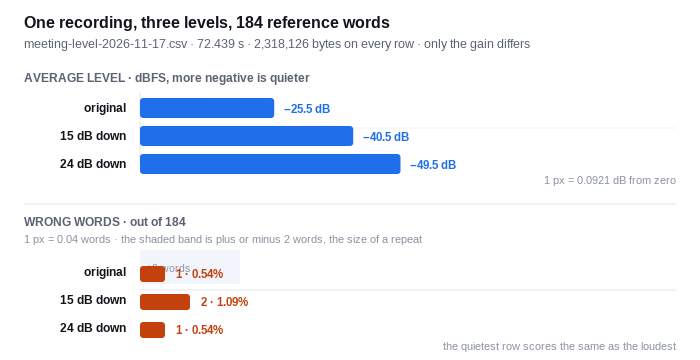
◆ One recording, three levels, one recogniser. Container, sample rate, channel count, duration and byte length are identical on all three rows, so the only variable is amplitude.
- ◆ −25.5 dBFS — the original. 1 wrong word, 0.54%. This was the first run of the session, in a fresh profile: it carries the model download, so its clock is not comparable to the two below.
- ◆ −40.5 dBFS — a room where everyone sits away from the microphone. 2 wrong words, 1.09%. One more word than the original, which is the kind of difference a repeat produces.
- ◆ −49.5 dBFS — a laptop microphone across the table. 1 wrong word, 0.54%. The quietest row scores exactly what the loudest row scored.
◆ One word on 184 words is 0.54 of a point, and our own repeats on this material move by up to ±2 words. All three rows sit inside that band, which is why this page reports the level result as no measurable effect rather than as a ranking.
◆ The three runs took 115.6, 71.1 and 66.1 seconds — but the first was in a fresh profile and carries the model download, so the honest comparison is between the two warm runs, 71.1 and 66.1. The ladder is consistent with what the earlier bitrate test found on different material: there, the largest file was 4.01× the smallest for a 1.59 point spread. Spending bytes and spending decibels both fail to buy accuracy here.
Five minutes of a silent room costs 1.9 seconds and nothing else
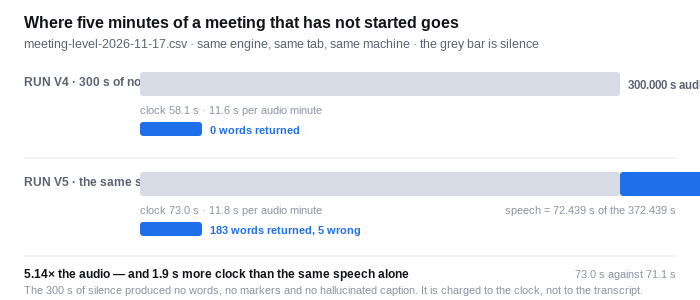
◆ Every meeting has a first minute that is people joining, and a room that has not started talking. This is what that minute costs.
- ◆ Silence alone — 300.000 s. Zero characters came back, and the run took 58.1 s. No placeholder caption, no music marker, no invented line: nothing. The 58.1 s is the fixed cost of starting a run, not the cost of the minutes.
- ◆ That silence, then the speech — 372.439 s. 183 words, 5 wrong, in 73.0 s. The same speech alone at −15 dB was 71.1 s. So the five silent minutes were charged 1.9 s of clock.
- ◆ 5.14× the audio for 1.03× the clock. Compare that with a phone call: five minutes of hold music in front of the same kind of content left the words untouched at 20 of 189 and stretched the clock 3.18×, because hold music is audio the engine still has to look at. Digital silence is not.
◆ The 300 seconds of silence carry 9,600,078 bytes of PCM — 80.6% of the concatenated file — and none of it reached the transcript. Payload is not input: the only thing the silent half ever bought was 1.9 seconds of wall clock.
◆ The 5-error row on V5 is higher than the 1–2 errors on V1–V3 for the same speech. That is a 3-word difference on 184 words and it is not attributed to the silence here — our repeat band is two words and this is outside it by one, so the honest statement is that we ran it once and will not call it an effect.
What the fourteen pages put next to a transcript
◈ Fourteen of the fifteen results we collected put a body in front of us. The columns below are the ones this phrase keeps failing on. A page that is silent on a column is counted as silent, not as zero.
| page | accuracy % | reference words | audio described | cert badge | words / minute |
|---|---|---|---|---|---|
| otter.ai | none | none | none | none | none |
| krisp.ai | 96% | none | none | SOC 2, GDPR, HIPAA, “HIPPA” | none |
| notta.ai | 98%+ | none | none | SOC 2, ISO 27001, GDPR, HIPAA | none |
| audioscribe.io | none | none | none | none | none |
| meetjamie.ai (list) | none | none | none | GDPR, SOC 2, HIPAA | none |
| tactiq.io | none | none | none | ISO 27001, SOC 2, GDPR, HIPAA | none |
| support.microsoft.com (Teams) | none | none | none | none | none |
| zoom.com (guide) | none | none | none | none | none |
| maestra.ai | none | none | none | none | none |
| ticnote.com | none | none | bitrate, once | GDPR, HIPAA, SOC 2, ISO 27001 | none |
| read.ai | none | none | none | SOC 2, GDPR, HIPAA | none |
| descript.com | none | none | none | none | none |
| mediascribe.app | none | none | none | none | none |
| speak-note.com | not read — the page returns a shell with no body text; excluded from every count | ||||
| fellow.ai (list) | not read — HTTP 403 on every user agent we sent; excluded from every count | ||||
- ◈ Two pages print an accuracy percentage; none prints a denominator. 96% and 98%+ are the only two numbers of that shape in the set, and neither sits within a paragraph of a reference transcript, a test set, or the words word error rate. Of the other percentages we found, every one was a customer quote or a figure about something else — a doctor’s time saved, a review score.
- ◈ Twelve of fourteen say nothing about the audio that reaches them. The one that says anything technical mentions bitrate once, in the sentence “higher bitrate means better transcripts”, and dies there. Our own ladder, on the same speech, ran 32, 64 and 192 kbit/s and moved by 3 words in 189 — a real effect, and the direction the page claims, but a smaller one than its sentence implies.
- ◈ Six pages print a certification badge, and the spelling is not always the standard’s. One of the six prints “HIPPA”, one letter off HIPAA, in the same sentence as the claim it is meant to support. A certification describes a vendor’s process, not the transcript in front of you.
- ◈ Six pages print a price, and one of the six prices a minute. The rest give monthly plans and seat counts. The exception states its unit plainly — “one minute of balance per minute of recording, rounded up, whatever the number of people on the call” — which is the only sentence in the fourteen pages that lets a reader price a specific meeting.
Counts run over the 14 pages whose body we could read on 2026-11-17. The searches were meeting transcription, transcribe meeting and meeting to text, de-duplicated to 15 URLs. fellow.ai returned HTTP 403 to both user agents we tried and speak-note.com returned a shell rather than a page; both are shown as not read and excluded rather than counted as zero. Nothing was uploaded to any of them.
The three levers, ranked by what they actually move
◆ The pages above sell the same three things — a bot, a summary, a live view — and the levers that change the transcript are none of them. Ranked by measured effect on the same repository’s recordings:
| lever | what changed | wrong words before → after | worth it? |
|---|---|---|---|
| model size | base → small, on a telephone-band clip | 22 (5/22) → 0 (0/22) | 22.7 points |
| far-field distance | same room, 20 dB down, at the room’s edge | 19 (10.05%) → 18 (9.52%) | 0.5 points, inside the band |
| microphone level | −25.5 → −49.5 dBFS | 1 → 1 (out of 184) | 0 words |
- ◆ The model is the only lever that moved anything past the wobble. The telephone-band row is from wer-by-sample.csv (B-hard, 11.2 s, 22 reference words): 5 errors on the base model, 0 on the small one. On 22 words a single word is 4.5 points, so that jump survives any reading of the noise.
- ◆ Distance buys half a point. L1 and L5 in teams-legs-2026-10-23.csv are the same room and the same 189 reference words; L5 is the same file 20 dB down and came back with 18 errors against 19. One word.
- ◆ Microphone level buys nothing at all. The 24 dB drop in this page’s own test left the error count where it started.
- ◆ What the meeting itself does to the audio is a different and much larger lever — two people at once came back 60.85% wrong after the platform mixed them into one track, against 10.05% for the same speech alone.
◆ Three different recordings, three different reference sizes (22, 189, 184 words) — so the column is comparable as a direction, not as a single scale. A single word is worth 4.5 points on 22 words and 0.54 on 184, which is exactly why the small sample is the one that can prove a change.
Where these numbers come from, and where they stop
◈ Every figure above is either a counted fact about the fourteen pages read on 2026-11-17 or a row from the public benchmark repository. None of it is a guess about what a competitor does behind its own interface.
- Raw data and the measurement scripts — github.com/supersophia8888-cloud/clipquill-asr-benchmark, including the recogniser’s raw text behind every error count, so the scoring can be redone under different rules.
- Archived copy with a DOI — 10.5281/zenodo.22826968, the concept DOI: that link always resolves to the newest version of this dataset, all versions.
- The same data as a dataset — huggingface.co/datasets/sophia8888/clipquill-asr-benchmark
- The level and silence rows on this page — meeting-level-2026-11-17.csv, five rows: three levels of one recording, five minutes of silence, and the same speech after it.
- The meeting legs — teams-legs-2026-10-23.csv, seven ways the same room reaches a recogniser, from 9.52% to 85.71%.
- The model comparison — wer-by-sample.csv and wer-by-condition.csv, per-clip and per-condition error counts with the reference word count on every row.
- The hold-music comparison — call transcription: five minutes of hold music costs no words and 3.18× the clock
- The platform that processes the audio first — Zoom transcription: nine pages, none saying what the platform did to the audio
- Two people at once — Google Meet transcription: the second speaker is the measurement
- The seven arrival paths — Teams transcription: from 9.5% to 85.7% wrong, seven ways into a meeting
Where this page stops: the level ladder is one recording, 72 seconds of English at one speaking rate, so it says what level does to this material and not what it will do to yours; the silence test is digital silence, not a quiet room with a fan in it, and a real room’s noise floor is a different file; the hour-long extrapolation is arithmetic on two measured rows rather than a one-hour run; the fourteen-page counts are one result set on one day. No file was uploaded to any of the fourteen pages.
Run it on your own meeting recording
◆ Drop the file in. The model comes down into the tab and the recording is decoded there, so nothing joins the call and nothing leaves the machine. Expect a first run to spend about 78.4 MiB and the better part of a gigabyte of RAM, and expect the first minute to feel slow — that is the download, not the words.
◆ The caps are 30 minutes of audio and 512 MiB per file, checked before any work starts. A 30-minute meeting is one job; a 45-minute one is two.
◆ A 30-minute meeting is one job and lands near 10.3 minutes of waiting at the settled rate; a 45-minute one is two jobs, so two of those waits rather than one and a half. The byte side is the easy half: 30 minutes at 64 kbit/s is 14.40 MB, inside a 512 MB ceiling, so the clock binds long before the bytes do.
◆ English is read by Moonshine base, a smaller model than the whisper tiers. Nothing in the 24 dB level result or the 300 s silence result above was run on the maximum tier, so those two rows say what this engine does at its default and not what it does at its slowest setting.