A WAV is the raw samples, and the extension hides how many
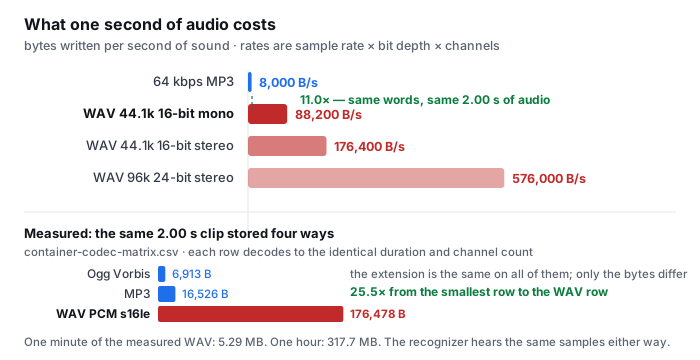
The phrase wav to text names a file extension that is carrying more information than the other extensions in this family. An .mp3 and an .m4a are compression profiles, so the extension and the bitrate usually travel together. A .wav is a RIFF header plus unencoded samples, and the samples inside can be 8, 16, 24 or 32-bit at anything from 8 kHz to 192 kHz, in mono or stereo. Every one of those combinations writes a file with .wav at the end and a very different number of bytes per second in the middle.
That is why a WAV is the one format in this category where file size is not a side effect, it is the format. Our container matrix (container-codec-matrix.csv, measured 2026-09-18 in a real Chrome window) stores the same two seconds of audio seventeen ways. The spread runs from 6,913 bytes for Ogg Vorbis to 176,478 bytes for WAV PCM s16le — a 25.5× range — and the WAV row is the far end of it by a wide margin.
- The arithmetic is the file format. 44,100 samples per second × 2 bytes per sample × 1 channel = 88,200 bytes per second. Doubling to stereo makes it 176,400; stepping up to 24-bit stereo takes it to 264,600. Nothing in the extension
.wavtells you which of those you have. - One page in nine names a bit depth. freeonlinetranscribe is the only page we could read for this phrase that mentions bit depths at all, and it names 16-bit, 24-bit and 32-bit float along with a sample-rate range of 8 kHz to 96 kHz. It also states the frame that matters most: “Mono and stereo both work, at any sample rate from 8 kHz up to 96 kHz.” Seven of the nine name no recording parameter of any kind.
- So the upload cost is invisible until it lands. A field recorder writing 24-bit stereo at 96 kHz costs 576,000 bytes per second — 6.5× the 44.1 kHz mono case — and a page that publishes one byte ceiling for all WAVs is describing a limit that lands at a different recording length depending on settings it never asked about.
The byte figures are rows from container-codec-matrix.csv; the 2.00 s / 1 channel / 44,100 Hz decode values are rows from decode-format-support.csv. The bytes-per-second figures are the definition of each format (sample rate × bit depth × channels), not separately measured; the measured two-second row is quoted next to them so the two can be compared. The bit-depth and sample-rate quotations are read from the freeonlinetranscribe page on 2026-10-07.
Nine pages publish a WAV limit, and one converts the units
The other question a reader of this phrase is really asking is how much recording does my file ceiling actually hold, and that question only exists because of the format. So we counted, on the nine readable pages ranking for wav to text on 2026-10-07: six of nine publish a byte ceiling, four of nine put a duration next to it, and one of nine actually relates the two.
| page | byte ceiling | duration / recommendation | does it convert the two? |
|---|---|---|---|
| anytranscribe | none stated | unlimited in the paid tier | no |
| veed | none stated | none stated | no |
| converter.app | “over 1 GB” | none | no |
| audioscribe | 100 MB | up to 5 minutes | states it, does not compute it |
| zamzar | 50 MB | none | no |
| freeonlinetranscribe | “roughly a 1 GB file” | “about one hour per job” | yes — at 48 kHz / 24-bit stereo |
| any2text | none stated | none (minutes are sold) | no |
| go-transcribe | “under 4 GB” | recommendation only | no |
| turboscribe | not read — HTTP 403 on every attempt; excluded from all counts | ||
Take the two numbers that appear side by side most often. audioscribe puts “up to 5 min · 100 MB” on its upload strip and repeats it in its FAQ. Read those as one constraint and they imply 100 MB ÷ 300 s = 333,333 B/s = 2.667 Mbps. That is 3.8× 44.1 kHz 16-bit mono and 1.9× the same setting in stereo, and it sits just under the 288,000 B/s of 48 kHz 24-bit stereo — so the two numbers only agree if every upload is a 24-bit stereo recording, which is not what most recorders write. There is also a plainer oddity: 100 MB divided by that 48 kHz 24-bit stereo rate is 5.8 minutes, not the 5 the badge promises. The byte ceiling and the minute ceiling are not describing the same recording, and the page cannot tell you which one will stop you first.
The one page that does the conversion is the one to copy. freeonlinetranscribe answers its own question “How big can the WAV file be?” with a sentence that names the axis: “The practical cap is audio duration rather than file size: the default processing ceiling is about one hour per job, which at 48 kHz / 24-bit stereo is roughly a 1 GB file.” Check its arithmetic against ours: at 48,000 × 2 × 2 the rate is 288,000 B/s, the ceiling is 3,600 s, and the file is 1,036,800,000 bytes — that is 1.037 GB decimal, or 0.966 GiB binary. Either reading lands on “roughly 1 GB”. Choosing the unit is the whole lesson: the same file is 1037 in one number system and 0.966 in the other, and a page that says “1 GB” has quietly picked one. It is the only sentence in nine pages that tells a reader which wall they will hit.
The ceilings are quoted from the nine pages read on 2026-10-07. The implied-rate figures are arithmetic on those quoted numbers, not measurements of their services. The 1.037 GB comparison uses the same 48 kHz / 24-bit stereo rate the page names; GB is taken as 109 bytes and GiB as 230, and the page does not say which it means — that is the point of the paragraph. MB in the two duration rows is 106 bytes.
What the WAV buys you, and what it does not
The reason people convert to WAV before transcribing is the belief that the uncompressed original is better input. On our own decode table, it is not a variable at all. Every container we tested — mp3, wav, ogg, m4a, mp4, mov, webm, aac — decodes in a real Chrome window to the same 2.00 seconds, 1 channel, 44,100 Hz. The recognizer receives the samples, not the file, and the samples are the same.
| acoustic condition | clips | reference words | default-tier WER |
|---|---|---|---|
| clean synthetic speech | 1 | 33 | 6.1% |
| real speech, no added noise | 2 | 28 | 10.7% |
| light background noise | 2 | 57 | 8.8% |
| heavy background noise | 2 | 89 | 34.8% |
| telephone band + echo | 1 | 22 | 22.7% |
| all eight clips | 8 | 229 | 20.1% |
| clean + light real speech only | 4 | 85 | 9.4% |
There is no column for the container in that table because we never varied it. What moves the number is the acoustic condition: the same model, the same scorer, a 6.1% to 34.8% spread across eight clips and 229 reference words. Converting a clean MP3 up to WAV feeds the model the same samples at 11.0× the upload size.
- Six of nine pages print a percentage; none prints a denominator. audioscribe says “high accuracy” in its steps and its title, zamzar says conversion is “accurate and reliable”, any2text headlines “98% accuracy on clean audio” and veed claims “VEED is 95% accurate in its WAV to text transcription”. Across all nine pages the words test set, corpus, validation set, ground truth and word error rate appear zero times. Not one of them says which recordings its number came from — and the clean-audio qualifier in any2text’s badge is exactly the condition that decides the result, offered without a figure.
- Where the WAV genuinely helps is the edge case, and it is not the size. A WAV keeps the original samples, so if you ever need to re-run the same recording through a different model, nothing has been thrown away in between. For a recording at 44.1 kHz that is a real argument. It is not an accuracy argument, and none of the nine pages makes it.
- The honest limitation of ours. Our decode table was run on one 2-second mono test tone per container, so we can say every one of those formats decodes to identical duration and channel count — we cannot say two hours of 24-bit stereo WAV behaves the same way in a phone browser, because we have not run it. Nothing on this page is claimed for that case.
All percentages are from wer-by-condition.csv in the public benchmark repository. WER is total errors divided by total reference words (weighted), not an average of per-clip percentages. The 229-word total is the scorer count after apostrophe splitting, documented in the repository README. The decode figures are rows from decode-format-support.csv. The quotations and the six-of-nine count are from the nine pages read on 2026-10-07.
Where the WAV goes
None of the nine pages is built to keep your file on your machine, and one of them says both things at once.
- audioscribe contradicts itself across two of its own pages. Its WAV page states “Everything runs in your browser”, and its FAQ answers whether files are stored with “Your file is sent for transcription and is not retained on our servers.” The same page also tells you the free tool handles “WAV files up to 100 MB and 5 minutes”, which is not a browser-side limitation anybody would choose.
- The rest are explicit about the server. freeonlinetranscribe says the file “streams directly to temporary storage and runs through an AI speech-to-text model on a GPU worker”; its audio-to-text page says uploads go “straight to a private bucket over a signed URL”; converter.app says files and transcripts “are automatically deleted after 2 hours”; go-transcribe uploads to its platform; zamzar reports having converted “over 760 million files since 2006”.
- We read it in the tab. Our recognizer is downloaded into the browser and the WAV is decoded there. Nothing about the file is sent anywhere, so there is no retention window to state and no bucket to describe. That is an architectural fact you can watch in the network panel rather than a sentence on a page.
The quotations are from the nine pages as read on 2026-10-07. We did not upload a file to any of them and make no claim about whether their retention statements are enforced as written.
Questions this page answers
How big is a WAV file compared to an MP3?
The size is set by the sample rate, the bit depth and the channel count, none of which the extension tells you. A 44.1 kHz, 16-bit mono WAV costs 88,200 bytes per second, which is 11.0× the 8,000 bytes per second of a 64 kbps MP3. In our container matrix the same two seconds of audio measures 176,478 bytes as .wav and 16,526 bytes as .mp3, exactly that ratio. A minute of that WAV is 5.29 MB, so a one-hour recording is about 317 MB.
Why does my WAV file look so large next to the same recording in MP3?
Because WAV has no compression step. A compressed format decides at encode time to throw away detail it predicts you will not miss; WAV stores the samples and adds a short header. That is why the same two seconds in our matrix runs from 6,913 bytes as Ogg Vorbis up to 176,478 bytes as WAV PCM, a 25.5× spread for audio that decodes to identical duration and channel count. The bytes differ; the recognition input does not.
Does converting my audio to WAV make the transcript more accurate?
No. Every container in our decode table yields the same 2.00 seconds, 1 channel, 44,100 Hz once decoded, so the recognizer receives the same samples whether you hand it a WAV or the compressed original. What changes accuracy is the acoustic condition of the recording. On our eight-clip set of 229 reference words the default tier scores 6.1% word error on clean speech and 34.8% under heavy noise. Converting up to WAV makes the upload larger and adds an encode generation; it does not move those numbers.
Why does a WAV hit an upload limit that the same recording in MP3 would not?
Because the limit is written in bytes and the format is what produces the bytes. At 44.1 kHz 16-bit mono a 100 MB ceiling is 18.9 minutes of WAV, while the same 100 MB of 64 kbps MP3 is 208.3 minutes. Our own caps are 30 minutes of audio and 512 MiB per file, and the two intersect at 2.386 Mbps, above every standard PCM recording, so on this site the 30 minutes is the wall that actually stops people.
Where does the WAV file go when I transcribe it?
With our tool, nowhere. The recognizer is loaded into the browser tab, the WAV is decoded there, and the file is never sent to a server. The pages ranking for wav to text are built the other way: the file reaches their machines on submit. One of them (audioscribe) states both halves on one page, writing “Everything runs in your browser” while its FAQ says the file “is sent for transcription”.
Where the raw data is
The container sizes, the decode support, and the per-condition error rates on this page come from the same published measurement run as the rest of this site.
- Raw data and the measurement scripts — github.com/supersophia8888-cloud/clipquill-asr-benchmark, including the raw model text behind every number, so the scoring can be redone under different rules.
- Archived copy with a DOI — 10.5281/zenodo.22826968, the concept DOI: that link always resolves to the newest version of this dataset, all versions.
- The same data as a dataset — huggingface.co/datasets/sophia8888/clipquill-asr-benchmark
- Every container and codec we measured — container-codec-matrix.csv in the repository, the same two seconds of audio stored seventeen ways.
- What the browser can decode in-page — decode-format-support.csv, eight containers, all 2.00 s / 1 channel / 44,100 Hz.
- Why the compressed formats in this family are all cheaper than WAV — the format is the part that matters least
- The same box with a video track in it — the video is the part you never read, and the extension is the same box as mp4
- What an accuracy number means when it has no denominator — five pages make an accuracy claim, and not one says what it was measured on
- How a limit written in two units hides which wall you hit — eight pages publish a limit, and only one tells you which one you will hit
Run it on your own file
The transcriber is on the front page of this site. It reads the audio in the tab and writes the words from it, so the WAV does not leave your machine — whether it is 44.1 kHz mono or 24-bit stereo from a field recorder, the samples are decoded where they already are. Expect the first run to spend about 78.4 MiB on the model download and roughly a gigabyte of RAM, and expect the recognition itself to take longer on a WAV only in the sense that a bigger file takes longer to read, not because the model works harder. The caps are 30 minutes of audio and 512 MiB per file, checked before any work starts, and for standard PCM the 30 minutes is the one that will stop you first.