The .m4a and the .mp4 in your folder are the same file format
The phrase m4a to text names a single file extension, and the first page of results treats it as a chore about that extension. On 2026-10-06 the ten pages ranking for it are all upload-and-process tools: zamzar, anytranscribe, audioscribe, freeonlinetranscribe, go-transcribe, converter.app, uniscribe, any2text, elevenlabs and notta. Seven of them frame the job as a file conversion; on the zamzar page the word “convert” appears 43 times and the word “transcribe” zero times.
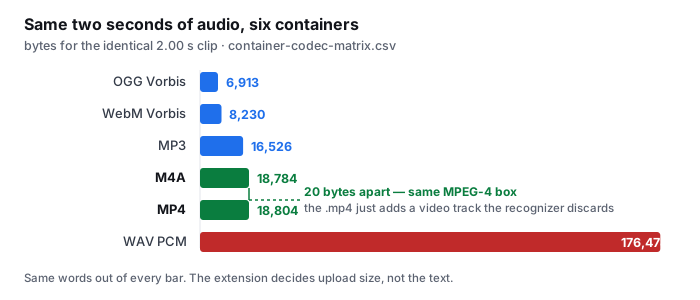
The extension is not the interesting part. In our container matrix (container-codec-matrix.csv, measured 2026-09-18 in a real Chrome window) the same two seconds of audio measure 18,784 bytes as m4a-none-aac.m4a and 18,804 bytes as mp4-h264-aac.mp4. That is a 20-byte difference — 1.001× — because they are the same MPEG-4 box, and the file named .mp4 is carrying a video track that costs 20 bytes in this two-second sample and a great deal more in a real clip.
- The model hears the same samples either way. Both files decode in-page to 2.00 s, 1 channel, 44,100 Hz (decode-format-support.csv). Give a recognizer the .m4a or the .mp4 of the same audio and the words are the same words.
- Three of ten mention the container; none mentions the sibling. zamzar writes “M4A files are an extension of the MP4 container format”; audioscribe writes “AAC audio inside an MP4 container”; freeonlinetranscribe writes that its worker “reads the AAC stream inside the M4A container directly”. Not one of the three then says that the .mp4 next to it is that same container — and none of the other seven says anything about the box at all.
- So m4a to text and mp4 to text are one piece of work. The phrase changes a letter; it does not change the format, the decode, or the text.
The byte figures are rows from container-codec-matrix.csv; the 2.00 s / 1 channel / 44,100 Hz decode values are rows from decode-format-support.csv. The container writing, the counting of “convert” against “transcribe”, and the three-of-ten container mentions were read from the ten live pages on 2026-10-06.
What the words actually depend on
If the extension does not matter, something does. On our benchmark the variable is the acoustic condition of the audio — how clean it is, what noise sits under the voice, whether it came through a telephone band. The set is eight clips and 229 reference words, scored with the same normalized word-error scorer the site publishes.
| acoustic condition | clips | reference words | default-tier WER |
|---|---|---|---|
| clean synthetic speech | 1 | 33 | 6.1% |
| real speech, no added noise | 2 | 28 | 10.7% |
| light background noise | 2 | 57 | 8.8% |
| heavy background noise | 2 | 89 | 34.8% |
| telephone band + echo | 1 | 22 | 22.7% |
| all eight clips | 8 | 229 | 20.1% |
| clean + light real speech only | 4 | 85 | 9.4% |
Read across the rows and the point is the spread, not any single number. The same model, the same scoring, a 6.1% to 34.8% range — and there is no column for the extension, because we never varied it. Three of the ten pages ranking for this phrase print an accuracy figure (any2text headlines 98% accuracy on clean audio, notta says up to 98.86%, elevenlabs shows an accuracy chart), and none of them says how many clips or words it was measured on. Across the ten pages read on 2026-10-06 the words test set, corpus, benchmark, dataset, validation set, ground truth and word error rate appear zero times.
- A second tier is offered if you want lower error. The optional higher-precision model scores 9.6% across all eight clips and 8.2% on the clean-plus-light grouping, against 20.1% and 9.4% for the default. The pattern holds — the audio dominates the file type — at a larger download. We are not going to call one “better”; both are in the repository so you can score them on your own audio.
- One page did attach a number to a condition. freeonlinetranscribe is the only page in the ten that writes a recording fact with a figure attached — it says iPhone voice memos are “recorded at a clean 64–96 kbps”. It is the closest any of them comes to naming what the audio actually is, and it is one page out of ten.
All percentages are from wer-by-condition.csv in the public benchmark repository. WER is total errors divided by total reference words (weighted), not an average of per-clip percentages. The 229-word total is the scorer count after apostrophe splitting, documented in the repository README. The 64–96 kbps sentence is quoted from the freeonlinetranscribe page as read on 2026-10-06; we did not verify that figure independently.
The video track is where the wasted bytes live
If an .m4a and an .mp4 are the same box, the only thing that separates them is the video. And on all ten pages ranking for this phrase, the video track is never discussed. The word “video” appears on nine of the ten pages, but reading every hit in context, not one of them says what happens to the video when you transcribe, whether it is stripped, or whether it matters.
| same two seconds of audio | container | bytes | what it carries |
|---|---|---|---|
| ogg-none-vorbis.ogg | ogg | 6,913 | audio only |
| webm-vp8-vorbis.webm | webm | 8,230 | audio + video track |
| mp3-none-mp3.mp3 | mp3 | 16,526 | audio only |
| m4a-none-aac.m4a | m4a | 18,784 | audio only |
| mp4-h264-aac.mp4 | mp4 | 18,804 | audio + video track |
| wav-none-pcm_s16le.wav | wav | 176,478 | audio only |
The .m4a and the .mp4 rows are 20 bytes apart in this sample because the clip is two seconds long and the video is nearly nothing. On a real recording the same split becomes the whole cost of the file: the audio portion of a 20-minute voice memo, at the low bitrate Apple uses, is a small file, while an .mp4 of the same 20 minutes with actual footage is many times larger — and none of those extra bytes reach the transcript, because the recognizer keeps the audio and discards the video.
- The extension decides upload size, not the text. A .wav of these two seconds is 176,478 bytes — 9.4× the .m4a — and it yields the same words. A conversion step from .m4a to .wav therefore makes your file bigger and can only lose quality, because it adds a re-encode between your recording and the model.
- Skip the conversion, keep the original. The file your phone wrote is already the thing the recognizer wants. Pushing it through an .mp3 or .wav export first buys nothing and costs a generation of encoding.
- One page says this, and it is the only one. freeonlinetranscribe writes “Converting first usually hurts quality — skip that step and upload the original file your phone or recorder produced.” That is the closest any of the ten gets to the gap; it still never mentions that the .mp4 is the same container.
Every byte figure in the table is a row from container-codec-matrix.csv. The “what it carries” column is read off the file names in that same CSV (the h264 and vp8 rows are the ones that name a video codec). We did not measure how large the video track grows on a real recording, so this page does not print that number.
Where the file goes
The ten pages ranking for this phrase are built on the upload-and-process model, and the .m4a case is where that gets spelled out most honestly — and least.
- One page contradicts itself in one FAQ. audioscribe answers “Do I need to install anything?” with “No. Everything runs in your browser”, and answers “Is my file stored?” with “Your file is sent for transcription and is not retained on our servers.” Both sentences are on the same page, in the same FAQ block. Running in the browser and being sent for transcription are not the same claim.
- Others are explicit about the server. go-transcribe uploads to “our secure web-based transcription platform”; freeonlinetranscribe says its worker runs “on a dedicated GPU” and that your audio and transcript “live in a private temporary bucket and are automatically deleted after 24 hours”; converter.app says files are “automatically removed within 120 minutes after conversion”.
- We read it in the tab. Our tool loads the recognizer into the browser, decodes the .m4a there, and sends nothing to a server. The video track of an .mp4 sibling is never extracted, never uploaded, never stored. That is an architectural fact you can watch in the network panel, not a sentence on a page.
The quotations are from the ten pages as read on 2026-10-06. We did not upload a file to any of them and make no claim about whether their retention statements are enforced as written.
Questions this page answers
Is m4a the same as mp4?
They are the same container, the MPEG-4 box. An .m4a is that box holding audio only; an .mp4 is the same box with a video track riding along. Our container matrix holds the same two seconds of audio at 18,784 bytes as .m4a and 18,804 bytes as .mp4, a difference of twenty bytes. The words a recognizer returns are identical, because both decode to the same 2.00 seconds at 1 channel and 44,100 Hz.
Do I need to convert my m4a to mp3 or wav before transcribing?
No. The recognizer decodes the AAC stream inside the .m4a directly, so a conversion step only adds a re-encode between your recording and the text. In our matrix the same two seconds of audio is 18,784 bytes as .m4a and 176,478 bytes as WAV PCM, a 9.4× difference for the same words. Converting to WAV makes the file bigger without making the transcript better, because the model hears the decoded samples either way.
What does m4a to text actually do to the file?
It reads the audio, it does not convert the file. Seven of the ten pages ranking for this phrase count as file converters, and the word “convert” appears up to 43 times on a single page while “transcribe” appears zero times. Speech recognition decodes the container, keeps the audio stream, and writes words; nothing rewrites the .m4a into another format. The file type decides upload size, not the text.
How accurate is m4a to text?
The file type does not change accuracy; the audio does. On our measured set of eight clips and 229 reference words, the default tier scores 6.1% word error on clean synthetic speech, 10.7% with no added noise, 8.8% with light noise, 34.8% with heavy noise, and 22.7% on a telephone-band clip. Across all eight clips it is 20.1%. The .m4a pages that print an accuracy number do not say how many clips or words it was measured on.
Where does the m4a go when you transcribe it?
With our tool, nowhere. The recognizer runs in the browser tab, the audio is decoded there, and the file is never sent to a server. The tools that rank for m4a to text are built the other way: the file reaches their machines the moment you submit it. One of them (audioscribe) says “everything runs in your browser” and, in the same FAQ, that your file “is sent for transcription”.
Where the raw data is
The container sizes, the decode support, and the per-condition error rates on this page come from the same published measurement run as the rest of this site.
- Raw data and the measurement scripts — github.com/supersophia8888-cloud/clipquill-asr-benchmark, including the raw model text behind every number, so the scoring can be redone under different rules.
- Archived copy with a DOI — 10.5281/zenodo.22826968, the concept DOI: that link always resolves to the newest version of this dataset, all versions.
- The same data as a dataset — huggingface.co/datasets/sophia8888/clipquill-asr-benchmark
- Every container and codec we measured — container-codec-matrix.csv in the repository, the same two seconds of audio stored seventeen ways.
- What the browser can decode in-page — decode-format-support.csv, eight containers, all 2.00 s / 1 channel / 44,100 Hz.
- The format as a conversion chore, and why that framing is wrong — the format is the part that matters least
- The same box with a video track in it — the video is the part you never read
- What an accuracy number means when it has no denominator — five pages make an accuracy claim, and not one says what it was measured on
Run it on your own file
The transcriber is on the front page of this site. It reads the audio in the tab and writes the words from it, so the .m4a does not leave your machine, and the .mp4 sibling’s video track is never extracted. Expect the first run to spend about 78.4 MiB on the model download and roughly a gigabyte of RAM, then the recognition runs on your own audio. Accuracy is the 20.1% figure with the conditions named — and if your recording is clean, read speech, the honest comparison is the 9.4% grouping, not the headline. The caps are 30 minutes of audio and 512 MiB per file, checked before any work starts, and for any standard audio file it is the 30 minutes that will stop you.