The first page for this phrase is mostly Google's own product
There is no other phrase in this family where the answer is written by the vendor that also runs the thing being transcribed. Search google meet transcription and six of the ten results are served from a Google domain — three of them Google's own documentation for its own feature, one Google's marketing page, and two extension listings in Google's own store.
That shape decides what the page can tell you. A feature description is precise about availability and silent about conditions. And the condition a meeting is made of is the one nobody puts a number on.
- Ten results, eight domains. Search taken 2026-10-16. chromewebstore.google.com and support.google.com each appear twice.
- Six of ten are on a Google domain. Four are Google's own docs or marketing; two are extension listings.
- Nine of ten read. The reddit thread returned HTTP 403 to both user-agent layers, so every count below is over the nine pages we could read.
- Google's own user help never uses the word “speaker”. Not once, on either of the two renderings. The administrator page uses it once, as “keeping track of who said what”.
Search results are the first page returned on 2026-10-16. Nothing here is a traffic estimate: we did not obtain a figure for this phrase and we do not print one.
What each of the ten results actually is
Two of the ten are the same help article, rendered once for desktop and once for Android. Two more are listings for extensions that read the platform's own captions rather than running a recogniser of their own — the Laxis listing says so itself, in its own FAQ.
| result | what kind of page | what it is offering |
|---|---|---|
| knowledge.workspace.google.com | Google's own admin doc | how to turn meeting transcription on or off for a whole domain; notes that “the transcript includes a list of attendees” |
| chromewebstore.google.com | extension listing | tl;dv: “Bot-free or bot-present recording”, “speaker labels in 20+ languages” |
| support.google.com (Android) | Google's own user help | the same answer page, rendered for Android |
| workspace.google.com | Google's own marketing | AI in Meet: “take notes for me”, and translated captions for 60+ languages |
| read.ai | vendor guide | a how-to that ends in a product pitch; the only page of the nine that names cross-talk, overlap and turn-taking |
| chromewebstore.google.com | extension listing | Laxis: “Speaker Recognition: See who said what”; its own FAQ adds “this extension captures captions, but it does not record meeting audio or video” |
| tactiq.io | product page | real-time transcripts with no bot; exports to PDF or TXT |
| usebubbles.com | vendor blog | “free methods” that route to the vendor's own notetaker, which joins as a participant |
| reddit.com/r/automation | not a product | “Automated Transcriptions for Google Meet Meetings” — not read (403) |
| support.google.com (desktop) | Google's own user help | the same answer page again |
The interesting column is the second one. Four of the ten results describe the platform's own feature, and they describe it well: which editions have it, how to start it, where the file goes, how long it takes to arrive. What none of the ten does is say what the transcript is made from in a way that survives contact with a real meeting — and that is not a documentation gap, it is the shape of the product. The audio is decoded once, live, as people speak.
Four of nine pages claim speaker attribution. Zero of nine gives a number.
Here are the four claims, in the words of the pages that make them:
| page | the claim |
|---|---|
| knowledge.workspace.google.com | transcripts are “great for keeping track of who said what without having to take notes during the meeting” |
| chromewebstore.google.com (tl;dv) | “Google Meet transcription with speaker labels in 20+ languages” |
| read.ai | “a written record of what was said in a call, with speaker labels and timestamps when the tool supports them” |
| chromewebstore.google.com (Laxis) | “Speaker Recognition: See who said what with speaker names displayed alongside the transcript” |
Four of the nine. The word “speaker” does not appear at all on Google's own user help pages, on Google's marketing page, on the Tactiq page, or on the Bubbles blog — so the attribution claim is made by everyone except the platform itself.
Now the count that matters. Zero of the nine gives any number for speaker attribution: no diarisation error rate, no percentage, nothing. Zero of the nine names a test set, a corpus, a validation set, ground truth, a sample size, or a word error rate anywhere on the page. Three of the nine print a percentage at all, and only one of those percentages is about accuracy — read.ai's “90% or higher accuracy when the audio is clean” and “99%” for a human service. The other two are “100% free” and a customer testimonial.
And the sharpest thing on the page. Exactly one of the nine mentions that people talk over each other. It is read.ai, three times, in three sentences that sit within a screen of each other:
- “The faster a transcript arrives, the more likely you'll see misheard words from cross-talk, accents, or specialized terminology…”
- “A human transcription service pushes accuracy closer to 99% and handles overlapping speakers, accents, and specialized terminology far better…”
- “AI transcription typically lands above 90% accuracy when the audio is clean and speakers take turns.”
Read those three together and the shape is complete. The condition that decides whether the number holds is named. The case where it fails is named. The remedy offered for the failing case is to hire a person. No number is attached to any of the three — and the other eight of the nine pages never raise the subject at all.
Quotes are the pages' own short phrases, taken from the plain-text extraction of each page on 2026-10-16. Counts are over the nine pages we could read, not the ten results.
So we put two voices through it — one after the other, then at the same time
We cannot measure anyone else's engine, so we measured ours. The test changes one variable: two speech clips from our own benchmark set, handed to the live page in three arrangements. Nothing was uploaded anywhere — the page runs the recogniser inside the browser tab.
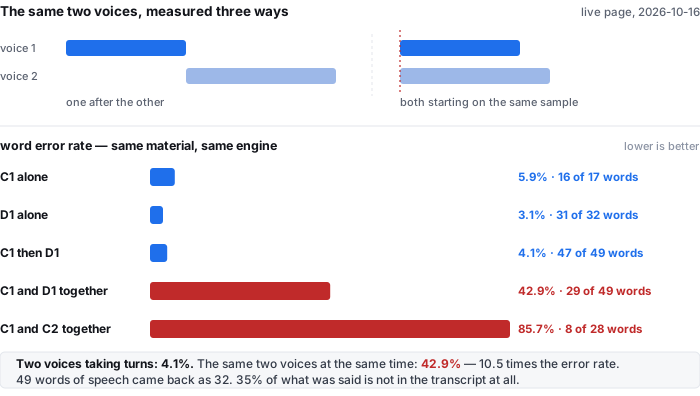
C1 and D1 are real speech, 17 and 32 reference words. We ran each alone, then concatenated one after the other, then summed them at −6 dB each so that they start on the same sample. The last row is C1 against C2, both clean, so the two streams overlap for their entire length.
| arrangement | reference words | words returned | errors | word error rate | words kept |
|---|---|---|---|---|---|
| C1 alone | 17 | 17 | 1 | 5.9% | 16 of 17 |
| D1 alone | 32 | 32 | 1 | 3.1% | 31 of 32 |
| C1 then D1 — taking turns | 49 | 49 | 2 | 4.1% | 47 of 49 |
| C1 and D1 — at the same time | 49 | 32 | 21 | 42.9% | 29 of 49 |
| C1 and C2 — at the same time, all the way through | 28 | 17 | 24 | 85.7% | 8 of 28 |
Two voices taking turns cost 4.1% — slightly less than the harder of the two clips on its own, because the two sentences never compete for the same acoustic space. The same two voices starting together cost 42.9%: 10.5 times the turn-taking figure. When the overlap runs the whole clip it is 85.7% — 21 times the turn-taking figure, and 12.1 times the 7.1% this site headlines for typical clean speech.
Per stream the loss is uneven. On the partial overlap the recogniser kept 11 of C1's 17 words and 20 of D1's 32 — 65% and 62%. On the full overlap it kept 6 of 17 and 4 of 11 — 35% and 36%. Neither stream wins; both are damaged.
And it does not fail by flagging doubt. It fails by merging the two speakers into one line. This is the raw text the page returned, unedited:
| arrangement | what the page returned |
|---|---|
| taking turns | “Mr. Quilter is the apostle of the middle classes, and we are glad to welcome his gospel. He tells us that at this festive season of the year, with Christmas and roast beef looming before us, similes drawn from eating in its results occur most readily to the mind.” — 49 words, both sentences intact, in order |
| at the same time | “The culture is the apostle of the Middle Classes, here glad to welcome Christmas Gospels, beef looming before us, similes drawn from eating, and its results occur most readily to the mind.” — 32 words, one spliced line, no marker of where the second voice began |
| full overlap | “Norrie's older escape is a matter of little class and a glad adderal in his gospel.” — 17 words for 28 words of speech |
In the middle row, 49 words went in and 32 came out: 35% of what was said is simply absent, and what is left reads as one person talking. A reader of that transcript cannot tell that a second person spoke at all, let alone which words were theirs. That is the failure mode that a speaker label is supposed to catch, and it is the one the four claiming pages never quantify.
Five files, ffmpeg 9.0.1, one file per page load in a real Chrome window against the live site on 2026-10-16; the returned text was read back from the page's own result box and hashed. Word error rate is DP alignment after lower-casing and replacing every non-alphanumeric character with a space — the same normalization documented in data/README.md. Reproduce with run-meet-test.mjs and analyze-e5-1016.py.
What that costs on a meeting you actually hold
The reference material in our benchmark runs at 148.2 words a minute, so a 45-minute meeting is about 6,670 words of speech and a 60-minute one about 8,893. Our output runs at one cue every 2.573 seconds, so the same 45 minutes arrives as roughly 1,049 separate cues — and not one of them carries a speaker label, because 0 of 36 cues in our own output do.
- 45 minutes at 18.1–20.5 seconds of processing per minute of audio = 815–923 seconds. The ceiling on this site is 30 minutes of audio and 512 MiB per job, so a 45-minute meeting is two jobs.
- Our entire eight-clip corpus is 92.7 seconds. A 45-minute meeting is 29 times it, so every error rate on this site describes about 3.4% of one meeting's audio.
- The audio is never the wall. 45 minutes at 64 kbit/s is 20.6 MiB; uncompressed mono at 44.1 kHz/16-bit is 227.1 MiB — 11.0 times as much, and still under half of the 512 MiB ceiling. The clock binds first.
- 78.4 MiB and about a gigabyte. That is the model on first visit and the memory the tab holds while it works.
Put the two halves together. The accuracy number everyone quotes is measured on audio with one person in it. A meeting has at least two, and the one condition that decides whether the number survives — whether they take turns — is named once in ten results, with no measurement, as the reason to buy something else.
148.2 words a minute and 512 MiB / 30 minutes are this site's own published figures; the cue rate (one every 2.573 seconds), the 0 of 36 speaker labels, the 18.1–20.5 seconds per audio minute and the 78.4 MiB first visit are measured on the deployed site and documented in the public benchmark repository. The 45-minute and 60-minute rows are arithmetic on those rates, not separate runs.
Questions people actually ask about this word
Is Google Meet transcription free?
No, not on a free account. Google's own help lists the editions that have Transcripts: Business Standard, Business Plus, Enterprise Starter, Enterprise Standard, Enterprise Plus, Teaching and Learning Upgrade, Education Plus, and Workspace Individual. The feature is on by default for all Workspace editions except Google Workspace for Education with a student license. Free consumer accounts and Business Starter are not on the list, which is the commercial reason the other six results exist. We do not state a search volume for this phrase, because we did not obtain one.
Does Google Meet transcription say who is speaking?
Google's administrator documentation says transcripts are good for “keeping track of who said what”, and three other pages on the first page claim speaker labels or speaker recognition. But Google's own user-facing help pages never use the word “speaker” at all, and not one of the nine readable pages gives any number for how often attribution is right. Our own output carries a speaker label on 0 of 36 cues — we do not offer speaker separation, and the number that goes with that is simply zero out of thirty-six.
What happens when two people talk at the same time?
We measured it, because nobody on the first page does. On our own engine, two voices taking turns produced a 4.1% word error rate. The same two voices starting on the same sample produced 42.9% — 10.5 times as much — and a full overlap produced 85.7%, 21 times as much. 35% of the words were not misheard, they were absent: 49 words of speech returned 32 words of text, merged into a single line with no marker of where the second speaker began. Exactly one of the nine readable pages mentions overlapping speakers, and it recommends a human service rather than giving a number.
How long does a 45-minute meeting take, and how much text comes back?
Both from our own measurements. Text: at 148.2 reference words a minute, 45 minutes of speech is about 6,670 words of transcript. Structure: at one cue every 2.573 seconds, it arrives as roughly 1,049 cues, none of them attributed. Time: at 18.1 to 20.5 seconds of processing per minute of audio at steady state, 815 to 923 seconds. The per-job ceiling is 30 minutes of audio and 512 MiB, so a 45-minute meeting is two jobs.
Where does the transcript go, and who can read it?
Google's own documentation answers this precisely, and it is the part of the feature description that is complete. The transcript is saved as a Google Doc in the meeting organizer's Drive, inside the “Google Meet” folder. An email with the link goes to the host, any co-hosts, and the person who started transcription; the file is also attached to the meeting's Calendar event. If there are more than 200 invitees in the host's organisation, only those people can open it — below that, every invitee gets edit access. It needs free space in both your organisation's Drive and the meeting host's Drive. You cannot pause it, and every time you start it you get a separate file. Only the spoken words are included: to capture chat messages you have to record the meeting as video as well.
What our numbers do not cover
- Our corpus has two voices, and only one of them is in this test. C1, C2 and D1 are the same speaker; the second voice in our benchmark is a synthetic clip and a telephone-band clip, neither of which belongs in a mixture experiment. So this measures what two overlapping speech streams do to one recogniser, not how well distinct human voices can be separated.
- The mixture is ours, not a conference mixer's. The two streams were summed at −6 dB each as lossless PCM and written to MP3 at 128 kbit/s mono. A real call platform mixes its own streams at its own gains, in Opus, at a bitrate we cannot see from outside.
- We did not run Google Meet. We did not join a meeting, record one, start a transcript, or hand anything to any of the nine pages. The engine in the test is ours, running in our own browser tab.
- The error rates are ours, on our own audio. They are not a claim about any service named on this page.
- The classification of the ten results is a reading of one search page on one day. We have quoted the lines we classified on so you can disagree with the call.
- One of the ten pages could not be read at all — the reddit thread returned HTTP 403 to every user-agent layer we tried — so every count is over nine pages, not ten.
- Search volume is not stated, on purpose. We did not obtain a figure for this phrase and we do not print one.
Try it on your own audio
The transcriber is on the front page of this site. It reads the file in your browser tab, so the audio never leaves your machine — and the ceiling is 30 minutes of audio and 512 MiB per job, which makes a 45-minute meeting two jobs. Expect the first run to spend about 78.4 MiB on the model download and roughly a gigabyte of RAM, then 18–20.5 seconds of processing per minute of audio once it is warm. What you get back is timestamped text that wraps at 42 display-width units a line — and no speaker labels, because we do not do speaker separation. If two people in your recording talk over each other, this page has just shown you what that costs.