The same 42 characters, in two languages, is not the same line
Every page in this family that gives a number gives a character count. Nine of the 75 readable pages give one, and the nine disagree. That disagreement is not the problem — a house style can differ from another house style. The problem is that not one of the nine says what it is counting, so there is no way to know whether the rule survives a language that is not English.
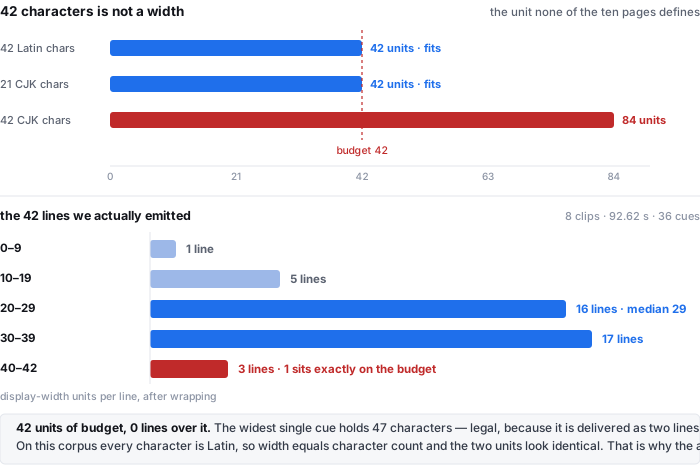
A CJK character takes twice the horizontal space of a Latin letter at the same font size. So a line wrapped to “42 characters” is 42 display units of English and 84 display units of Chinese — it has silently doubled the budget it was supposed to enforce, and it will run off the frame in exactly the player the number was meant to protect.
- Nine pages, five answers. 32 (3playmedia, veed), 32–40 (riverside), 32–42 (lemonfox), 38 (videotext, mobile safe area), 42 (clideo, audiosrt, screenapp, sonix).
- Zero define the unit. Not one of the 75 pages uses the words display width, full-width character or CJK in connection with line length.
- One page mentions CJK at all — echowave, and about splitting Thai and CJK text on word boundaries, not about width.
- Four of 75 cap the line count at two (clideo, riverside, lemonfox, sonix). The rest leave it open.
Searches taken 2026-10-17, one page of results per phrase. Nothing here is a traffic estimate: the volumes below were supplied to us and are printed as given, and no figure is inferred from a competitor.
This family is ten phrasings, and four different jobs
The words look interchangeable and they are not. Each phrase returns a different kind of page, and one of them returns a job we do not do.
| phrase | US monthly | what the ten results actually are | do we serve it |
|---|---|---|---|
| timestamped transcript | 4,400 | ten transcribers or transcription guides, ten different domains: screenapp, elevenlabs, saytowords, voicedeck, transcribenext, voicecreator.pro, vexascribe, podsqueeze, mictoo, speechpad | yes |
| subtitle generator | 1,600 | ten video editors, ten different domains: happyscribe, kapwing, clideo, veed, clipchamp, canva, maestra, elevenlabs, caption-x, media.io — fonts, styles, burn-in | partly — the file, not the burnt-in video |
| transcript with timestamps | 720 | transcribers plus three YouTube caption scrapers (tactiq, bibigpt, apify) that read a video's existing captions rather than running a recogniser | yes |
| create srt file | 390 | five tools, four how-to articles (3playmedia, riverside, lemonfox, veed) and one university IT knowledge base | yes |
| srt file generator | 210 | nine generators and one Reddit thread asking for a free one | yes |
| mp3 to srt | 170 | ten converters or transcribers, ten different domains | yes |
| mp4 to srt | 140 | ten of the same, ten different domains — the video container is treated as an audio source | yes |
| srt generator | 110 | nine generators and one directory of local AI tools | yes |
| audio to srt | 110 | ten transcribers, ten different domains | yes |
| vtt converter | 70 | nine of the ten take a subtitle file you already have and change its format — vtt to srt, vtt to docx, vtt to word, vtt to txt, txt to vtt. Only one (mp4 to vtt) is generation | no — we do not read .srt or .vtt |
So the family is four jobs wearing one vocabulary: transcribe audio into timestamped text, generate a subtitle file from audio or video, add styled subtitles to a video, and convert one subtitle format into another. We do the first two, half of the third, and none of the fourth. The last row is the one worth stating out loud, because a page that quietly accepts the word “converter” and then asks for a video wastes the visit.
What we emit, measured instead of recommended
The numbers below are not a style guide. They are what came out of this site's own export, taken from the live page on 2026-10-17, on the same eight clips our error-rate work uses: 92.62 seconds of audio in total, seven of them real recorded speech and one — A-clean — synthetic text-to-speech.
| what | measured | how it compares to the rules above |
|---|---|---|
| cues | 36 | one every 2.573 s across the corpus; per clip 1.952–3.003 s |
| lines after wrapping | 42 | 36 cues, of which 6 wrap to two lines and 30 stay single |
| line width | 8–42 units, median 29 | budget is 42; 1 line sits exactly on it, 0 go over |
| longest single cue | 47 characters | over every limit in the table above — and legal, because it is delivered as two lines |
| cue duration | 0.85–4.01 s | Netflix's floor is 5/6 s ≈ 833 ms and its ceiling 7 s: the shortest cue clears the floor by 17 ms |
| gap between adjacent cues | 0.000 s, all 28 boundaries | videotext says merge or widen anything under 0.1 s; every boundary we emit is under it |
| reading speed | median 9.1–18.9 per clip, max 19.1 | 5 of 36 cues over 17 characters per second, 0 of 36 over 20, and all five sit in the one synthetic clip that reads at 226 words a minute. On the 31 cues of real speech: 0 over 17 |
| coverage of the audio | 1.000–1.001 | the cues account for the whole file, with no silent stretch left untimed |
Two of those rows are worth reading twice. The 47-character cue is the whole argument in one line: count characters and it breaks the strictest limit on the page; count the lines it is actually delivered in and it breaks nothing. And the 0.000-second gaps mean the cue boundaries butt up against each other exactly — there is no breathing room between subtitles anywhere in the corpus, which is the case the 0.1-second rule exists to catch.
Size, since it comes up whenever someone asks what an SRT actually is: the eight files together are 2,410 bytes against 311,168 bytes of MP3, a ratio of 129 to 1, or about 67 bytes per cue and roughly 1,561 bytes per minute of audio. The subtitle file for a 90-second clip is smaller than one second of the audio it describes.
The three numbers almost nobody prints: floor, ceiling, and the gap
Line length is the number everyone argues about. The three numbers that decide whether a file looks broken in a player are quieter.
- “Any gap shorter than 0.1 seconds between adjacent subtitles should be merged or widened to prevent rendering artifacts.” — videotext, the only page of the 75 that gives a gap figure
- “Minimum cue duration (Netflix) 5/6 second (≈ 833 ms) … Maximum cue duration (Netflix) 7 seconds” — vexascribe, the only page that prints a floor and a ceiling
- “Merge subtitle lines shorter than 0.8 seconds, which display too briefly to register.” — videotext, one of two pages that give any minimum at all
That is the entire published state of the art across 75 pages: one gap figure, two minimum durations, one maximum. Everything else is line length.
Our own export enforces a floor, and it is a floor of 0.5 seconds — every cue's end time is clamped to at least half a second after its start. That is below both published minimums. On this corpus it never fired: the shortest cue came out at 0.85 s, so the clamp changed nothing. But the honest statement is that if a cue ever lands shorter than half a second, we stretch it to half a second and the timestamp on screen is then no longer where the speech ended. That is a deliberate distortion, it is in the code, and no page in this family tells you whether its own export does the same thing.
We also do not cap a cue at two lines. That is a decision, not an oversight: on this corpus 36 cues needed at most 2 lines anyway, and forcing a three-line cue into two would produce two lines that each break the width budget — the worse of the two failures.
Two exports of the same cue disagree by up to 999 milliseconds
The site offers three exports from one result: .TXT, .SRT, .VTT. They are built from the same cue list, and they do not carry the same time.
| export | what a timestamp looks like | precision | cue numbers |
|---|---|---|---|
| .TXT | [00:07:39] then the text, one line per cue | whole seconds, truncated — up to 999 ms early | none |
| .SRT | 00:00:07,215 --> 00:00:09,003 | milliseconds, rounded | numbered |
| .VTT | 00:00:07.215 --> 00:00:09.003 under a WEBVTT header | milliseconds, rounded | not numbered |
The TXT export truncates to the second. A cue that starts at 7.215 s is stamped [00:00:07] — 215 ms early — and a cue at 7.999 s is stamped [00:00:07] too, 999 ms early. That is the export most people paste into a document, and it is the export with the loosest time in it. If you are cutting video from the transcript, take the SRT or the VTT; the TXT is for reading.
Also worth knowing before you look for the feature: the timestamps are off by default. There is a checkbox labelled Show timestamps above the result, and it starts unchecked. Nothing is hidden behind it — the same checkbox governs both the screen and the TXT export — but a page that promises a timestamped transcript and then shows you plain text on the first click is a page that has not read its own default.
The one page in this family that does measure something
It would be wrong to say nobody measures. One of the 75 does, and it does it properly.
transcribenext.com ran two AMI Meeting Corpus meetings — 69 minutes of far-field meeting audio — through its production servers and compared the time its transcript gave the first word of an utterance against the time a human annotator marked, across 1,373 utterance onsets. Word-level timestamps landed a median 130 ms from the human mark, with 88.3% within half a second. Segment-level timestamps from the same engine were 250 ms, and from Whisper large-v3-turbo 460 ms. The data is published under CC BY 4.0.
That is a better measurement than anything else on these eleven pages, and it answers a question we cannot: is the stamp at the right moment. Our corpus has reference transcripts but no human-annotated word onsets, so we have no way to compute an onset error and we do not print one. What transcribenext does not measure is the shape of the file it hands you — the line width, the duration floor, the gaps, the reading speed of its own cues. It prints a timestamp accuracy table and no geometry at all. That is the gap this page is filling, and the two measurements are complementary rather than competing: one says the number is right, the other says the line is renderable.
What this page cannot do
- Convert an existing subtitle file. The file picker takes MP4, MOV, WEBM, M4A, MP3, WAV, AAC, OGG, FLAC, OPUS, 3GP and M4B. There is no
.srtor.vtton that list, and that is most of what vtt converter returns. - Burn subtitles into a video. We produce the file; a video editor does the styling, the font and the placement. That is why subtitle generator returns ten editors and this page is not one of them.
- Translate. The model is told which language is spoken and it transcribes that language. Ask it for English on a Chinese clip and you get English-sounding nonsense, not a translation.
- Work in real time. It reads a file that already exists. Live captioning is a different product.
- Separate speakers. No cue carries a speaker label — 0 of 36 in our own output — and nothing on this page is a claim otherwise.
What our numbers do not cover
- Eight clips and 92.62 seconds. That is a corpus, not a survey. A different speaker, a different microphone or a different language will move every number above.
- Every character in it is Latin. Width and character count are therefore the same number on all 42 lines, and our own data cannot demonstrate the two-to-one difference the argument rests on. The 84-unit bar in the figure is arithmetic from the width rule, not a measurement of ours.
- No player was tested. We have not opened these files in VLC, Premiere, YouTube Studio or a phone, and we do not claim they render correctly there. The page states what the files contain; it does not certify what a player does with them. The format differences in the export table are read from the site's own export code, which is what produces the file — not from a file round-tripped through a player.
- No onset accuracy. Our corpus has no human-annotated word timings, so the 130 ms / 250 ms / 460 ms figures above are transcribenext's, measured on their engine and their audio, not ours.
- The five line limits are a reading of nine pages on one day. The quotes are printed so you can disagree with the classification.
- Five URLs returned HTTP 403 to every user-agent layer we tried — turboscribe twice, fast-transcriber twice, and one Reddit thread — so they are counted as not read, and every fraction on this page is over the pages we could actually read.
- “A body worth reading” means 3,000 characters of text or more. 75 of the 86 cleared that line; 11 did not, and four of those were happyscribe pages that answered with a 16-character anti-bot shell rather than an article. Counting them as pages would have made every fraction here look better than it is.
- Search volumes are printed as supplied. We did not measure them and we did not estimate any that were not given.
Try it on your own file
Drop an audio or video file on the front page, pick the language that is spoken, and wait. Then tick Show timestamps for the stamped text, or press Export .SRT or Export .VTT for the subtitle file. The recognition runs in your browser tab, so the file never leaves your machine; the model is downloaded once at about 78.4 MiB and cached. The ceiling is 30 minutes of audio and 512 MiB per job, and processing runs at 18–20.5 seconds per minute of audio once warm. What comes back is wrapped at 42 display-width units, floored at 0.5 seconds per cue, with no speaker labels and no line-count cap — all four of those stated above with the numbers behind them.
Questions this page gets asked
What is a timestamped transcript?
Text with a time marker on each block, so any line can be found in the recording. Here it is one checkbox — Show timestamps, off by default — and it puts one whole-second stamp in front of each cue, in the form [00:07:39]. The number of stamps is decided by where the recogniser put its cue boundaries: 36 stamps for 92.62 seconds in our test, one every 2.573 seconds.
How many characters should a subtitle line have?
Nine pages in this family print a number and they give five answers: 32, 32–40, 32–42, 38, 42. None says what it counts. We wrap at 42 display-width units, with a full-width character counted as 2, because a 42-character line of Chinese is twice the width of a 42-character line of English. Our longest of 42 lines sat exactly on 42 units, and none went over.
Can I get an SRT file from an MP3 or an MP4?
Yes. Both are accepted on the front page and both are treated as audio — the picture is not read. You get a numbered SRT with HH:MM:SS,mmm times and one or two wrapped lines per cue. The file is small: 2,410 bytes of subtitle for 311,168 bytes of MP3 across our eight clips, about 67 bytes per cue.
What is the difference between SRT and VTT?
A comma versus a full stop between seconds and milliseconds, a WEBVTT header, and cue numbers in SRT that VTT does not carry. Both come out of the same cue list with the same wrapping, so the line breaks are identical — a width problem in one export is a width problem in both.
Can this page convert an existing SRT file to VTT?
No. The picker accepts audio and video only, with no .srt or .vtt in the list. Format-to-format conversion is a different job, and it is nine of the ten results for vtt converter.