The picture is decoded zero times
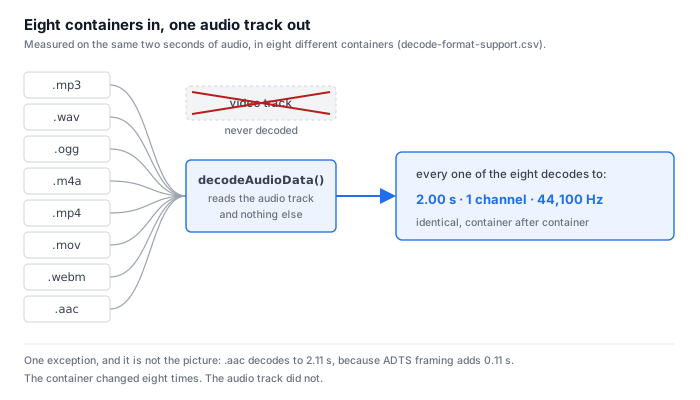
Here is the whole mechanism. The file arrives as a container. Inside it there are usually two tracks: one carrying the picture, one carrying the sound. The recognition step calls decodeAudioData() on that file, and decodeAudioData() reads the audio track and nothing else. The video track is not downscaled, not sampled, not looked at. It is never decoded at all.
That single fact answers most of what people ask about this phrase:
- Resolution does not matter. 480p, 1080p and 4K of the same recording produce the same text, because the pixels are never read.
- Frame rate does not matter. 24, 30 and 60 frames a second are the same file to a decoder that reads none of them.
- Anything written on screen does not matter. Slide titles, burned-in subtitles, a name card, a shared screen — all of it lives in the video track, so none of it can reach the transcript. If your video is a screen recording or a lecture with the words on the board, the text you get is still only what was said out loud.
- The audio track is the whole input. Which is why the interesting question is not “what does my video look like” but “what is in the sound”.
Eight containers, one audio track: the measurement
We did not infer this from documentation. We decoded the same two seconds of audio out of eight different containers in a browser and recorded what came back.
| container | decoded | duration | channels | sample rate |
|---|---|---|---|---|
| .mp3 | yes | 2.00 s | 1 | 44,100 Hz |
| .wav | yes | 2.00 s | 1 | 44,100 Hz |
| .ogg | yes | 2.00 s | 1 | 44,100 Hz |
| .m4a | yes | 2.00 s | 1 | 44,100 Hz |
| .mp4 | yes | 2.00 s | 1 | 44,100 Hz |
| .mov | yes | 2.00 s | 1 | 44,100 Hz |
| .webm | yes | 2.00 s | 1 | 44,100 Hz |
| .aac | yes | 2.11 s | 1 | 44,100 Hz |
Eight containers, eight decodes, and seven identical results. The audio track that comes out is the same 2.00 seconds at one channel and 44,100 Hz whether the file was named .mp3 or .mov. The container is packaging. The recognition step never opens it far enough to see the picture.
- The one exception is not the picture either. .aac decodes to 2.11 s, and the reason is framing: ADTS adds 0.11 s to the same audio. It is an artifact of how the bitstream is chopped up, not of anything visual — and it is a reminder that the differences that do exist live on the audio side.
- Two of the ten ranking pages get halfway there. uniscribe writes that it “pulls the audio track and turns the video into text with timestamps, so you never need to convert it to MP3 first”, and veed writes that its transcriber “processes the audio track automatically”. Both sentences are there to sell a convenience, not to answer the question. Neither says the picture is never read, and neither draws the consequence — that resolution, frame rate and on-screen text therefore cannot matter.
- Zero of the ten mention on-screen text. Across all ten pages the words for OCR, slide text and burned-in subtitles do not appear in a single sentence about what the tool reads. That is the question a screen recording, a webinar or a lecture actually raises, and the results page is silent on it.
Decoded durations, channel counts and sample rates are from decode-format-support.csv in our public benchmark repository. All eight decodes completed without error; the .aac row is the only one that is not 2.00 s and the note in the source file attributes it to ADTS framing.
The extension on the file does not tell you what is inside it
If the picture never enters, then what does decide whether a file works? The audio codec. We ran the page end to end on nine files to see where it draws the line, and the result is more specific than “mp4 works”.
| file | container | audio codec | outcome | time to verdict |
|---|---|---|---|---|
| p1.mp4 | .mp4 | mp3 | accepted | 37 s |
| p1.mkv | .mkv | mp3 | accepted | 35 s |
| p1.mov | .mov | mp3 | accepted | 44 s |
| p2-mp3.mp4 | .mp4 | mp3 | accepted | 28 s |
| p2-aac.mp4 | .mp4 | aac | accepted | 19 s |
| p2-opus.mp4 | .mp4 | opus | accepted | 24 s |
| p2-vorbis.mp4 | .mp4 | vorbis | accepted | 28 s |
| p2-ac3.mp4 | .mp4 | ac3 | refused | 1 s |
| p1.ts | .ts | mp3 | refused | 1 s |
Read the four .mp4 rows together. The same extension, four files, three accepted and one refused — and the one that fails carries AC-3 audio. The extension told the reader nothing. The audio codec told the reader everything.
- A refusal is instant, and that is the useful part. Both refused files came back in 1 second, before any transcription started, with a message naming the problem: the browser could not read the file's audio track. The accepted files took 18.5 to 42.5 seconds. If a file is going to fail, it fails immediately — you are not waiting a minute to find out.
- In the wider 20-file matrix, three failed outright. .avi carrying MPEG-4 video with mp3 audio, .flv carrying H.264 with AAC, and .wmv carrying WMV2 with WMA all returned an EncodingError. Three of twenty — and in every case the blocker is a codec combination, not the presence of a picture. A file with a picture and a decodable audio track goes through; a file with no picture at all and an undecodable track does not.
- So the advice that follows is not the usual advice. Every one of the ten ranking pages prints a list of extensions, and a list of extensions is the wrong shape for this problem — it cannot distinguish the four identical-looking .mp4 files above. What you need to know is the audio codec, and most people have never had a reason to look.
Outcomes and timings are from page-decode-endtoend.csv; the three EncodingError rows are from container-codec-matrix.csv. Refusal messages are quoted from the page itself and name the audio track as the cause.
Same two seconds, twenty encodings: 6,913 to 176,478 bytes
Because the picture is never read, the only part of the file that does any work is the sound — but the file you hand over is still the whole file. We encoded the same two seconds of audio twenty different ways to see how far apart the same content can land.
| file | container | bytes | decoded | vs the smallest |
|---|---|---|---|---|
| ogg-none-vorbis.ogg | .ogg | 6,913 | yes | — |
| webm-vp8-vorbis.webm | .webm | 8,230 | yes | 1.2× |
| mp3-none-mp3.mp3 | .mp3 | 16,526 | yes | 2.4× |
| avi-audio-to.mp4 | .mp4 | 17,383 | yes | 2.5× |
| mp4-h264-mp3.mp4 | .mp4 | 17,374 | yes | 2.5× |
| aac-none-aac.aac | .aac | 18,242 | yes | 2.6× |
| m4a-none-aac.m4a (audio only) | .m4a | 18,784 | yes | 2.7× |
| mp4-h264-aac.mp4 (has a picture) | .mp4 | 18,804 | yes | 2.7× |
| mkv-h264-aac.mkv | .mkv | 18,814 | yes | 2.7× |
| mp4-same-video-remuxaac.mp4 | .mp4 | 18,815 | yes | 2.7× |
| mov-h264-aac.mov | .mov | 18,835 | yes | 2.7× |
| mp4-same-streams.mov | .mov | 18,835 | yes | 2.7× |
| mkv-same-streams.mp4 | .mp4 | 18,836 | yes | 2.7× |
| webm-vp9-opus.webm | .webm | 19,386 | yes | 2.8× |
| mkv-h264-opus.mkv | .mkv | 19,440 | yes | 2.8× |
| avi-mpeg4-mp3.avi | .avi | 23,924 | no | — |
| wmv-audio-to.mkv | .mkv | 33,547 | no | — |
| wmv-wmv2-wmav2.wmv | .wmv | 35,742 | no | — |
| flv-h264-aac.flv | .flv | 19,364 | no | — |
| wav-none-pcm_s16le.wav | .wav | 176,478 | yes | 25.5× |
The same two seconds of sound, from 6,913 bytes to 176,478 bytes: 25.5× for identical content. Against the two files that share a codec, the gap is smaller but still real — the .wav is 9.4× the .mp4 and 10.7× the .mp3.
- Two files, one codec, one with a picture and one without. mp4-h264-aac.mp4 carries H.264 video with AAC audio and weighs 18,804 bytes. m4a-none-aac.m4a carries the same AAC audio and no picture at all, and weighs 18,784 bytes. The difference is 20 bytes — 0.106 percent.
- Which is a measurement we refuse to over-read. Those 20 bytes are small because our test clip's picture is almost empty: a still frame, two seconds long. It would be dishonest to point at this and conclude that a video track is negligible, and we are not going to. What this pair proves is that the decoder treats them the same — both accepted, both the same duration. It proves nothing about how much a real 1080p or 4K picture weighs, and we have not measured that.
- What it does tell you is where the lever is. If you are choosing how to hand a file over, the number that moves is the audio bitrate, not the resolution. A 128 kbps audio track is 16,000 bytes a second; uncompressed 44.1 kHz 16-bit mono is 88,200 bytes a second — 11.0× more, for sound the recognizer will read identically.
Every byte count is from container-codec-matrix.csv, twenty rows, the same two seconds of source audio. The “vs the smallest” column is our division against the 6,913-byte .ogg; 176,478 ÷ 6,913 = 25.5, 176,478 ÷ 18,804 = 9.4, 176,478 ÷ 16,526 = 10.7. The 20-byte difference is 18,804 − 18,784. Byte rates are 128,000 ÷ 8 = 16,000 and 44,100 × 1 × 2 = 88,200.
What that means against a file size cap
Our own limits are 30 minutes of audio and 512 MiB per job, checked before any work starts. Because the picture never enters the recognizer, those two numbers are really about the file you hand over — and the file you hand over does contain the picture.
| if the file were audio only, at | bytes per second | one minute | one hour | 512 MiB holds |
|---|---|---|---|---|
| 64 kbps audio | 8,000 | 0.5 MB | 28.8 MB | 18.6 hours |
| 128 kbps audio | 16,000 | 1.0 MB | 57.6 MB | 9.3 hours |
| 44.1 kHz 16-bit mono, uncompressed | 88,200 | 5.3 MB | 317.5 MB | 101.4 minutes |
The honest reading of that table: on the audio side alone, the 30-minute cap binds long before the 512 MiB cap does — half an hour of uncompressed mono is 158.8 MB, well inside 512 MiB. So for an audio file, the clock is the wall. For a video file we cannot say, because we have not measured what the picture adds, and the 20-byte difference in our test clip is not evidence.
Byte rates are our own arithmetic from the codec settings, not measurements of user files: 64 kbps = 64,000 ÷ 8 = 8,000 B/s, 128 kbps = 16,000 B/s, 44,100 × 1 channel × 2 bytes = 88,200 B/s. The “512 MiB holds” column is 536,870,912 ÷ bytes per second, and 30 minutes × 88,200 = 158,760,000 bytes.
What we have not measured
The claim on this page — the picture never reaches the recognizer — is not a claim about file size, and it is worth being precise about where our evidence stops.
- We have not measured a real video. Our container matrix uses two seconds of audio with a near-empty picture. We have not run a 1080p or 4K recording through and weighed the tracks separately, so we cannot tell you what fraction of a real file the picture is.
- We have not tested on-screen text. We can say with confidence that on-screen text cannot reach the transcript, because the video track is never decoded. We have not tested a slide deck, a burned-in-subtitle file or a screen recording, so we cannot tell you what you would get instead — whether the audio of a lecture alone is enough, or how much of a screencast is carried by the narration.
- We have not tested multi-track video. A recording where each speaker arrives on a separate audio track is a case we have never run, and it is exactly the case where “the audio track” stops being a single thing.
- We did not upload anything to the ten ranking pages. Everything on this page about them is what their pages say, read on 2026-10-10. We make no claim about whether their published behaviour matches their published text.
Questions this page answers
Does the resolution or frame rate of my video change the transcript?
No. The decoder reads the audio track and never touches the video track, so resolution, frame rate and picture bitrate never enter the result. We measured it: eight different containers holding the same two seconds of audio — mp3, wav, ogg, m4a, mp4, mov, webm and aac — all decoded to 2.00 seconds, one channel, 44,100 Hz. The container changed eight times and the audio track came out identical every time. The one exception is not the picture: .aac decoded to 2.11 seconds, because ADTS framing adds 0.11 seconds. None of the ten pages ranking for video to text that we read on 2026-10-10 states this as a conclusion; two mention pulling the audio track, and both say it only to reassure you that you need not convert to MP3 first.
Does what is written on screen in my video end up in the text?
No, and this is the part people expect most. On-screen text — slide titles, burned-in subtitles, a name card, a shared screen — lives in the video track, and the video track is never decoded, so none of it can reach the transcript. Zero of the ten pages ranking for this phrase mentions on-screen text, OCR or burned-in subtitles at all. If your video is a screen recording, a slide deck or a lecture with the words on the board, the transcript is still only whatever was said out loud. We have not measured a video that carries on-screen text, so we can tell you what does not happen but not what you would get instead.
Why did one video work and another get refused?
Because of the audio codec inside the file, not the extension on it and not the picture. In our end-to-end run of nine files, four carried the same .mp4 extension: three were accepted and one was refused. The refused one carried AC-3 audio; the accepted ones carried mp3, AAC, Opus and Vorbis. A .ts file carrying mp3 audio was also refused. In the wider 20-row matrix, three files failed outright with an EncodingError — .avi with MPEG-4 video and mp3 audio, .flv with H.264 and AAC, and .wmv with WMV2 and WMA — and again the reason is the codecs, not the picture. Refusals come back in about 1 second; accepted files took 18.5 to 42.5 seconds.
Why is a video file so much larger than the same audio?
We can show the spread but not attribute it to the picture. Across twenty encodings of the same two seconds of audio, the files run from 6,913 bytes (.ogg, Vorbis) to 176,478 bytes (.wav, uncompressed PCM) — 25.5× for identical content. The .mp4 carrying H.264 video and AAC audio is 18,804 bytes, 9.4× the .ogg; the audio-only .m4a is 18,784 bytes. The difference between them is 20 bytes, or 0.106 percent — but that says nothing about real video, because our test clip's picture is almost empty. We have not measured how much a real 1080p or 4K picture weighs, so we do not claim the video track is what makes a real file large.
What actually decides whether my file transcribes?
The audio track: which codec it is in, and whether the browser can decode that codec. Not the container name, not the extension, and not the picture. Our own cap is 512 MiB and 30 minutes of audio per job, checked before any work starts. Because the picture never enters the recognizer, those caps are really about the file you hand over: if a file were 128 kbps audio only, 512 MiB would be about 9.3 hours; if it were uncompressed 44.1 kHz 16-bit mono, 512 MiB would be about 101.4 minutes. We do not know which side of that a real video lands on, because we have not measured the picture's weight.
Where the raw data is
The decode results, container byte counts and page outcomes on this page come from the same published measurement run as the rest of this site.
- Raw data and the measurement scripts — github.com/supersophia8888-cloud/clipquill-asr-benchmark, including the raw model text behind every number, so the scoring can be redone under different rules.
- Archived copy with a DOI — 10.5281/zenodo.22826968, the concept DOI: that link always resolves to the newest version of this dataset, all versions.
- The same data as a dataset — huggingface.co/datasets/sophia8888/clipquill-asr-benchmark
- Eight containers, one audio track — decode-format-support.csv in the repository.
- Same two seconds, twenty encodings — container-codec-matrix.csv, 6,913 to 176,478 bytes.
- Which files the page accepts and which it refuses — page-decode-endtoend.csv, nine files with their verdicts and timings.
- The extension that does not decide — video to text converter: the extension is not what it converts
- The measured error rates behind the text — video to text accuracy, including the clips that went badly
- Where the accuracy percentages come from — 28 pages quote an accuracy percentage, 0 say what it was measured on
- The file-size wall in two different units — eight pages publish a limit, and only one tells you which one you will hit
Run it on your own video
The transcriber is on the front page of this site. It reads the audio track out of the container in your browser tab, which means the picture never leaves your machine and never enters the result — and it means the caps are 30 minutes of audio and 512 MiB per file, checked before any work starts. Expect the first run to spend about 78.4 MiB on the model download and roughly a gigabyte of RAM, and expect 18–20.5 seconds of processing per minute of audio.