What was measured
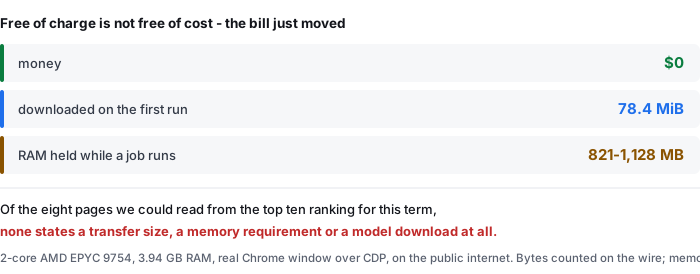
These are per-device costs, so they are properties of the machine and the browser, not of your file. The measurements were taken on one specific machine and are published with the scripts so the method can be repeated.
- Machine — 2-core AMD EPYC 9754, 3.94 GB RAM, real (non-headless) Chrome window driven over the Chrome DevTools Protocol, on the public internet, with other workloads running
- Model — onnx-community/whisper-base, quantised ONNX, served from this site, in the browser tab. No audio is sent anywhere
- Transfer — every byte counted on the wire, brotli applied where the server applies it, one row per file so the total can be rebuilt from the parts
- Memory — peak resident memory of the whole Chrome process tree spawned for the run: process ids taken from
SystemInfo.getProcessInfoover CDP, thentasklistsummed over those ids every 3 s. The page's own JS heap is deliberately not used, because the model lives in a worker and does not appear in it - Dates — 2026-09-17 and 2026-09-18, against the live public site
Sources: transfer-size-by-file.csv (per-file bytes, wire and decoded) and memory-peak.csv (peak MB per clip length, cold and warm). Nothing was measured again for this page: the arithmetic is the only new thing on it.
The first-run download, file by file
The first visit to a device is not one download, it is eleven, and the split matters: the parts that compress are tiny and the parts that do not are almost all of it.
- Encoder, quantised ONNX — 23,201,314 bytes decoded, 23,201,314 bytes on the wire
- Decoded ONNX, part 1 — 20,971,520 bytes decoded, 20,971,520 bytes on the wire
- Decoded ONNX, part 2 — 20,971,520 bytes decoded, 20,971,520 bytes on the wire
- Decoded ONNX, part 3 — 11,750,275 bytes decoded, 11,750,275 bytes on the wire
- Model subtotal — 79,700,989 bytes decoded, 77,547,313 bytes on the wire (97.3% of the decoded subtotal)
- Everything a first visit actually fetches — 102,272,429 bytes decoded, 82,233,500 bytes on the wire ≈ 78.4 MiB, runtime and page included
- The one line in that table that does compress — the tokenizer, 2,480,466 bytes decoded down to 641,057 on the wire, a factor of 3.87
The shape of it is the point. Four ONNX files account for 76,894,629 of the 77,547,313 wire bytes in the model subtotal, and all four are listed as not compressed: quantised neural-network weights are close to incompressible, so brotli has almost nothing to take. The six JSON and tokenizer files in the same subtotal compress by roughly 97% and are worth 652,684 bytes on the wire — under one percent of the whole. A page that advertises a compressed download is not lying, it is describing the wrong files: the compression is real, and it applies to the part that was never large.
Every number in that list is a row of transfer-size-by-file.csv (bytes_decoded, bytes_on_wire_brotli, compressed). 82,233,500 bytes is the file's own WHOLE_FIRST_VISIT_INCLUDING_RUNTIME_AND_PAGE row; 82,233,500 / 1,048,576 = 78.42 MiB.
What the machine holds while the job runs
The transfer is paid once per device. The memory is paid every run, and it does not fall as the audio gets longer.
- 13-second clip, cold run — peak 1,128 MB
- 13-second clip, warm run — peak 821 MB
- 60-second clip, cold run — peak 919 MB; warm, 823 MB
- 277-second clip, cold run — peak 969 MB; warm, 921 MB
- 1,610-second clip (26 min 50 s), cold run — peak 977 MB; warm, 999 MB
The measurement machine had 3.94 GB of RAM in total. The smallest figure in that table is 821 MB, or 20.8% of it; the largest is 1,128 MB, or 28.6%. In other words, roughly a quarter of the whole machine is committed for the duration of the job, and a five-minute clip does not cost meaningfully more than a 13-second one — the range across clip lengths shorter than half an hour, 821 to 1,128 MB, is narrower than the range between a cold and a warm start of the same 13-second clip. The only row where warm came out above cold is the 1,610 s one, and that row is a single run; we are reporting it rather than smoothing it.
Source: memory-peak.csv (audio_seconds, cold_peak_mb, warm_peak_mb). Cold means Cache Storage and the HTTP cache were cleared and the page reloaded; warm means the same profile reloaded with the model already in Cache Storage. Machine total is from the measurement record, not from this file.
Why this can be free when a hosted one cannot
The difference is not generosity, it is where the processor sits — and that is checkable by watching where your own machine's work goes while a page claims to be free.
- Hosted transcription is a per-file bill to the vendor. The audio is sent to a server, a GPU pool does the work, and the vendor pays for that time. A free allowance is therefore written as a number, because every use of it is a cost: 3 transcriptions a day on one page, 600 minutes a month after sign-up and 10 free minutes a day before it on another, 30 free credits a month on a third, and 1 free hour of credits on a fourth. Those four figures are the constraint that ends the free use, and every one of them is a counter.
- When the work moves into the tab, the counter has nothing left to count. The model crosses the network once into the browser's own store, and every job after that is the visitor's processor reading the visitor's disk. There is no per-file bill to meter, so there is no allowance to publish — and no cap on how many files a day, how many minutes a month, or how many credits are left.
- The bill did not vanish, it changed units. It is now 78.4 MiB of transfer once per device, 821 to 1,128 MB of RAM per run, the electricity for the seconds the processor is busy, and a tab that has to stay open. Those are the four things a visitor pays here, and they are all measurable before and during the work — which is more than can be said for a counter you only see after you hit it.
One consequence worth stating plainly, because it cuts against this page's own argument: the free thing is not the cheaper thing for everybody. If your device has less than a gigabyte to spare, or a metered connection worth less than 78.4 MiB, a hosted tool that does the work elsewhere and returns a short text file is genuinely the better trade. The point is not that local is free. The point is that the price is stated here, and the eight pages ranking for this term that we could read state neither price.
The four allowance figures are quoted from the readable top-ten pages we fetched on 2026-09-25 and are recorded here as stated on those pages, not tested by us. We did not run any of those tools.
What the pages ranking for this term leave out
We read the organic first page for transcribe video to text free on 2026-09-25, before writing this page, through two independent search engines — one with the market set to en-US, one through a US-English endpoint. The ten results are 9 distinct domains: one domain appears twice with two different URLs. Our fetcher could read 8 of the 10; the other 2 answered with a bot-check interstitial and are recorded below as not read, not as “not stated”.
- Zero of eight states a download the visitor pays. Not one of the eight readable pages mentions fetching a model to the browser, ONNX, or weights of any size. That is 0 of 8.
- Zero of eight states a transfer size or a bandwidth cost. No page gives a figure for how much data the visitor's own machine will pull to make the free thing work. 0 of 8.
- Zero of eight states how much memory the job needs. No page mentions RAM, memory usage, or a footprint of any kind — on pages that describe files of up to 2 GB being handed to a browser box. 0 of 8.
- Seven of eight name the counter instead, and the counter is always a number. 3 transcriptions a day; 600 minutes a month, 10 minutes a day before sign-up; 30 free credits a month; 1 free hour of credits; 3 files a day, 30 minutes and 100 MB each; 5 files a day for a free account; a 2-hour ceiling presented as the reason nothing is charged. Seven pages, seven allowances, no page saying what the free tier costs to use.
- Only one of the eight says who pays. One page explains its own economics — that it runs its own GPU servers, that short files cost it almost nothing, and that the paid tier for long files covers the free one. It is the only page of the eight that answers the question this term is actually asking, and it answers it with its own cost, not the visitor's.
- Two pages say “no sign-up” in the same breath as an account that raises the limit. Both pair an anonymous allowance with a free account that lifts it, which is a fair design — but it means the word free in those headlines is doing three jobs: no money, no account, and a number per day.
- One page states a rate that its own figures do not support, and we are recording it as stated, not as wrong. It carries a headline claiming unlimited file size and duration while its own plan table reads 3 transcriptions per day, and its own interface shows a daily-usage message when the allowance is gone. We did not test it, so this is what the page says about itself, no more.
- One page's tool promised something the page then contradicts. Another of the ten writes 100% free beside a support message offering to restore credits at no charge after they run out — the second sentence only makes sense if something was being counted.
To be exact about the limits of this comparison: it covers the organic first page returned for this term on the day of writing, through the two engines named above. Where a page did not state something we record it as not stated. Where our fetcher was blocked we record the page as not read and draw no conclusion about its content — two results, both on one domain, are in that category, and either of them could state a transfer size or a memory figure without us knowing. We have not run any of these tools, and nothing on this page is a claim about their accuracy or their speed.
What this page does not tell you
- Your transfer and your memory will not match ours. Both are properties of the device, the browser build, and what else is running. A machine with a different processor, or a browser doing the work on a GPU, would move the memory figure; a device that is offline after the first run would move the transfer to zero.
- The 1,610-second memory row is one run. Single runs are reported as such throughout.
- The 78.4 MiB is this site's model, at this size. A different tool that runs in the browser would have its own figure, and we have not measured anybody else's. What is general is the structure: the weights dominate, and they do not compress.
- Nothing here is a claim about the other pages' products. We read their text and quoted their own allowance figures. A page that omits a number is not a page that gets the number wrong.
- “Free” is a word with several meanings. This page uses it in one sense only: no money changes hands, no account is required, and no allowance is counted. It does not mean no cost, and the sentence above about a slow or short-on-memory device is the case where the hosted alternative is the better deal.
Questions this page answers
Is it free to transcribe video to text here, and what is the catch?
There is no price, no account, no daily file count and no credit that runs out. The catch is a one-time transfer: the first run on a device pulls 78.4 MiB of model weights and code before any word appears, and the tab holds between 821 MB and 1,128 MB of RAM while a job runs. That is the whole bill. Nothing is charged and nothing is counted, because the work happens on your own machine instead of a rented one. Source: transfer-size-by-file.csv and memory-peak.csv.
Why can some sites transcribe video to text free and others cannot?
It follows from where the work runs. A free tier that ran on the vendor's own hardware would be a per-file bill to the vendor, which is why such tiers are written as a limit — files a day, minutes a month, or credits. A tool that runs the model on the visitor's processor pays that bill with the visitor's download, memory and electricity instead, so it does not need the limit. Of the pages ranking for this term that we could read, the ones stating allowances were the ones processing on a server; this page states no allowance, and states the 78.4 MiB first-run transfer instead.
Do the pages ranking for transcribe video to text free say what it costs the visitor?
Not one of the eight readable pages does. 0 of 8 mentions a model download to the browser, 0 of 8 gives a transfer size, and 0 of 8 mentions memory. Seven of the eight instead name the constraint that ends the free use. The pages that say free are describing who is not charging, not what is being spent.
How do I check the transfer and the memory on my own machine?
Open the browser's developer tools before the first run. On the Network panel, clear the log, reload the page, and read the total transferred — that is the first-run download, and here it measured 78.4 MiB. For memory, use the browser's own task manager and add up the tab's process tree while a file is being transcribed; across four clip lengths our peaks ran from 821 MB to 1,128 MB. Both readings are per-device, so your numbers will differ from ours, and that is the point of reading them yourself.
Where the raw data is
Two files carry everything on this page: transfer-size-by-file.csv (one row per file, bytes on the wire and bytes decoded, so the 78.4 MiB can be rebuilt from its parts) and memory-peak.csv (peak resident MB of the whole process tree, per clip length, cold and warm). The measurement scripts, the method notes, and an explicit list of what these numbers do not cover are published next to them.
- Raw data and the measurement scripts — github.com/supersophia8888-cloud/clipquill-asr-benchmark
- Archived copy with a DOI — 10.5281/zenodo.22826968, the concept DOI: that link always resolves to the newest version of this dataset, all versions.
- The same data as a dataset — huggingface.co/datasets/sophia8888/clipquill-asr-benchmark
- What the same machine costs on the first run, second by second — the measured download, timings and memory
- How often the words come back wrong — the word error rate we measured, including the clips that went badly
- How much text you get back — 148 words a minute of speech, measured on eight clips
- Why a language count is not an accuracy figure — the script and scoring problem
Run it on your own file
The transcriber is on the front page of this site. Drop in a video or audio file you already have, pick the spoken language, and read the transcript. Nothing is uploaded; the model runs in the browser tab and the file never leaves your device. Expect the first run to spend 78.4 MiB on the download and between 821 MB and 1,128 MB of RAM, and every run after that to start straight away. The caps are 30 minutes of audio and 512 MiB per file, checked and refused before any work starts — and there is no file count, no minute count and no credit to run out of.