The first visit is the expensive one
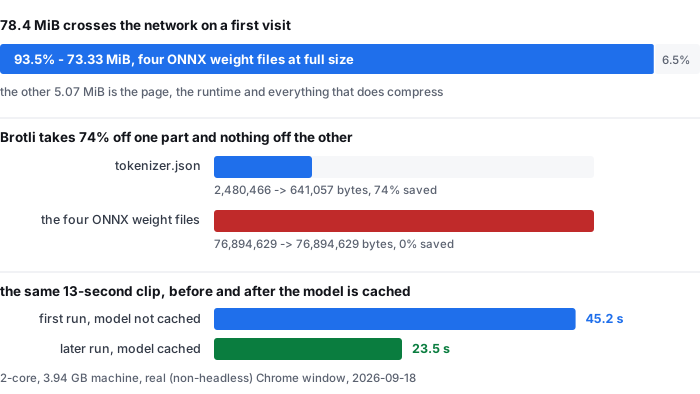
A browser-side transcriber cannot start until the recognition model has arrived, and this model is neither small nor compressible. On a first visit, with Cache Storage and the HTTP cache empty, this is what crosses the network:
- whole first visit, including the page and the runtime — 82,233,500 bytes (78.4 MiB) on the wire
- the same payload after decompression — 102,272,429 bytes (97.5 MiB)
- of the 82,233,500 bytes, 76,894,629 bytes (73.33 MiB, 93.5%) are four ONNX weight files served at full size
- the model subtotal, weights plus tokenizer and configs — 77,547,313 bytes (73.95 MiB) on the wire
- the parts that do compress, for contrast — tokenizer.json, 2,480,466 bytes down to 641,057
Brotli barely touches quantised neural weights, which is why 74.0 of the 78.4 MiB is model at full size. If you are comparing a browser transcriber against an upload service, this download is the cost the upload service does not have — and it is paid again on any machine that has not cached the model before. Source: transfer-size-by-file.csv.
Seconds, cold and warm, measured on the live site
These are wall-clock times recorded by our own harness on the public site, in a real (non-headless) Chrome window, over the public internet, on a 2-core 3.94 GB machine that was also running other work. Cold means Cache Storage and the HTTP cache were cleared first, so the full 78.4 MiB crossed the network again. Warm means the same profile reloaded with the model already cached.
- 13 s of audio — 45.2 s cold · 23.5 s warm
- 60 s of audio — 38.9 s cold · 24.9 s warm
- 277 s of audio (4 min 37 s) — 98.9 s cold · 105.2 s warm
- 1610 s of audio (26 min 50 s) — 550.4 s cold · 485.7 s warm
Two things in that list are worth reading twice. The first is that the length effect is strong: a 13-second clip costs 1.8× its own duration even when warm, because a fixed start-up is spread over very little audio, while the 26-minute file runs at about 0.30×. The second is the 277-second row, where warm came out slower than cold. That is one pair of runs, it contradicts the trend, and we do not have an explanation — so we are not offering one.
The page's own status line reports slightly lower figures than the harness, because the harness clock also covers reading and decoding the file. On the 13-second clip the page said 44.1 s cold and 23.1 s warm, against 45.2 s and 23.5 s measured end to end. Both sets are in the CSV. Source: timing-live-clipquill-com.csv.
Memory: budget about a gigabyte
Peak resident memory of the entire Chrome process tree spawned for each run, sampled every 3 seconds. The browser's own JS heap is not the right instrument here — the model lives in a worker, which a page-level heap snapshot does not show — so these are process working sets.
- 13 s of audio — 1128 MB cold · 821 MB warm
- 60 s of audio — 919 MB cold · 823 MB warm
- 277 s of audio — 969 MB cold · 921 MB warm
- 1610 s of audio — 977 MB cold · 999 MB warm
Note that the shortest clip has the highest cold peak. Loading and compiling the model dominates the 13-second run; there is barely any audio to amortise it over. If your machine has less than a gigabyte of headroom, a browser transcriber is the wrong tool regardless of how short the file is. Source: memory-peak.csv.
What the current top ten for this term leave out
We read the pages ranking for video transcriber before writing this one. Nine of the ten are upload services that transcribe on their own GPUs; the tenth is a GitHub project you would install and run yourself. None of them is a transcriber that runs in the tab you already have open, and that difference is what makes the three sections above necessary in the first place.
- Speed claims without a machine. Every one of them publishes some version of “seconds” or “under a minute”, and not one names the hardware, the browser, or the connection it was measured on. Those claims describe a warm server, not your laptop.
- No download size anywhere. The bytes a client-side transcriber must fetch before it can start are simply absent from all ten pages. We publish ours to the byte.
- No memory figure anywhere. Also absent. A reader choosing between tools cannot tell whether the local path needs 200 MB or 2 GB.
- No reproducible measurement. None of the ten links to a dataset, a CSV, a DOI or a script. Their accuracy and speed statements cannot be re-run by anyone.
- Caps handled inconsistently. Some state a per-file limit, some call themselves unlimited, some do not say at all. Ours — 30 minutes and 512 MiB — is stated on the front page and enforced before processing starts.
- Where the work happens is usually left implicit. A reader who needs the file to stay on their own device has to infer it. For an upload service that inference is the whole decision.
To be exact about the limit of this comparison: the ten pages we read were the organic results returned for this term on the day of writing. Where a page did not state something, we record it as not stated rather than estimating it.
Choosing between the two kinds of video transcriber
- Long file, ordinary machine, no confidentiality constraint — use an upload service. On this hardware a 26-minute file is 479.3 s warm even after the model is cached, and this page will refuse anything past 30 minutes or 512 MiB outright.
- The file cannot leave the device — an upload service is ruled out by definition, and the numbers above are the price of the alternative: 78.4 MiB of download once, roughly a gigabyte of RAM, and processing time between 0.30× and 1.8× the audio length depending on how long the clip is.
- You will transcribe repeatedly — the first run is the expensive one. The same 13-second clip fell from 45.2 s to 23.5 s purely because the model was already in Cache Storage, and every run after that pays no download at all.
- You need a caption file — a browser transcriber works from a file you already have on disk. Nothing here fetches from a link, so a video still living on a platform has to be saved to your device first.
What we did not measure
- One machine, one browser, one OS. Two cores, 3.94 GB of RAM, Chrome on Windows, with other work running alongside. Every second and megabyte above will differ on your hardware.
- The 1610-second row is a single run. The shorter rows are not repeated dozens of times either; treat the shape of the curve as reliable and the individual figures as indicative.
- No file longer than 30 minutes was attempted, because the page refuses them. We have no one-hour number and will not produce an estimate for one.
- Download size was measured on one build. The model files are versioned and a future build would change the 78.4 MiB.
- The warm-slower-than-cold result at 277 s is unexplained. It is published as measured, not smoothed away.
Where the raw data is
Three files carry every figure on this page: transfer-size-by-file.csv (per-file bytes on the wire and after decompression), timing-live-clipquill-com.csv (cold and warm, app-reported and wall clock) and memory-peak.csv (peak process-tree memory per run). The measurement scripts and the method notes are published alongside them, including what the numbers do not cover.
- Raw data and the measurement scripts — github.com/supersophia8888-cloud/clipquill-asr-benchmark
- Archived copy with a DOI — 10.5281/zenodo.22826968, the concept DOI: that link always resolves to the newest version of this dataset, all versions.
- The same data as a dataset — huggingface.co/datasets/sophia8888/clipquill-asr-benchmark
- How accurate the model is, per audio condition — the word error rate we measured on eight clips
Run it on your own file
The transcriber is on the front page of this site. Drop in a video or audio file you already have, pick the spoken language, and read the transcript. Nothing is uploaded — the model runs in the browser tab and the file never leaves your device. Expect the first run to spend 78.4 MiB on the download and about a gigabyte of RAM, and every run after that to start straight away.