Start with the sentence the whole first page assumes
Every one of the ten results for transcribe youtube video to text is a box you paste a link into. Not one of them starts by asking whether the link works, and the ones that mention the problem at all mention it as a footnote. What follows is the link route, taken seriously: what it does with a real two-hour video, and what each way it can fail actually tells you.
This page is written by a tool that cannot take a link at all. That is stated plainly in the first question below rather than buried, because it is the reason we went and tested the link route instead of assuming it works.
We put a two-hour video in front of it
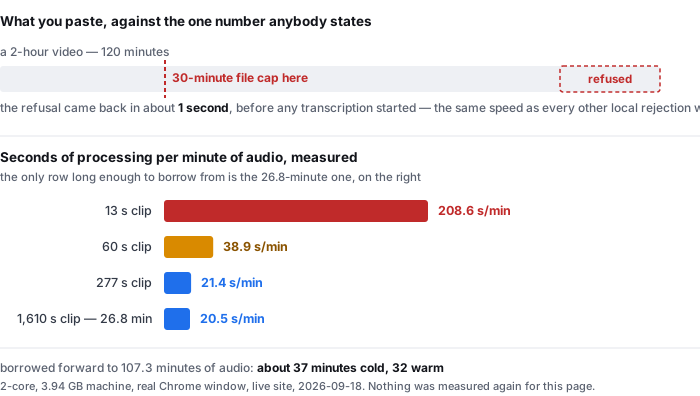
It was refused in about a second, before any transcription started. The page's own message: “That recording is longer than the 30-minute limit. Try uploading a section of the audio instead.” The trial this site runs on accepts files up to 30 minutes of audio, so a two-hour video is a file that has to be dealt with before any transcriber — theirs or ours — is even in the conversation.
That is the shape of the problem this category does not describe. On a link-based tool the cut happens somewhere on someone else's server, invisibly, and you find out what you got afterwards. Here it has to happen on your machine first, where you can see what you are cutting, and the cut is the part the ten ranking pages never mention because a link-based tool never has to make you do it.
Source: the limits published on this site — 30 minutes of audio and 512 MiB (536,870,912 bytes) per file, checked and refused before any work starts. The refusal above is one of the checks in page-decode-endtoend.csv, where every refusal we recorded came back in 1 second against 18.5–27.2 seconds for accepted files.
Two hours, four files, and the wait that follows
A two-hour video has to be cut into at least four files at the 30-minute cap, and here is what each of those four files costs. These numbers were already in our files before this page existed; nothing was measured again for it.
- E1-real-noise-heavy — 29.4 s of audio, 71 reference words, 17.2 s on the fastest model, 10.2 s on the slowest
- The 1,610-second clip — 26.8 minutes, 543.4 s on a first run and 479.3 s when the model was already cached, reported by the page
- The same clip, end to end — 550.4 s first run and 485.7 s cached, measured around the page rather than by it
So the arithmetic a person making a two-hour transcript actually needs, and which no page in this category states: the 26.8-minute clip is the closest thing we measured to one of the four chunks you would cut, and it runs at 20.5 seconds of wall clock per minute of audio cold and 18.1 seconds per minute warm. Applied to 107.3 minutes of audio — four chunks at the 30-minute cap — that is roughly 32 minutes of rendering warm and 37 minutes cold, on a 2-core machine, before you have opened the file, reviewed the text, or fixed anything.
That extrapolation is the weakest thing on this page and you should discount it. Our measured seconds-per-minute falls as clips get longer: 208.6 at 13 seconds, 38.9 at 60, 21.4 at 277, 20.5 at 1,610. Almost all of that fall happens between 13 and 60 seconds, and it flattens out afterwards, so applying the 1,610-second rate forward is the least unreasonable row to borrow from. It is still borrowing. Nothing in our data covers a continuous 107-minute file, and the direction of the remaining error is upward, because a machine doing four files in a row is a machine getting warmer than the one that produced these numbers.
Sources: timing-live-clipquill-com.csv for the four rows above and their wall-clock columns, measured on the live public site on a 2-core machine with 3.94 GB of RAM; timing-same-material-local.csv for the two model tiers on the 1,610-second clip, which takes 673.6 s on the slower tier and 445.9 s on the faster one. The per-minute figures, the 107.3 and the 32/37 are arithmetic on those files. Nothing was measured again for this page.
What the transcript is actually made of
Our own reference files put the pooled rate at 148.4 words for every minute of speech: 229 hand-written reference words over 92.619 seconds of audio across eight clips. But a word count is a poor description of a text, and the shape of what you receive is the thing the ranking pages never describe either.
Counted over those 224 scored tokens — the 229 is the scorer's count of the reference, and the two differ because the scorer separates possessive apostrophes into their own tokens, which this count does too but which lands slightly differently on the joint — there are 158 distinct words. The single most frequent word, the, appears 12 times and accounts for 5.4% of the text. Articles, prepositions, pronouns and the verb “to be” together account for 95 of 224, or 42.4%. Only 129 of 224 tokens, 57.6%, are content words.
For scale on that text: the model gets 25.4% of the longest clip's 71 words wrong in heavy background noise, and 21.3% across that whole bucket. Those are word error rates on hard audio and not a statement about correct spelling on a clean file, so read them as the upper end of what can go wrong rather than the normal case.
Sources: the eight reference files in samples/ of our repository, counted directly; wer-by-sample.csv and wer-by-condition.csv for the error rates. Every share above describes our 224-token reference text, which is a description of eight short clips and not a description of a transcript you will receive.
What a failed link actually tells you
This is the part of the route that the ranking pages leave unsaid, and it is the part you will meet first. Four different things can happen when you paste a link, and the pages you find for transcribe youtube video to text almost all describe them as one thing: they failed.
- The link resolves but the tool never sees it. Five of the eight readable pages transcribe the audio rather than read a caption file — we found 5 of 8 acknowledging that YouTube has captions of its own — which means they are pulling the media, not the metadata. Only 1 of 8 states the precondition that makes this work: the video has to be reachable by their machine. Any link that a server cannot fetch is simply a link that did not work, and no page we read separates that from a video with no speech in it.
- The tool works but produces a transcript you did not ask for. Of the audio actually inside the video, the format is a fact about the source rather than a choice you make. Our own test file is wmv2 video with wmav2 audio — a combination this site refused at wmv and accepted once the audio was moved, unchanged, into a .mkv container. The container is a wrapper; the audio inside it decided whether the work could happen. A link-based tool is doing that same step, just where you cannot see it, and 1 of 8 readable pages mentions the audio at all.
- The URL is a playlist or a channel, not a video. One page of the ten says playlist URLs work, and lists Shorts as well; three advertise bulk or batch handling; one lists bulk sources for 6 different platforms. The rest offer one box for one link, and none of the eight readable pages says what it does when you paste something that is not a video.
- The video has captions switched off, or none at all. 0 of 8 pages we read state whether a transcript they produce is better or worse than captions that already exist. Five advertise that they work without captions, which is a real capability — recognising speech instead of reading a file — but the comparison it invites is the one nobody published.
- The video is long. A two-hour recording is over the limit on the link route, and here it is over the 30-minute file cap, refused again in about a second, before work starts. Between the two, the link route may still be doing work on that video. The details of what various tools say about length limits have changed since we read them, so we are not publishing a table of their numbers here.
Every count above was taken on 2026-09-27 from our saved copy of the organic first page for transcribe youtube video to text. The ten results are 10 distinct domains, so no domain is double-counted, and one of them returned a security interstitial and one a rate-limit page; both are counted as not read. Readable: 8 of 10. Every count is out of eight, not ten, and is given that way on purpose — a page we could not read is not read, not not stated.
The other half: what this page does not tell you
- It is a rate, not a promise. 148.4 words a minute is pooled from eight clips whose own rate runs from 117.9 to 198.0, a factor of 1.68. The 30-minute ceiling is worth about 4,450 words of text at the pooled rate and between 3,536 and 5,940 at those two extremes. A recording with pauses in it produces fewer, and we have not measured by how much.
- One language, one script family. The eight clips are English. Our only non-Latin measurement is one Mandarin clip counted in characters, not words: 97 reference characters over 23.088 s, one clip. The model emits Traditional Chinese against a Simplified reference, so 36 of those 97 differ by script alone and the raw character error is 43.3%; normalise through zhconv and it is 7.2%; add digit normalisation and it is 6.2%. One clip, presented as three numbers and no rate, because a rate from one clip is a rate from one clip.
- Two speakers, six of eight clips read aloud, one noise type. That is the whole sample. The 97 of 99 language tokens have never been run, and the 1,610-second row is a single run — those gaps are in the dataset's own notes and are listed there so this page cannot quietly improve on them.
- Nothing here is a claim about anyone else's product. We read their pages. We did not run their tools, and a page that omits a precondition is not a page that gets the work wrong.
- The link route is not bad. It is the only way to transcribe a video you cannot download, and for a short public clip it is far less work than what this page asks you to do. The failure modes above are the price, and they are not stated on the first page because the first page has nothing to gain from stating them.
Questions this page answers
Can I transcribe a YouTube video to text without downloading it?
Not on this site, and we are not going to pretend otherwise. Every page ranking for this term asks you to paste a link and does the work on its own servers. The transcriber here runs the whole recognition model inside your browser tab, so the file has to be on your device first. There is no link box and there will not be one: your audio never leaves the machine, which is the trade we chose. If you want the link route, one of the ten pages ranking for this term will do it, and the rest of this page is about what that route costs you when the link does not cooperate.
How do I get the audio out of a YouTube video to transcribe it?
By downloading the video and letting the transcriber read its audio track. The containers this site accepts are mp3, wav, ogg, m4a, mp4, mov and webm; aac is accepted too and decodes 0.11 s longer than its nominal 2.00 s duration, because ADTS framing adds it. We checked all eight against a real Chrome window: all eight decoded, at 44.1 kHz mono. If you are handed something else, the container can often be swapped without re-encoding the audio. Our test file in avi was refused and then accepted once its audio was put into an .mp4 shell with no change to the audio itself, and the same was true for wmv remuxed into .mkv. That is a rename of the wrapper, not a conversion of the sound.
What if the video has no captions or subtitles at all?
Then the link route is likely to work on it and this site definitely works on it, for opposite reasons. 5 of 8 readable pages advertise that they transcribe videos with no captions, which means they recognise the speech from the audio rather than reading a caption track. That is a real difference from a transcript scraper, and it is the difference they are selling. On this side the renderer does not consult YouTube at all, so it is indifferent. What 0 of 8 pages state is the other half of the claim: whether that transcription is better than captions that do exist. We have not tested it either — our dataset contains no comparison against YouTube captions.
Why did the link fail, and does that mean the video has no transcript?
Different failures prove different things, and the ranking pages do not distinguish between them. A refusal that arrives in about a second tells you the file was rejected locally, before any transcription started, and says nothing about what is in the audio: we measured 1 second to a refusal for a container the browser cannot decode, against 18.5–27.2 seconds for files that were accepted. A refusal after the work has begun is a statement about the audio. An access failure is a statement about neither: a link that returns nothing may be private, may be region-restricted, may have been removed, or may be unreachable from the server doing the asking — and 1 of 8 readable pages mentions that its link has to be reachable by someone else's machine.
Can I paste a YouTube playlist or several links at once?
One page of the ten states that playlist URLs work; three more advertise bulk or batch processing, and one of those lists bulk pages for 6 different sources. This site has no link box at all, so the limit that applies is the one on files: 30 minutes of audio and 512 MiB (536,870,912 bytes) each, checked and refused before any work starts. That matters more here than on a link-based tool, because a two-hour video cannot be handed over as a link to be split on a server. It has to be cut into four files on your machine first, and at 148.4 words a minute of speech that ceiling is worth about 4,450 words.
Where the raw data is
The measurements above come from the same eight English clips and the same Mandarin clip as everything else published here. The files are the evidence; the arithmetic on this page is the only new thing on it.
- Raw data and the measurement scripts — github.com/supersophia8888-cloud/clipquill-asr-benchmark
- Archived copy with a DOI — 10.5281/zenodo.22826968, the concept DOI: that link always resolves to the newest version of this dataset, all versions.
- The same data as a dataset — huggingface.co/datasets/sophia8888/clipquill-asr-benchmark
- How often those same eight clips came back wrong — the word error rate we measured, including the clips that went badly
- How much text a minute of speech is worth — the words-per-minute measurement the 30-minute ceiling is computed from
- The container is not what it converts — which extensions pass and which are refused, tested one by one
- What the tool costs the machine it runs on — the measured download size, timings and memory
Run it on your own file
The transcriber is on the front page of this site. It has no link box, so the first step is to get the audio onto your machine — which is also the step that makes the failure modes above disappear, because a file you are holding does not have to be reachable by anyone else. Drop it in, pick the spoken language, and read the transcript. Nothing is uploaded; the model runs in the browser tab and the file never leaves your device. The caps are 30 minutes of audio and 512 MiB per file, checked before any work starts, and expect the first run to spend 78.4 MiB on the download and about a gigabyte of RAM.