What was measured
Two things, kept separate because they answer different questions. The first is whether the browser can decode the audio at all. The second is whether this page, end to end, accepts the file and returns text. The second is the one that matters to a reader, and it is the one with the interesting answer.
- Material — 2-second 440 Hz mono tones generated with
ffmpeg, then packed into 20 container-and-codec combinations. Every file in the matrix is a tone, not speech: this is a test of decoding, and a tone is the cleanest way to isolate it - End-to-end set — 9 of those files handed to the real page in a real browser, through its own file input, driven over the Chrome DevTools Protocol
- What the page does — it calls the browser's own
AudioContext.decodeAudioData()on the file, resamples to 16 kHz mono, and runs the recognition model in a worker. There is no transcoding or repackaging step before that call, so the verdict is the browser's verdict on the audio track - Model — onnx-community/whisper-base, quantised ONNX, served from this site, in the browser tab. Nothing is uploaded
- Machine — 2-core AMD EPYC 9754, 3.94 GB RAM, real (non-headless) Chrome 153.0.8010.50 window, on a local byte-identical build of this site
- Date — 2026-09-26. This is a new measurement, not a re-run of the 2026-09-18 format check
Sources: container-codec-matrix.csv (20 files, decode or refuse, one row each, with byte sizes) and page-decode-endtoend.csv (9 files, what the page itself said, and how many seconds it took to say it). The earlier decode-format-support.csv answers a narrower question — eight containers, all with the same audio codec — and is left as it was.
The container swap: same audio track, three different extensions
One MP3 audio track was packed into three containers. The audio inside is byte-identical, produced once and copied rather than re-encoded. Only the box changed.
- MP4 holding the MP3 track — accepted, transcribed in 37 s wall clock
- MKV holding the same MP3 track — accepted, transcribed in 35 s
- MOV holding the same MP3 track — accepted, transcribed in 44 s
- MPEG-TS holding the same MP3 track — refused, in about 1 s
The first three say what you would expect: the container does not matter when the codec inside it is one the browser can read. The fourth is the interesting one. MPEG-TS carries the very same MP3 audio track, and it is refused — so this is not a clean rule that only the codec matters. It is two rules stacked: the browser has to be able to open the container and read the codec inside it, and a page that lists extensions is only talking about the first half.
Rows: p1.mp4, p1.mkv, p1.mov, p1.ts in page-decode-endtoend.csv, all with audio_codec = mp3. Seconds include model work on a 2-second tone, so they are wall clock, not a decode time. Nothing was measured again for this page: the arithmetic is the only new thing on it.
The codec swap: same MP4 extension, four accepted and one refused
This is the part that explains almost every “it says MP4 is supported but it would not take my MP4” complaint. Four files below share one container, one video codec and one length. The audio track is what differs.
- MP4 with an AAC audio track — accepted, transcribed in 18.5 s
- MP4 with an MP3 audio track — accepted, in 26.1 s
- MP4 with an Opus audio track — accepted, in 24.2 s
- MP4 with a Vorbis audio track — accepted, in 27.2 s
- MP4 with an AC-3 audio track — refused in about 1 second, with the message that the browser could not read its audio track
The refused file is the whole point of this page. Its extension is .mp4. It is on the accepted-extension list of this site. It has a perfectly ordinary video track and it is the same two seconds long as the four that went through. What it has instead is an AC-3 audio track — the codec a great many camcorders, set-top recorders and DVD-era rips produce by default — and AC-3 is not something a browser decodes out of the box.
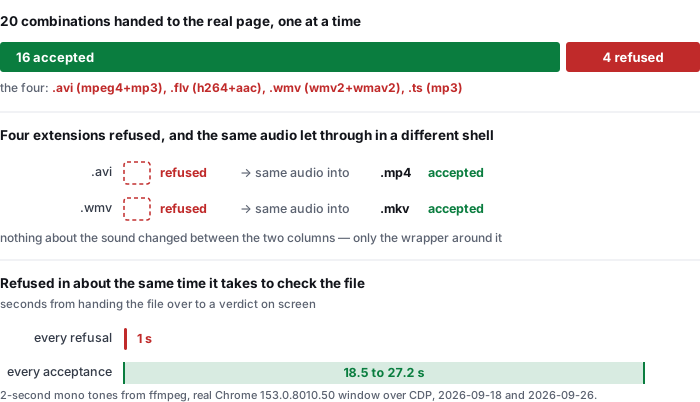
Notice also how fast the refusal came. The four accepted files took between 18.5 and 27.2 seconds each, almost all of it the model's work on a 2-second tone. The refusal took about one second: the file is turned away before any recognition starts, which is why the message is a decoding error and not an accuracy problem. If your file is going to be refused, it is refused immediately, and rewording the request or retrying will not change it.
Rows: the five p2-*.mp4 entries in page-decode-endtoend.csv. The exact page message on refusal is “Could not decode this file. The browser could not read its audio track. If the file is AMR (.amr) or WMA (.wma) — common on voice recorders and older phones — browsers cannot decode it. Convert it to MP3 or WAV first (any free converter will do), then drop it in again. Try MP4, MOV, WEBM, M4A, MP3, WAV, AAC, OGG, FLAC, OPUS, 3GP or M4B.” that advice names MP4, which is the confusion this page is about. Wall-clock seconds are for a 2-second tone on the measurement machine and are not a claim about your machine or your file length.
The full matrix: 20 files, 16 read and 4 refused
Everything we built, with the verdict on each. Four containers were refused outright — one pure container that is merely old, one that pairs a modern video codec with a legacy audio codec, and two that combine both.
- Read — AAC, in a bare
.aacfile (ADTS framing) and in.m4a - Read — MP3, bare
.mp3, and inside MP4, MKV and MOV - Read — PCM WAV, bare
.wav - Read — Vorbis, in
.ogg, and inside a WebM - Read — Opus, in a WebM, and inside MP4 and MKV
- Read — MPEG-4 Part 2 video with MP3 audio, once it was repacked from AVI into MP4
- Refused — AVI holding MPEG-4 Part 2 video and an MP3 track
- Refused — FLV holding H.264 video and an AAC track
- Refused — ASF/WMV holding WMV2 video and a WMA v2 track
- Refused — MPEG-TS holding H.264 video and an MP3 track
Two of those refusals are worth separating from the others, because they are not codec problems at all. The AVI row and the FLV row were both built with codecs the browser handles perfectly well — H.264 and AAC in the FLV case, MP3 audio in the AVI case. Both were refused. Then we repacked the AVI's streams, without re-encoding a single frame or a single sample, into an MP4, and it was accepted. Same video data, same audio data, different box, different answer. That is the container half of the rule, demonstrated rather than asserted.
One limit of the matrix, stated plainly so it is not read as a bigger claim than it is: only one sample rate is represented. Every file here is 44,100 Hz. A file at an unusual sample rate, or with more than two channels, might behave differently, and we have not tested that. Source: container-codec-matrix.csv, one row per file with its byte size, plus p1.mov, mkv-same-streams.mp4 and mp4-same-streams.ts for the repacking rows.
What the pages ranking for this term leave out
We read the organic first page for video to text converter on 2026-09-26, before writing this page, through two independent search engines — one with the market set to en-US, one through a US-English endpoint. Their first pages agreed, so this is one result set seen twice, not two. The ten results are 10 distinct domains. Our fetcher could read 8 of the 10; the other 2 answered with a bot-check interstitial and are recorded below as not read, not as “not stated”.
- Eight of eight publish a list of accepted extensions, and that list is the whole answer they give. The counts run from 2 distinct extensions on the shortest list to 6 on the longest. Every one of those lists is a statement about the box. None of them is a statement about the audio inside the box.
- Not one of the eight uses the word container. That is 0 of 8. Not one of them draws the distinction this page is built on, even in passing. On pages whose entire subject is which files a converter will take, the concept that decides whether a file will be taken is absent.
- Exactly one of the eight names any audio codec at all. That is 1 of 8, and it names two of them in a list of formats you can convert to text, not as the thing that decides whether your video will work. The other seven mention no codec name anywhere on the page.
- Two of the eight mention an intermediate step, and neither draws a conclusion from it. One says the tool does not care about the video codec because it only needs to decode the audio track — which is close to the right model, and then still leads with a list of extensions and says MP4 works out of the box. The other says files are re-encoded. Both describe a step; neither tells the reader that the codec of that audio track, not the extension, is what will decide the outcome for their file.
- The lists disagree with each other, and no page says which are load-bearing. Across the eight readable pages the named extensions include MP4, MOV, MKV, WEBM, AVI, WMV, FLV, M4V, MPEG, MPG, MP3, WAV, M4A, AAC, OGG, FLAC and AIFF. Four of those containers we measured as refused — AVI, FLV, WMV and MPEG-TS, with the caveat that our refusals were codec-dependent and a page may be describing its own server-side pipeline, which is a different machine from a browser.
- Not one of the eight publishes its own test data. No page links to a file listing which of its advertised formats was actually put through, at which codec, with what result. So none of these lists can be checked, and a reader whose file fails has nothing to compare against. Ours can, and the two CSVs are linked at the bottom of this page.
To be exact about the limits of this comparison: it covers the organic first page returned for this term on the day of writing, through the two engines named above. Where a page did not state something we record it as not stated. Where our fetcher was blocked we record the page as not read and draw no conclusion about its content — two results are in that category, and either could state a codec list without us knowing. We have not run any of those tools; our refusals are this page's behaviour on a browser-side decoder, and a tool that transcodes on its own servers may well accept files this one turns away. Nothing here is a claim about their accuracy or their speed.
What this page does not tell you
- Only one sample rate was tested, and only one channel. Every file in the matrix is 44,100 Hz mono. The 2026-09-18 container check covered 48 kHz material; this one does not repeat that, and neither tested surround or multi-channel audio.
- The test files are tones, not speech. That is deliberate for a decoding question, and it means nothing here says anything about transcription accuracy. Those numbers are on a separate page, measured on real speech.
- The four refusals are browser refusals, on this site. A hosted converter with a server-side pipeline using a full
ffmpegbuild would decode most of the files we refused, and may therefore legitimately advertise AVI, FLV or WMV. The claim here is narrow: an extension list does not tell you what happens, and the reason it does not is the codec. - One file can be refused for a different reason than the codec. We did not test damaged files, truncated files, DRM-protected files, or files with no audio track at all. Each of those is a separate failure mode with its own message, and none of them is in this matrix.
- AC-3 has a specific cause, and it is not obscure. Camcorders, DVD recorders, broadcast captures and many screen recorders write AC-3 by default. If your file came from one of those and was refused with a decoding message, the codec is the likely reason — and the fix is a repack or a re-encode of the audio track, not a different tool.
Questions this page answers
Which video formats can a video to text converter read, and does the file extension decide it?
The extension does not decide it. A converter has to read the audio codec inside the file, and the same audio codec travels in several different containers. One MP3 track was carried in an MP4, an MKV and a MOV and all three were transcribed. Four files with the identical .mp4 extension — one each with AAC, MP3, Opus and Vorbis audio — were all transcribed, and the same MP4 with AC-3 audio was refused. Same extension, opposite answers. Sources: page-decode-endtoend.csv and container-codec-matrix.csv.
My file is an MP4 and the converter refused it. Why?
Because the extension is a label on the box, not on the audio track. Two of our test files had the same .mp4 extension, the same video codec and the same two-second length. One carried an AAC track and was transcribed in 18.5 seconds. The other carried an AC-3 track and was refused in about one second with the message that the browser could not read its audio track. The extension was identical, so the extension cannot be what the decision was made on.
What is the difference between a container and a codec?
A container is the box: MP4, MKV, MOV, AVI, WebM. A codec is what is inside it: the way the audio was compressed, such as AAC, MP3, Opus, Vorbis or AC-3. One container holds many different codecs, which is exactly why a list of accepted extensions cannot tell you whether your file will work. Our MKV decoded with an AAC track, an MP3 track and an Opus track; our MP4 decoded under four codecs and failed under a fifth.
Do the pages ranking for video to text converter explain any of this?
They do not. Of the eight we could read, all eight publish a list of accepted extensions and none uses the word container — 0 of 8. Exactly one names any audio codec, and it does so in a list of things you can convert to text rather than as the deciding factor. Two mention an audio-extraction or re-encoding step without following it to the conclusion.
Where the raw data is
Two files carry everything on this page: page-decode-endtoend.csv (the nine files handed to the live page, what the page said, and the seconds to verdict) and container-codec-matrix.csv (all twenty combinations, decode or refuse, with byte sizes). The scripts that generated the material, the method notes, and an explicit list of what these numbers do not cover are published next to them.
- Raw data and the measurement scripts — github.com/supersophia8888-cloud/clipquill-asr-benchmark
- Archived copy with a DOI — 10.5281/zenodo.22826968, the concept DOI: that link always resolves to the newest version of this dataset, all versions.
- The same data as a dataset — huggingface.co/datasets/sophia8888/clipquill-asr-benchmark
- What the tool costs the machine it runs on — the measured download, timings and memory
- How often the words come back wrong — the word error rate we measured, including the clips that went badly
- How much text you get back — 148 words a minute of speech, measured on eight clips
- What free actually costs — the 78.4 MiB you pay instead of money
Run it on your own file
The transcriber is on the front page of this site. Drop in a video or audio file you already have, pick the spoken language, and read the transcript. If the file is refused, read the message before trying something else: a refusal here happens in about a second, before any recognition starts, and it means the browser could not open the audio track — a repack or an audio re-encode will usually fix it, and a different wording of the same file will not. Nothing is uploaded; the model runs in the browser tab and the file never leaves your device. The caps are 30 minutes of audio and 512 MiB per file, and they are checked before any work starts.