What was measured
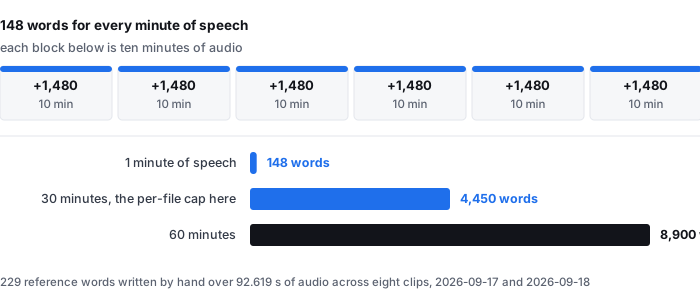
This is a rate over eight clips, and the eight clips are the whole evidence base. It is not a survey and it is not an average of anybody else's numbers.
- Clips — 8 English recordings, 4.8 s to 29.4 s, 92.619 s of audio in total
- Reference text — 229 words, transcribed by hand from the audio. These are the words that were spoken, checked against the recording by a person, not the words the model produced
- What is divided by what — reference words ÷ audio seconds, per clip and then pooled across all eight
- Model — onnx-community/whisper-base, quantised ONNX, served from this site
- Machine — 2-core AMD EPYC 9754, 3.94 GB RAM, real (non-headless) Chrome window driven over the Chrome DevTools Protocol
- Dates — 2026-09-17 and 2026-09-18, against the live public site
Sources: wer-by-sample.csv carries audio_seconds and reference_words for each of the eight clips, and timing-same-material-local.csv records the same eight clips concatenated into a 92.619 s pool. One thing does not reconcile exactly and we are publishing it rather than picking a number quietly: the eight audio_seconds values add up to 92.7 s, which is 0.081 s more than the pool. Each per-clip value is rounded to one decimal place, so the column carries a rounding residue. The pooled rate below uses the pool length, 92.619 s.
Words per minute of speech, clip by clip
Every clip is short, so each row is a small sample. They are listed separately because the spread between them is the useful part: the same person reading the same kind of material can be counted at 118 words a minute in one clip and 198 in another.
- A-clean — 10.0 s, 33 words — 198.0 words a minute
- C1-real-clean — 5.9 s, 17 words — 172.9 words a minute
- C2-real-clean — 4.8 s, 11 words — 137.5 words a minute
- D1-real-noise-light — 12.5 s, 32 words — 153.6 words a minute
- D2-real-noise-light — 9.9 s, 25 words — 151.5 words a minute
- B-hard — 11.2 s, 22 words — 117.9 words a minute
- E2-real-noise-heavy — 9.0 s, 18 words — 120.0 words a minute
- E1-real-noise-heavy — 29.4 s, 71 words — 144.9 words a minute
- All eight pooled — 92.619 s, 229 words — 148.4 words a minute
The slowest clip is B-hard at 117.9 words a minute and the fastest is A-clean at 198.0. That is a factor of 1.68 between two clips of the same language from the same measurement session, which is why a single words-per-minute figure for “speech” is worth less than the range it came from. The pooled figure sits near the middle because the longest clip, at 29.4 s, carries the most weight.
Every number in that list is reference words divided by audio seconds from wer-by-sample.csv, except the pool length, which is from timing-same-material-local.csv. Nothing was measured again for this page; the arithmetic is the only new thing on it.
What that is, at the lengths people actually transcribe
The point of a rate is that you can put your own recording into it. Below, each length is given three times: at the pooled rate, at the slowest clip's rate, and at the fastest clip's rate. The three columns are the honest spread, not a range we picked to look careful.
- 10 minutes of speech — 1,483 words at the pooled rate, and between 1,179 and 1,980 at the extremes
- 30 minutes of speech — 4,450 words at the pooled rate, and between 3,536 and 5,940 at the extremes
- 60 minutes of speech — 8,901 words at the pooled rate, and between 7,071 and 11,880 at the extremes
The 30-minute row is the one that matters for this site: 30 minutes of audio and 512 MiB (536,870,912 bytes) per file are the hard caps on the transcriber here, refused before any work starts. At our own measured rate that ceiling is worth about 4,450 words of text, and between 3,536 and 5,940 depending on how fast the speaker talks. If you have a two-hour recording, you are splitting it into four files here, and you should expect somewhere between 14,000 and 24,000 words of output to come out of that.
The extrapolation to 10, 30 and 60 minutes multiplies our measured per-minute rate by the length. It assumes a flat speaking rate across a recording, which our data does not test — our longest clip is 29.4 s. Source for the caps: the limits published on this site. Source for the rate: wer-by-sample.csv.
What the pages ranking for this term leave out
We read the organic first page for transcribe video to text on 2026-09-24, before writing this page, through two independent search engines — one with the market set to en-US, one through a US-English endpoint. Their first pages overlapped on 10 of 10 results, so this is one result set seen twice, not two. The ten results are 8 distinct domains: one domain appears twice with two different URLs, and another appears twice as well. Our fetcher could read 6 of the 10; the other 4 answered with a bot-check interstitial and are recorded below as not read, not as “not stated”.
- All six readable pages describe the input side. Every one of them spends its main body on how to add a file or paste a link, which formats are accepted, how many languages are supported, and how many files you may queue. Not one of the six describes the output side — what comes back, how long it is, or how it relates to the length of the recording.
- Not one states any words-per-minute figure, any output length, or any relationship between recording length and transcript length. That is 0 of 6. Six pages, six descriptions of a conversion, and no statement anywhere of how much text the conversion produces.
- Every cap is an input cap. Across the six readable pages the per-file duration limits are 5 minutes (one page's free tier), 60 minutes (one page, stated twice), 2 hours (one page), and 10 hours (one page's paid tier). Every one of those is a limit on what you may put in. None is expressed as a limit on what you get out, and none is converted into text anywhere.
- The size caps disagree just as widely, and the two are never reconciled. 500 MB on two pages, 3 GB on another, and 10 GB in a fourth page's upload box — which also advertises 2 hours of video in its FAQ, a combination that means the same file can be refused for being too big or too long depending on which limit it hits first. No page says which limit binds, or what a duration cap is worth in file size.
- One vendor's two ranking pages contradict each other on the cap. Two of the ten results are the same company's site with different URLs. One states “up to 500MB and 2 hour recording”; the other states “500 MB size and 60-minute duration limits” and repeats “up to 60 minutes long” in its FAQ. Same company, same tool, two pages ranking for the same term, 2 hours against 60 minutes.
- One page advertises two caps that cannot both be true. A fourth page carries an “Unlimited Minutes” badge next to an upload box that reads “Max 3GB per video or audio, up to 5 tasks in queue.” There is no statement of how many minutes 3 GB is, so the unlimited badge and the file limit cannot be checked against each other.
- No page publishes its own data. Not one of the six links to a CSV, a dataset, a script or a DOI, so none of these caps can be re-run or checked. Ours can, and the file is linked at the bottom of this page.
To be exact about the limits of this comparison: it covers the organic first page returned for this term on the day of writing, through the two engines named above. Where a page did not state something we record it as not stated. Where our fetcher was blocked we record the page as not read and draw no conclusion about its content — four results, including two URLs on one domain, are in that category, and any of them could state a words-per-minute figure without us knowing. We have not tested any of these tools, and nothing on this page is a claim about their accuracy or their speed.
What this page does not tell you
- It is not the length of the transcript the model produces. The 229 words are the reference — what was said, written down by hand. We did not count the words in the model's own output, so this page cannot tell you whether the text you receive comes out longer or shorter than the speech it came from. Anyone who tells you the output length is the input length is telling you something we have not measured.
- It is English, and “word” is a language-specific unit. All eight clips are English. Our only non-Latin measurement is one Mandarin clip, and it is counted in characters, not words — 97 reference characters over 23.088 s, one clip, no rate, and we are not going to turn one clip into one. Source: chinese-cer-one-clip.csv.
- Eight clips, two speakers, and six of the eight are read speech. That is the whole sample. Conversational speech, overlapping speakers, and long unedited recordings are not in it.
- The denominator is the whole clip. Audio seconds include everything in the file that is not speech — pauses, music, silence, dead air. A recording with long gaps between speakers will produce fewer words a minute than these clips, and this page has not measured by how much.
- Nothing here is a claim about the other six pages' products. We read their text. We did not run their tools, and a page that omits a number is not a page that gets the number wrong.
Questions this page answers
How many words is one minute of transcribed speech?
About 148 for every minute of speech, measured on our own eight clips — 229 hand-written reference words over 92.619 seconds of audio. At that rate a 10-minute recording is about 1,483 words, 30 minutes about 4,450, and 60 minutes about 8,901. The spread across our clips runs from 117.9 to 198.0 words a minute, so the same length of recording produces noticeably different amounts of text depending on how fast the speaker talks.
Is that the length of the transcript I will receive?
No. The 229 words are the reference — what was actually said, written down by hand and checked against the recording. We did not count the words in the model's own output, so this page cannot tell you whether the text you get back comes out longer or shorter than the speech it came from.
Do the pages ranking for this term say how much text comes out?
None of the six we could read does. All six describe the input side: which formats are accepted, how many languages are supported, how many files you may queue. Not one states a words-per-minute figure, an output length, or any relationship between recording length and transcript length. Four of the ten results could not be read because they answered with a bot check, so the count is 0 of 6 readable pages, not 0 of 10.
What are the file limits here?
30 minutes of audio and 512 MiB per file, checked and refused before any work starts. At our measured rate that ceiling is worth about 4,450 words of text, and between 3,536 and 5,940 depending on speaking rate. A two-hour recording has to be split into four files here.
Where the raw data is
Two files carry everything on this page: wer-by-sample.csv (per-clip seconds, reference words, and both model tiers' error counts) and timing-same-material-local.csv (the 92.619 s pool that the eight clips were cut from). The scorer that produced the reference counts, the method notes, and an explicit list of what the numbers do not cover are published next to them.
- Raw data and the measurement scripts — github.com/supersophia8888-cloud/clipquill-asr-benchmark
- Archived copy with a DOI — 10.5281/zenodo.22826968, the concept DOI: that link always resolves to the newest version of this dataset, all versions.
- The same data as a dataset — huggingface.co/datasets/sophia8888/clipquill-asr-benchmark
- How often those same eight clips came back wrong — the word error rate we measured, including the clips that went badly
- What the tool costs the machine it runs on — the measured download size, timings and memory
- Why a language count is not an accuracy figure — the script and scoring problem
Run it on your own file
The transcriber is on the front page of this site. Drop in a video or audio file you already have, pick the spoken language, and read the transcript — and then count the words, because that is the part none of the pages ranking for this term will tell you. Nothing is uploaded; the model runs in the browser tab and the file never leaves your device. The caps are 30 minutes of audio and 512 MiB per file, and they are checked before any work starts. Expect the first run to spend 78.4 MiB on the download and about a gigabyte of RAM, and every run after that to start straight away.