The container carries video you do not read
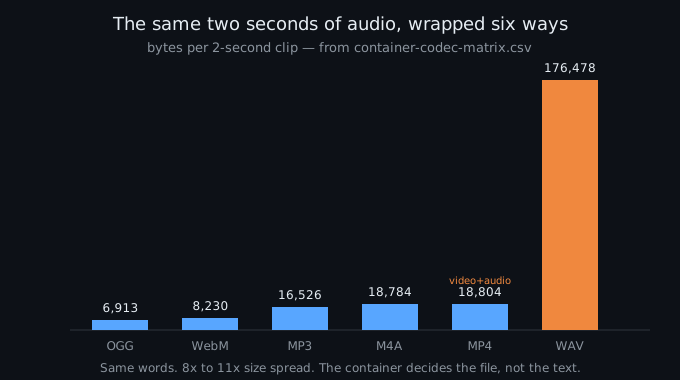
An MP4 is a video container. Turning it into text is speech recognition of the audio stream inside it, not a format conversion in the sense that a tool rewrites the file type. The browser decodes the MP4, separates the audio, and a model reads that. The tools that rank for this phrase on 2026-10-05 are built on the upload-and-process model — they take your file to a server — and not one of them tells you that the video track is dead weight for a transcript. In our container matrix the same two seconds of audio is 16,526 bytes as MP3, 18,784 bytes as M4A, and 176,478 bytes as WAV PCM: an 11× size spread for the same words. The MP4 row sits at 18,804 bytes for two seconds and that already includes a video stream; with real footage the MP4 balloons while the transcript it yields is identical. The container and the video decide how much you upload and how much disk the file takes. They do not decide what the words are.
- The audio is the same audio. Whatever the wrapper, the decoder turns it into the same PCM samples and the recognizer hears those. A twenty-minute interview is only about 9.6 MB of audio at 64 kbps; an MP4 of the same clip may be ten times that once the video is in it, and none of the extra bytes reach the transcript.
- So the format is the cheap step. The container decides whether your player opens the file and how much bandwidth an upload costs. It does not decide the text.
- Mp4 to text and transcribe mp4 are the same job. The phrase swaps the word order and changes nothing about the work; this page covers both, because the model does not know which verb you typed.
The 16,526 / 18,784 / 176,478-byte figures are read from container-codec-matrix.csv in the public repository, measured 2026-09-18 with a real Chrome window; the MP4 row there also packs a video track. The 9.6 MB for twenty minutes is 64 kbps times 1,200 seconds, the definition of that bitrate.
What the text actually depends on
If the container does not matter, something does. On our benchmark the variable is the acoustic condition of the audio — how clean it is, what noise sits under the voice, whether it came through a telephone band. The set is eight clips and 229 reference words, scored against the default tier with the same normalized word-error scorer the site publishes.
| acoustic condition | clips | reference words | default-tier WER |
|---|---|---|---|
| clean synthetic speech | 1 | 33 | 6.1% |
| real speech, no added noise | 2 | 28 | 10.7% |
| light background noise | 2 | 57 | 8.8% |
| heavy background noise | 2 | 89 | 34.8% |
| telephone band + echo | 1 | 22 | 22.7% |
| all eight clips | 8 | 229 | 20.1% |
| clean + light real speech only | 4 | 85 | 9.4% |
Read across the rows and the point is the spread, not any single number. The same model, the same scoring, a 6.1% to 34.8% range — and the column headed “file type” does not exist, because we never varied it. A page that headlines an accuracy percentage without telling you which of these rows it is measuring is not telling you what you would get on your own recording.
- A second tier is offered if you want lower error. The optional higher-precision model scores 9.6% across all eight clips and 8.2% on the clean-plus-light grouping, against 20.1% and 9.4% for the default. It is the same pattern — the audio dominates — at a larger download. We are not going to call one “better”; both are in the repository so you can score them on your own audio.
- The category’s accuracy badges rarely carry a denominator. Across the audio-family tools we have read, the ones that print an accuracy number almost never say how many clips or words it was measured on. We print ours.
All percentages are from wer-by-condition.csv in the public benchmark repository. WER is total errors divided by total reference words (weighted), not an average of per-clip percentages. The 229-word total is the scorer count after apostrophe splitting, documented in the repository README.
Where the file goes
The second thing this category does not line up on is privacy, and the tools on the first page for this phrase are built on the upload-and-process model: your file reaches their machines.
- We read it in the tab. Our tool loads the recognizer into the browser, reads the audio there, and sends nothing to a server — no account step requires it. The MP4’s video track is never extracted, never uploaded, never stored.
- The upload-based tools send the file to a server. That is their architecture; the file leaves your machine the moment you click. A page that never mentions your file after you submit has decided for you where it goes.
- Says local is not is local. A claim in a marketing sentence is not an open model running in the tab you can watch.
The local-processing stance is our tool’s; the upload-and-process description is the documented architecture of the audio-family services that rank for these phrases (read across transcribe-audio, audio-file-to-text and adjacent queries on 2026-10-02 to 2026-10-04). We have not uploaded a file to any of them and make no claim about whether their limits are enforced as written.
Questions this page answers
Is mp4 to text a file conversion?
No. An MP4 is a container that holds a video track and an audio track, and turning it into text is speech recognition of the audio, not a format conversion. The browser decodes the MP4, keeps the audio, and a model reads it. Our container matrix holds the same two seconds of audio at 16,526 bytes as MP3 and 176,478 bytes as WAV PCM — an 11× size difference for the same words. The video track is discarded by the recognizer; the container decides upload size, not the text.
What actually determines how accurate the text is?
The audio, not the file type. On our measured set the default tier scores 6.1% word error on clean synthetic speech, 10.7% on real speech with no noise, 8.8% with light noise, 34.8% with heavy noise, and 22.7% on a telephone-band clip. Same model, same 229 reference words; only the acoustic condition changes. The question of mp4 versus wav never enters the equation, because the recognizer hears the decoded audio either way.
Does the video in the mp4 matter?
No. The recognizer uses the audio track and discards the video. Whether the MP4 is ten megabytes or a hundred, only the audio portion becomes text; the extra bytes are video frames the transcript never reads. That is also why the same two seconds of audio is 16,526 bytes as MP3 and 18,804 as MP4 in our matrix: the MP4 adds a video stream, and with real footage it grows while the words stay the same.
Where does the mp4 go when you transcribe it?
With our tool, nowhere. The recognizer runs in the browser tab, the audio is read there, and the file is never sent to a server. The upload-and-process tools on the first page for this phrase are built the other way: the file reaches their machines the moment you submit it. Saying it runs locally is not the same as an open model you can watch run.
Where the raw data is
The container sizes, the per-condition error rates, and the decode support on this page come from the same published measurement run as the rest of this site.
- Raw data and the measurement scripts — github.com/supersophia8888-cloud/clipquill-asr-benchmark, including the raw model text behind every number, so the scoring can be redone under different rules.
- Archived copy with a DOI — 10.5281/zenodo.22826968, the concept DOI: that link always resolves to the newest version of this dataset, all versions.
- The same data as a dataset — huggingface.co/datasets/sophia8888/clipquill-asr-benchmark
- The per-condition error rates — wer-by-condition.csv in the repository, the same model on the same 229 words across five acoustic conditions.
- Why the container barely matters — the format is the part that matters least
- What an accuracy number means when it has no denominator — five pages make an accuracy claim, and not one says what it was measured on
- The wall on the other side of the file — five pages ask where your recording goes, and all five answer “to us”
Run it on your own file
The transcriber is on the front page of this site. It reads the audio in the tab and writes the words from it, so the file does not leave your machine — the MP4’s video track is never extracted or uploaded. Expect the first run to spend about 78.4 MiB on the model download and roughly a gigabyte of RAM, then the recognition runs on your own audio. Accuracy is the 20.1% figure with the conditions named — and if your recording is clean, read speech, the honest comparison is the 9.4% grouping, not the headline. The caps are 30 minutes of audio and 512 MiB per file, checked before any work starts, and for any standard audio file it is the 30 minutes that will stop you.