Seven pages, and a question five of them ask themselves
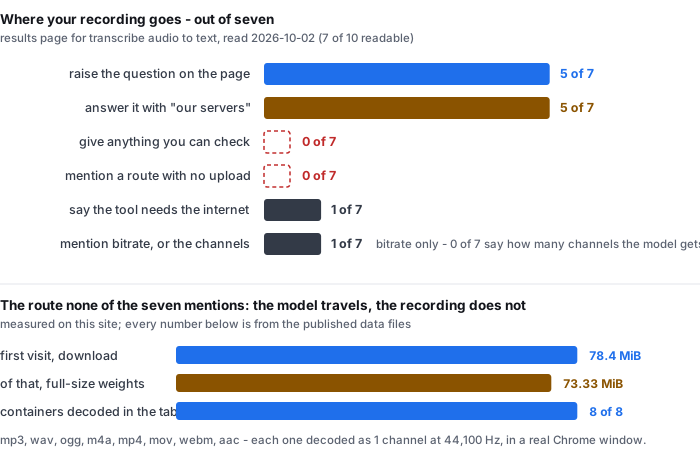
We read all ten results for transcribe audio to text on 2026-10-02. Ten results, 9 distinct domains — one domain holds two of them — and 7 of 10 returned readable HTML. Three answered with HTTP 403, so they are excluded from every content count below and every count is out of seven.
- The question is theirs, not ours. 5 of 7 readable pages put the question in their own FAQ block: Is my file stored anywhere? · Is my data secure when converting audio to text? · How private is this? and Do you keep my audio? · Is my audio data secure? · What happens to my file after I upload it? Those are the pages’ own headings. When five out of seven tools choose to raise the same question unprompted, that is the question their readers are asking.
- All five answer it the same way. The file goes to a server. The wording varies — an encrypted cloud platform, our own GPU servers, a private bucket, sent for transcription — but the direction of travel is identical on all five, and two of them put a badge on the first screen saying so: Files deleted after 24h.
- None of the five gives you anything to check. 0 of 5 publishes a request count, a retention log, a third-party audit, a sub-processor list, or a statement about who else can reach the bucket. Every claim is a sentence on a marketing page, including the one page that says the opposite of what a sentence can do: Privacy here is structural, not a promise on a marketing page — and then describes a private bucket with a 24-hour lifecycle, which is a promise on a marketing page.
- Nobody mentions the alternative. 0 of 7 says that a recogniser can run in the browser tab, so that the audio is decoded on your machine and never sent anywhere. That is not a technical impossibility — it is what this site does — and no page in the ten raises it as an option, or as a trade-off they rejected.
- One page answers the question the other way. Asked Does it work offline?, one page replies: No, the tool requires an internet connection to function. Transcription is done online. That is the straightest answer anywhere in the seven, and it is the only page that states the dependency as a fact rather than dressing it up.
Counted on 2026-10-02 from our saved copy of the organic first page for transcribe audio to text, fetched through two independent engines that returned the same ten results. Every count is out of the seven pages that returned readable HTML; the three HTTP 403 responses are excluded from all of them. Each count was assigned by printing the full context of every match and reading it, not by tallying a regular expression — the method that caught false positives on this site on 2026-09-26 and 2026-10-01. A mention that appears only in a footer privacy link, a navigation bar, or a list of other tools was not counted.
The five answers, quoted, and what is missing from each
Here is the whole of the evidence these pages offer, in their own words. We are not naming the sites, because the point is what the seven do and do not say, not which one says it.
- “All uploads are encrypted in transit and at rest.” — an answer to its own FAQ, Is my audio data secure? Encrypted in transit is checkable in principle; encrypted at rest is a claim about their storage. Neither is evidenced on the page.
- “Anonymous uploads and their transcripts are automatically deleted 24 hours after upload. We never use your audio to train models, and files are not shared with any third party; processing happens on our own GPU servers.” — an answer to its own FAQ, What happens to my file after I upload it? This is the most complete answer in the seven: it names a retention window, a training policy, a sharing policy and the hardware. It is still four sentences and no number you can verify.
- “Every audio file and transcript lives in a private bucket with a 24-hour lifecycle — after a day, the bucket deletes them automatically and we cannot recover them.” — the same page that says privacy here is structural, not a promise on a marketing page. The structure it describes is an account system, which is real: there is nothing to log into. It is not a statement about where the audio goes.
- “Your file is sent for transcription and is not retained on our servers.” — an answer to its own FAQ, Is my file stored anywhere? Two sentences, one of which describes the route.
- “Your files are encrypted during processing and automatically deleted after transcription is complete.” — a badge on the first screen, next to the words 100% Secure & Private. No retention window, no route, no third party.
Read them together and the shape is consistent. The retention window is the number these pages reach for, and it is always a promise about the future rather than a fact about the present. Nothing on any of the five tells you what happens between the moment you press the button and the moment the bucket deletes it: how many parties see the file, what the transport actually is, or whether the promise is enforced by code or by policy.
All five quotations are copied from our own saved copies of the pages, retrieved on 2026-10-02. We have not tested any of them and make no claim about whether their promises are kept.
The route none of the seven mentions, and its price
There is a second way to transcribe audio to text, and it is not new: the recogniser can run in the page. The browser reads the audio file off your disk, decodes it, hands the samples to a model that has been downloaded into the tab, and writes the text. The file never crosses the network, not because a policy says so but because nothing in the code path sends it.
You can tell the two routes apart by the direction of the traffic, which is the part that is measurable:
- What arrives instead of what leaves. On the first visit to this site, 78.4 MiB crosses the network into the tab — 82,233,500 bytes in total, of which 77,547,313 is the model and 76,894,629 of that, or 99.2%, is four uncompressed ONNX weight files. 73.33 MiB of the transfer is the full-size weights as served. The recording goes the other way, which is to say nowhere.
- What the browser can read locally. 8 of 8 common audio containers decoded in a real Chrome window: mp3, wav, ogg, m4a, mp4, mov, webm and aac. Each one came out as 1 channel at 44,100 Hz. The AAC file with ADTS framing is the one case where the container adds something: it reads back as 2.11 s against 2.00 s for the other seven, 0.11 s of framing that is not audio.
- What it costs. The download above, roughly a gigabyte of memory while a job runs, and a steady state of 18 to 20.5 seconds of wall clock for every minute of audio. On a phone on a metered connection that first visit is a real cost, and it is the honest price of not uploading.
None of the seven pages discusses this route at all, so a reader comparing them never sees the trade-off: an upload that leaves the machine in exchange for a page that works immediately, against a download that costs 78.4 MiB once in exchange for a file that does not leave. Which one is right depends on the recording. A voice memo of a medical appointment and a podcast episode are not the same file, and the seven pages treat them identically.
The transfer figures are read from transfer-size-by-file.csv and the container results from decode-format-support.csv, both in the public benchmark repository, measured 2026-09-17 and 2026-09-18. The steady-state rate is from timing-live-clipquill-com.csv and the memory figure from memory-peak.csv. The 0.11 s framing difference is a single measurement of one file.
Neither route tells you what the recogniser actually receives
There is a second gap in the seven, and it sits underneath the first. Every page lists formats. Not one page says what the file turns into before the model sees it.
- 0 of 7 mentions the channel count in any form — not mono, not stereo, not multi-channel. A recording made on a phone held between two people is one channel; a Zoom export can be two, with each participant on one side. Nothing in the seven tells you whether that difference survives to the model, and none of them says which of the two their accuracy figure was measured on.
- 1 of 7 mentions bitrate at all, and its answer is the only audio-quality number anywhere in the seven: Clearer audio gives better text, but the model is surprisingly forgiving. Phone voice memos, Zoom exports, and compressed MP3s at 64 kbps all transcribe well. That is a floor with no upper end and no measurement behind it — a useful sentence, and the only one.
- 0 of 7 says how many seconds of speech a minute of recording contains, or what happens to the text when the recording is mostly silence. Both decide what you actually get back.
We do not close this one either, and it is worth saying exactly how far our own data reaches. Every container in our decode table was fed mono source audio, so all eight rows read 1 channel. We have not measured what this site does with a stereo file, or with a stereo file where the two channels differ. The bitrate ladder above 64 kbps has not been run. So on the question of what the model hears, the seven pages are silent and this page is partial, which is a smaller claim than the one the seven make by omission.
The channel and sample-rate columns are in decode-format-support.csv; the README in the same directory states the limits of the corpus. Nothing on this page was re-measured for the audio family, and the mono-only limitation is stated there rather than here first.
The other half: what this page does not tell you
- We did not run any of the seven. Every count above is about what the pages say, not about what their tools do. A page with a retention promise may keep it perfectly. We are reporting that it offers you nothing to check, which is a different and smaller claim.
- We did not test the promises. No upload was made to any of the seven and no deletion window was observed. The retention windows quoted are their words, not our findings.
- Our own numbers are narrow. 8 clips, two speakers, one noise type (pink noise), 6 of 8 read speech, English only, and every file mono. The corpus was not built from meetings or phone calls, which are the recordings the seven pages name first.
- We cannot take a link or a cloud file. This site needs the file on your device. A page that accepts a URL can transcribe a recording you cannot download, and one of the seven does exactly that — it pulls the audio on its side. That convenience is real and this route does not have it.
- The first visit is a real cost. 78.4 MiB before the first word, and about a gigabyte of memory while a job runs. On a metered connection or a 4 GB machine that is the argument against this route, and it belongs on the page rather than in a footnote.
- The pages were read once, on one day. The ten results were saved on 2026-10-02. These pages rewrite their copy often, and a page that answers this question badly today may answer it well next month.
Questions this page answers
When I transcribe audio to text online, where does my recording go?
On five of the seven readable pages, it goes to their servers. The answers describe an encrypted cloud platform, a private bucket with a 24-hour lifecycle, or their own GPU servers, and two of them add a badge promising deletion after 24 hours. 0 of 5 gives you anything you can check: no request count, no retention log, no third-party audit, no statement about who else can read the bucket.
Is there a way to transcribe audio to text without uploading the file?
Yes, and none of the seven mentions it. A recogniser can run in the browser tab, so the audio is decoded on your machine and never sent. The direction of the traffic is what tells the routes apart: the first visit downloads 78.4 MiB, 73.33 MiB of it full-size model weights, and the recording is never sent. The measured cost is that download, about a gigabyte of RAM, and 18 to 20.5 seconds per minute of audio. One page on the results page answers the related question the other way: asked whether it works offline, it says the tool requires an internet connection.
Does the accuracy of a transcription depend on the audio quality?
One page out of seven raises it, and answers with a number and an adjective: clearer audio gives better text, but the model is surprisingly forgiving, with phone voice memos, Zoom exports and MP3s at 64 kbps all transcribing well. That is the only bitrate figure in the seven, and it is a floor rather than a threshold. 0 of 7 mentions the channel count. We do not close it either: our own decode table covers mono source audio only, eight containers, all decoded as 1 channel at 44,100 Hz.
Which audio formats can be transcribed in a browser?
Eight of the common ones, measured rather than listed: mp3, wav, ogg, m4a, mp4, mov, webm and aac, each decoded in a real Chrome window at 1 channel and 44,100 Hz. A separate run over eighteen files shows the extension is not the deciding factor — an avi, flv and wmv container failed with an encoding error, the same streams in mp4, mkv, mov and webm passed, and remuxing the avi audio into mp4 fixed it while remuxing the wmv audio into mkv did not. Every page in the seven lists formats; none publishes a decode result.
What does transcribe audio to text mean, and who is it for?
It means turning the speech in a recording into written words, and the recordings the seven pages name are meetings, interviews, podcasts, lectures and voice memos. Those are the cases where the file is the sensitive part, which is why five of the seven raise the privacy question themselves. Our own limits: eight short clips, two speakers, one noise type, six of eight read speech, English only. A voice memo recorded in a corridor is not in that, and neither is a four-person meeting.
Where the raw data is
The transfer sizes, the container decode results and the timing rate above come from the same measurement run as everything else published here. The reading of the ten results pages is the only new thing on this page.
- Raw data and the measurement scripts — github.com/supersophia8888-cloud/clipquill-asr-benchmark, including the raw model text behind every number, so the scoring can be redone under different rules.
- Archived copy with a DOI — 10.5281/zenodo.22826968, the concept DOI: that link always resolves to the newest version of this dataset, all versions.
- The same data as a dataset — huggingface.co/datasets/sophia8888/clipquill-asr-benchmark
- The two columns, tier by tier — words dropped against spots to fix by hand
- What the number 20.1% is made of — how the error rate was measured
- What a generator hides about its source — the two jobs behind one word
- What the nine pages selling a transcript never show — no page prints the text
Run it on your own file
The transcriber is on the front page of this site. It reads the audio in the tab and writes the words from it, so the file does not leave your machine — that is the whole of the claim, and the transfer figures above are how you check it. Expect the first run to spend 78.4 MiB on the download and about a gigabyte of RAM, then 18 to 20.5 seconds of wall clock for every minute of audio after that. Accuracy is the 20.1% figure with the clips named, not a single headline number. The caps are 30 minutes of audio and 512 MiB per file, checked before any work starts.