Ten pages, one word doing two jobs
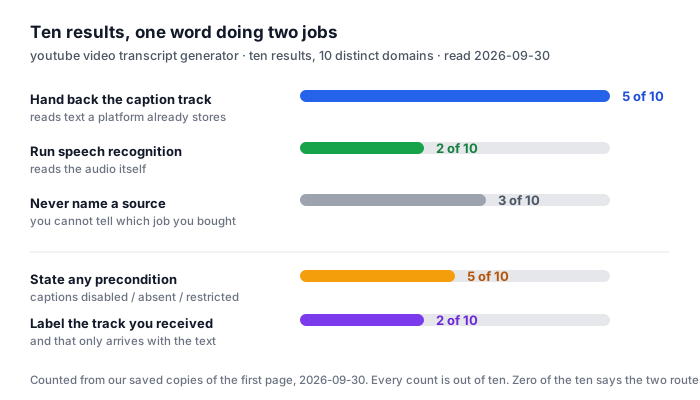
We read all ten results for youtube video transcript generator on 2026-09-30. Ten results, 10 distinct domains, and 10 of 10 returned readable HTML, so every count below is out of ten.
- The word is in the title of nine of them. 9 of 10 page titles contain the phrase YouTube Transcript Generator almost verbatim, usually with Free in front of it. It is the single most repeated string on the results page, and it is the one thing that does not distinguish the ten.
- Two run recognition on the audio. One writes that it uses AI speech recognition … instead of depending on YouTube’s own caption files, and leads with No captions? No problem. The other says its speech-to-text engine converts the video and that private or members-only videos can’t be transcribed. Both name a source. Both are selling the recognition, not the retrieval.
- Five hand back the caption track that already exists. The plainest is a page whose own FAQ says “No. This tool extracts the actual captions uploaded to YouTube” when asked if it is an AI transcript generator. Another states that it retrieves and formats accessible YouTube captions that already exist on the platform … It does not perform raw audio-to-text transcription on captionless videos. A third says our tool relies on the closed captions (CC) provided by YouTube and nothing else. Two more say it less bluntly, one by saying it serves a manual track verbatim, one by saying the transcript languages are those available for the original video.
- Three never name a source. 3 of 10 pages describe generating a transcript without ever stating where the text comes from. On those three you cannot tell, before or after, which of the two jobs you just paid for.
Counted on 2026-09-30 from our saved copy of the organic first page for youtube video transcript generator. Every count is out of ten. Each split was assigned by printing the full context of every caption, subtitle, recognition and engine reference on every page and reading it, not by matching a regular expression and tallying the result — the same method that caught a false positive on this site on 2026-09-26. A page that mentioned captions only in a navigation sidebar or a list of other tools was counted as not stating a source.
The two routes are not the same text, and nobody sells them as different
Here is the part that costs a reader something. Reusing a caption track and re-running recognition on the audio are two different sources of text. They agree only when the caption track was itself produced by a recogniser on the same audio — and even then one of them is working from the sound and the other from a prior machine’s reading of it.
The top ten does not present this as a choice. It presents it as one product. 0 of 10 pages contain a sentence telling you that a transcript taken from the caption track and a transcript produced from the audio will differ. The nearest thing to it is one page’s note that a creator-written track is essentially 100% accurate and served verbatim, while an auto-generated one matches YouTube’s own ASR — which is a quality ranking of two caption types, not a statement that the page might have produced the text itself.
The contradiction is worth seeing side by side, because both halves describe the same word and reach opposite conclusions.
- “No. This tool extracts the actual captions uploaded to YouTube … This is more accurate than AI transcription services because it uses the source captions directly rather than re-transcribing the audio.” — a page answering its own FAQ, 2026-09-30
- “Using AI speech recognition instead of relying on YouTube’s built-in captions, it works on videos with no captions available at all.” — a different page, same results page, 2026-09-30
One says the accurate route is to take what is already there. The other says the accurate route is to ignore what is already there and listen again. Both are defensible, because what decides it is the caption track you happen to get: a creator-written track is usually the better text, and an auto-generated track is the same recognition you would have run yourself, one generation further from the sound. Neither page mentions that the other route exists.
Both quotations are copied from our own saved copies of the two pages, retrieved on 2026-09-30. They are the only two places in the ten where route and accuracy are connected in a sentence. We are not naming either site, because the point is the disagreement, not the sites.
Which route is missing a precondition, and which is missing nothing
There is one place where the split stops being philosophical and starts being about whether the tool works on your video: what happens when there are no captions.
- The retrieval side refuses, and says so. One page instructs you to ensure the video has a “CC” button on YouTube, and states plainly that if the owner disabled captions or there are no subtitles, we cannot extract the text. Another says some videos do not have captions enabled, have restricted captions, or are blocked from transcript access. A third describes the same wall from the other side, explaining why a video shows No captions available. These pages are honest, and their honesty is a direct consequence of the route they chose.
- The recognition side turns the same fact into a feature. No captions? No problem is the headline of one, and the mechanism is stated in the same breath — listening to the video’s audio track directly rather than depending on caption files. When the source is the audio, the absence of captions is not an obstacle.
- Half the results page leaves you guessing. Only 5 of 10 pages state any precondition or failure case at all. On the other five you cannot tell in advance whether your video is one the tool will refuse, because the page has not said which route it takes and therefore has nothing to refuse on.
This is the practical cost of the missing sentence. If a page had said we read the caption track, a reader with a captionless video would know to leave in one second. If it had said we listen to the audio, that reader would know the opposite. The word generator covers both, so the reader learns which one it is by trying.
Preconditions counted on 2026-09-30 from the same ten saved pages. A page counts as stating a precondition if it names a condition under which it will not produce a transcript — captions disabled, captions absent, restricted captions, a shorter-than-expected video, or a private one. Marketing copy about not needing captions does not count as a precondition. Each of the five was read in full before being counted.
What a transcript generator cannot do for a file on your disk
This site does not rank for the question above by taking a side in it, because both of the routes the top ten argues about depend on a platform that stores captions. There is no such platform in the middle here. The model runs in the browser tab, the audio never leaves the device, and there is no caption track anywhere for anyone to reuse or to skip.
Which means the second half of the argument disappears and what is left is the measurement. Of the two things the top ten disagrees about, we can only ever do the first one, and we can say exactly what it costs and how wrong it is, because we ran it and wrote the numbers down.
- The accuracy is a range, not a number. Across 8 clips and 229 reference words, word error rate came out at 20.1% overall. Grouped by acoustic condition it spreads over 5 bands: 6.1% on clean synthetic speech, 10.7% on real speech with no noise, 8.8% on light pink noise, 34.8% on heavy pink noise, and 22.7% on telephone-band audio with echo. The single worst clip was 40.8%. One published figure for the same job cannot be all of those.
- The worst clip is named, not averaged away. The 40.8% clip is E1-real-noise-heavy, 29.4 seconds and 71 reference words. The best is A-clean at 6.1%, 10.0 seconds and 33 words. Both are in the same published file as the 20.1% total, so the total can be checked against what produced it.
- What one minute of speech is worth. We counted the reference text at 148.4 words per minute. That is how much transcript a minute of audio owes you, and it is the figure that turns a percentage into a number of wrong words: at 20.1% it is 46 wrong words against 229 reference words — about one error every five words — and on the heaviest clip it is 29 against 71, closer to one error every two and a half words.
- Where the text actually comes from. Nothing is retrieved. The recogniser reads the audio and writes the words, which is the one route of the two that keeps working when there is no track to read. It is also the only route this page can describe with a number for, because the retrieval route returns somebody else’s text and has no measurement of ours attached to it.
Sources: wer-by-sample.csv for the per-clip errors, the clip identifiers, their durations and their reference word counts; wer-by-condition.csv for the five weighted condition bands and the 229-word total; the 148.4 words-per-minute figure is the sum of reference words over the sum of clip seconds in wer-by-sample.csv. The errors-per-second arithmetic is on those two files. Nothing was measured again for this page, and the percentages are the same figures published on /video-to-text-accuracy/ and /transcription-benchmark/.
The other half: what this page does not tell you
- We did not run any of the ten. Every count above is about what the pages say, not about what their tools return. We read the pages and we take the extractions and recognitions at their word. A page that says it extracts captions may do something else in code; we have no way to see that and are not implying it.
- The route gap has no number from us. Saying the two routes produce different text is true by construction — one returns a stored string, the other writes a new one from the audio. How far apart they land depends entirely on the caption track, which we cannot see. We could put a number on it by running the same video through both, and we have not, so we are not printing one.
- The route split rests on what pages admit. The 3 of 10 that never name a source are not necessarily hiding one; a page can be written without that sentence by ordinary carelessness. Some of the five we placed on the retrieval side say it once, deep in an FAQ, and a reader skimming the top of the page would come away believing the other thing. Both are the same gap to a reader.
- Our own numbers are narrow. 8 clips, two speakers, one noise type (pink noise), 6 of 8 read speech, English only. The 20.1% total is a weighted figure over 229 reference words, which is a small corpus, and the heavy-noise band is two clips. We publish it as a range with the clips named for exactly that reason.
- One thing the top ten does better than us. A link-based tool can take a video you cannot download. This one cannot: the file has to be on your device. That is a real limitation of the route we chose, not a feature, and it is why the recognition route is the only one available to us.
- Reading the pages was done once, on one day. The ten pages were saved on 2026-09-30. These tools rewrite their copy often, and the one that calls itself not an AI transcript generator today may not tomorrow.
Questions this page answers
Does a YouTube video transcript generator create a new transcript, or reuse the captions that already exist?
It is one or the other and the top ten never says which. Of the ten pages ranking for this term on 2026-09-30, 2 run speech recognition on the audio and say so, 5 hand back the caption track YouTube already stores and say so somewhere on the page, and 3 never state a source at all. The word generator covers both. They are not the same job: the first produces text even when a video has no captions, and the second produces nothing when it does not. Our own page has no caption track to reuse, because the file never reaches a platform that stores one.
Is a transcript from the caption track more accurate than one from speech recognition?
Two of the ten pages give opposite answers and both call their own route the accurate one. One writes that pulling the source captions is more accurate than AI transcription services because it uses the source captions directly rather than re-transcribing the audio. Another writes that using AI speech recognition instead of relying on YouTube’s built-in captions is what makes its output accurate. The disagreement is real and neither page acknowledges the other route exists. What decides it is the caption track you happen to get: a human-written track is usually the better text, and an auto-generated track is the same recognition you would have run yourself, one generation removed and without the audio.
Why does the same video give different text on different transcript generators?
Because both routes are being sold under one word and they do not agree. A tool reading the caption track returns whatever the uploader or the platform’s recogniser wrote, unchanged. A tool that runs recognition on the audio produces its own words from the sound. On a clip with a human-written track the two can differ on every line. Nothing we measured lets us put a number on that gap, because we have not run the same video through both routes. We are saying the routes differ by construction, and that no page in the top ten tells you which route you are buying.
What happens when a video has no captions?
It depends entirely on which of the two routes the tool takes, and this is the one place the top ten does get concrete. The pages that pull the caption track say plainly that they cannot help: one tells you to ensure the video has a “CC” button on YouTube before expecting anything, another says a video with restricted or disabled captions cannot be extracted. The pages that run recognition treat the absence of captions as their selling point and lead with No captions? No problem. Only 5 of 10 state a precondition at all, so on half the results page you cannot tell in advance whether your video is one the tool will refuse.
Can I tell which route a transcript generator uses before I use it?
Only 2 of the 10 pages give you anything to read after the fact, and none gives you a choice before. Both that do label the track: one says its transcript metadata tells you which track was returned and lists every available language, the other marks auto-generated captions so you know which type you are reading. Useful, but it arrives with the text rather than before it. Our own measurement made the same distinction visible for a different reason: we counted 8 clips and 229 reference words and published which clip ranks worst, because a number you cannot check against its source is not worth printing.
Where the raw data is
The word error rates, the per-clip breakdown and the reference word counts above come from the same measurement run as everything else published here. The files are the evidence; the reading of the ten results pages is the only new thing on this page.
- Raw data and the measurement scripts — github.com/supersophia8888-cloud/clipquill-asr-benchmark
- Archived copy with a DOI — 10.5281/zenodo.22826968, the concept DOI: that link always resolves to the newest version of this dataset, all versions.
- The same data as a dataset — huggingface.co/datasets/sophia8888/clipquill-asr-benchmark
- The five accuracy bands, clip by clip — the benchmark that ranks the same clips two ways
- What the number 20.1% is made of — how the error rate was measured
- What happens when the link is the problem — the failure modes of the paste-a-link route
- How long one minute of audio takes — the measured rate per minute
Run it on your own file
The transcriber is on the front page of this site. It generates, in the sense that it writes the words from the audio rather than reading a track that already exists, which is the only one of the two routes available to a file on your disk. Expect the first run to spend 78.4 MiB on the download and about a gigabyte of RAM, then 18 to 20.5 seconds of wall clock for every minute of audio after that. Accuracy is the 20.1% figure above with the clips named, not a single headline number. The caps are 30 minutes of audio and 512 MiB per file, checked before any work starts.