Ten results, six promises of unlimited, no clock anywhere
We read all ten results for transcribe youtube video on 2026-09-28. Ten results, 9 distinct domains (one site ranks twice), and this time 10 of 10 returned readable HTML, so every count below is out of ten rather than out of the eight we could read for the longer variant of this term.
- Unlimited is the headline. 6 of 10 pages make an unlimited or no-limit claim: unlimited, batch transcribe YouTube videos and playlists; no limits on the length of the video and no limits on the number of transcripts; unlimited minutes; unlimited transcripts, work without limits; unlimited … no daily limits, no restrictions … no daily caps. One of those six sells it on a paid tier rather than giving it away.
- A time claim is the second headline. 7 of 10 pages say something about how long it takes. Only 2 of those 7 put a number on it — 12 seconds median turnaround, and a 1-hour video in under 30 seconds. The other five say instantly or in seconds and stop there.
- The rate is on none of them. 0 of 10 pages state seconds of processing per minute of audio, a real-time factor, or a speed multiplier. There is no unit anywhere in the top ten, which is why two numbers as far apart as 12 seconds and 30 seconds for an hour can sit on the same results page unchallenged.
- And nothing about the second video. 0 of 10 pages say whether a queue runs one at a time or several at once. The single word simultaneous we found in the ten is about watching the video beside its transcript, not about processing two files.
Counted on 2026-09-28 from our saved copy of the organic first page for transcribe youtube video. Every count is out of ten, because every one of the ten returned readable HTML. The claim counts are quoted verbatim from the pages; the negative counts (0 of 10) were checked by printing every hit for queue, concurrent, parallel, simultaneous, one at a time, per minute of audio, real-time factor and x real-time and reading them in context, not by counting a regular expression.
What the wait is actually made of, measured
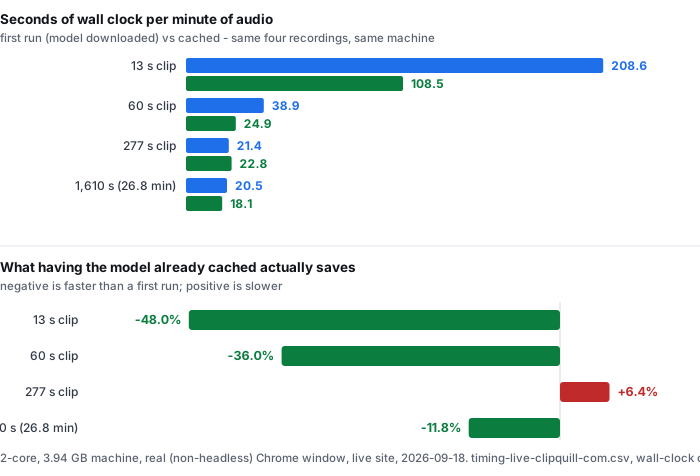
This is the number the top ten does not print, so here it is with the clips it came from. Four recordings, each run twice: once with the browser cache cleared so the model has to come down the network again, once with the model already stored on the device.
- 13 s of audio — 45.2 s first run, 23.5 s cached — 208.6 and 108.5 seconds per minute of audio
- 60 s of audio — 38.9 s first run, 24.9 s cached — 38.9 and 24.9 seconds per minute
- 277 s of audio — 98.9 s first run, 105.2 s cached — 21.4 and 22.8 seconds per minute
- 1,610 s of audio — 26.8 minutes — 550.4 s first run, 485.7 s cached — 20.5 and 18.1 seconds per minute
Read the last two columns downwards and the shape of the problem appears. The rate falls steeply while the clip is short, because a short clip is mostly download, and then it flattens: 208.6, 38.9, 21.4, 20.5 seconds per minute on a first run. Everything that was going to fall away has fallen away by about 60 seconds of audio. What is left is the per-minute cost of the recognition itself, and it applies to the first video and the fiftieth video equally.
Applied to a one-hour recording, the 1,610-second rate gives about 20.5 minutes of wall clock on a first run and 18.1 minutes cached, on a 2-core machine with 3.94 GB of RAM, before you have read the text or fixed anything in it. That is the figure a person planning a week of uploads needs, and it is the one figure that appears on none of the ten pages.
Source: timing-live-clipquill-com.csv, the wall-clock columns, measured against the live public site in a real (non-headless) Chrome window. The seconds-per-minute figures are arithmetic on those columns: wall-clock seconds divided by audio minutes. Nothing was measured again for this page.
The download is not what limits you. The rate is.
If the wait were mostly a download, doing a second video would be cheap and the word unlimited would describe something. It is not mostly a download, and here is the measurement that shows it: the saving you get from the model already being on the device, on the same four clips.
- 13 s of audio — −48.0% (45.2 s down to 23.5 s)
- 60 s of audio — −36.0% (38.9 s down to 24.9 s)
- 277 s of audio — +6.4% (98.9 s up to 105.2 s)
- 1,610 s of audio — −11.8% (550.4 s down to 485.7 s)
On a 13-second clip, caching is worth almost half the run. On a 26.8-minute clip it is worth about a ninth of it. And on the 277-second clip the cached run came out 6.3 seconds slower than the first run — which is the honest way to say that once a clip is long enough, the difference between cached and not is smaller than the difference between one run and the next.
The download itself is not small, and it is not negotiable either. A first visit to this site moves 78.4 MiB (82,233,500 bytes on the wire) before the first word appears, and the model accounts for 77,547,313 bytes of that. Of those model bytes, 76,894,629 — 99.2% — are four ONNX weight files served with no compression at all, so no amount of tuning the server shrinks them. That is a cost you pay once per device and then stop paying, which is exactly why it cannot be the thing that limits an unlimited plan.
What limits an unlimited plan is the other number, the one that does not go away. On this machine a single job held 821 to 1,128 MB of memory while it ran, at every clip length we tried. That is the real ceiling: not how many videos the terms of service allow, but how many minutes of audio the device in front of you will get through.
Sources: timing-live-clipquill-com.csv for the four cold and warm wall-clock pairs; transfer-size-by-file.csv for the 82,233,500, 77,547,313 and 76,894,629 byte figures and for the four weight files being served uncompressed; memory-peak.csv for the 821–1,128 MB peak, which is the resident set of the whole Chrome process tree rather than of the page alone. The percentages are arithmetic on those files.
The other half: what this page does not tell you
- Someone else's number, from this same category. In a thread with 533 comments on r/MacOS in March 2026, one person reported transcribing about ten hours of video, calls and audiobooks a day, locally, in under four minutes — about 255× real time on an M3 Max. Our 1,610-second clip ran at 2.9 to 3.3× real time. Both are honest measurements of the same job on two machines roughly 80 times apart. That gap is the reason a page printing a bare 12 seconds is telling you about its hardware, and why the only useful published figure is a rate you can compare against your own machine.
- We read their pages. We did not run their tools. Their 12 seconds and their 30 seconds are statements about their hardware, and a server with a GPU is a different machine from a 2-core laptop. Nothing here says those numbers are false. What it says is that a number without a machine, an audio source and a unit cannot be checked by the person deciding whether to use the tool.
- The 277-second row is the weakest one. Each clip was run once cold and once warm, so the 6.3-second difference on a 98.9-second run is one measurement against one measurement. It is enough to say the caching saving has stopped mattering by then. It is not enough to say a cached run is reliably slower, and we are not saying that.
- One machine, one route, English audio. 2 cores, 3.94 GB of RAM, model running inside the browser tab. Our only non-English measurement anywhere on this site is one clip of Mandarin, counted in characters, and it is not part of the timings above. The 1,610-second row is a single run in each direction.
- Nothing here covers a queue. We measured one clip at a time, the way the page runs them. What happens when four files are handed over back to back is not in our data, and the direction of the error is upwards, because a machine doing four in a row is warmer and more loaded than the one that produced these numbers.
- This site has no link box. The ten pages above are link-based and this one is not: the model runs in your browser and the file has to be on your device first. That is a different trade, not a better one, and it is the reason we can measure the machine cost at all.
Questions this page answers
How long does it take to transcribe a YouTube video?
On the machine we measured, a one-hour recording runs at about 20.5 minutes on a first run and 18.1 minutes once the model is already cached, because one minute of audio costs 18.1 to 20.5 seconds of wall clock. The only two numbers the ranking pages publish for this are 12 seconds and under 30 seconds for a one-hour video, and both are stated without a machine, an audio source or a rate per minute, so neither can be checked against anything. We did not run their tools and are not calling their numbers wrong, because a server with a GPU is not a 2-core laptop. What is missing is not the figure, it is the unit: nobody says what one minute of audio costs, so you cannot size your own queue.
Is there a limit to how many YouTube videos I can transcribe?
6 of 10 pages ranking for this term say some version of no: unlimited videos, unlimited minutes, no daily caps, no restrictions. One of the six sells that on a paid tier. On a tool that runs inside your browser, which is what this site is, the limit that binds is not in anybody's terms of service — it is memory and time on the device doing the work. Our measured peak was 821 to 1,128 MB of RAM held while a single job runs, and the per-minute rate does not fall as you go, so fifty videos cost fifty times the rate rather than some discounted batch price. A server-side tool is answering a different question, and none of the ten says which one it is answering.
Why is the second video not faster than the first?
Because what gets cached is the model, not the work. Across our four measured clips the saving from running with the model already downloaded was 48.0% on a 13-second clip, 36.0% on a 60-second one and 11.8% on a 26.8-minute one, and on the 277-second clip the cached run came out 6.3 seconds slower than the first run. Once a clip is long enough that the download is a small part of the total, the run is measuring the machine rather than the network, and run-to-run variation is the same size as the caching benefit. The download itself is real: 78.4 MiB on a first visit, of which 76,894,629 bytes are four ONNX weight files served uncompressed. It is simply a short-clip story.
Does transcribing a YouTube video in a browser work on a phone?
We have not measured on a phone and we will not guess. What we can say is what it took on the machine we did measure: 821 to 1,128 MB of peak memory while a job runs, and 18 to 20.5 seconds of wall clock per minute of audio on a 2-core CPU. A phone that will hand a tab that much memory can run it; a phone that will not, cannot. The pages promising unlimited videos state neither figure, and neither do the pages promising unlimited minutes.
Do any of these tools tell you how long a video will take?
Two of the ten put a number on it, 12 seconds and a one-hour video in under 30 seconds, and five more say instantly or in seconds without a number. 0 of 10 state a rate per minute of audio, a real-time factor or a speed multiplier, and 0 of 10 say whether a second video starts while the first is still running or waits behind it. That last omission is the one that decides whether the word unlimited describes something you can actually use.
Where the raw data is
The four timings, the transfer sizes and the memory peaks above come from the same measurement run as everything else published here. The files are the evidence; the arithmetic on this page is the only new thing on it.
- Raw data and the measurement scripts — github.com/supersophia8888-cloud/clipquill-asr-benchmark
- Archived copy with a DOI — 10.5281/zenodo.22826968, the concept DOI: that link always resolves to the newest version of this dataset, all versions.
- The same data as a dataset — huggingface.co/datasets/sophia8888/clipquill-asr-benchmark
- What the first visit costs — the measured download size, cold and warm timings, and memory
- What free costs instead of money — the 78.4 MiB you pay instead of a subscription
- How much text a minute of speech is worth — the words-per-minute measurement
- What happens when the link is the problem — the failure modes of the paste-a-link route
Run it on your own file
The transcriber is on the front page of this site. It has no link box: the model runs inside the browser tab and the file has to be on your device first. Expect the first run to spend 78.4 MiB on the download and about a gigabyte of RAM, then 18 to 20.5 seconds of wall clock for every minute of audio after that. The caps are 30 minutes of audio and 512 MiB per file, checked before any work starts, so a long recording is cut into files you can see rather than split somewhere you cannot.