The picture is decoded zero times, and the file size says otherwise
Start with the branch nobody explains. The how-to pages tell you to get the audio and then hand it to a transcriber, which is correct advice and also the end of their sentence. What arrives in the transcriber is a container, and if you took the audio by re-encoding the video, most of what arrived is a picture and nothing will read it.
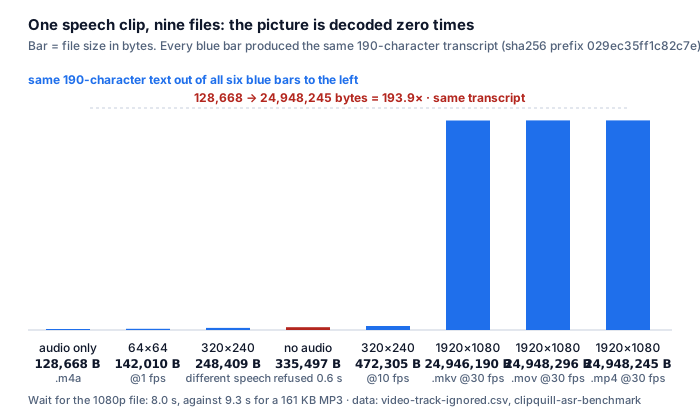
We built nine files to isolate that one variable — the same speech clip, the same audio encoding, only the picture changing — and ran them through the page:
- The transcript did not change. Seven files produced a 190-character transcript with the same SHA-256 prefix, 029ec35ff1c82c7e. That set includes the audio-only .m4a (128,668 B), the 64×64 @1 fps video (142,010 B), the 320×240 @10 fps video (472,305 B) and the 1920×1080 @30 fps video (24,948,245 B).
- The files did change, a lot. From 128,668 to 24,948,245 bytes is 193.9× — for the same words, in the same order, at the same accuracy.
- And the same picture with different speech did change the text. The control file, 320×240 carrying a different voice, produced 88 characters with a different hash. So the picture is what the recogniser ignores, not the audio.
- The clean proof is the file with a picture and no audio track. no-audio.mp4 (335,497 B) was refused in 0.6 seconds. If the picture mattered to the transcription, that file would have been usable.
Files and results are in video-track-ignored.csv in our public benchmark repository; the generator is scripts/build-video-track-set.sh and the runner scripts/run-video-track.mjs. The images are synthetic (ffmpeg's testsrc2 pattern), not filmed footage, and the byte sizes depend on the x264 build — re-running elsewhere will produce different sizes. What reproduces is the decoded geometry and the page's behaviour.
Nine pages, two branches, and the second one is where they stop
Ten results, ten different domains. One of them — a Reddit thread — returned HTTP 403 on both user agents we tried, so every count below is over the nine pages we could actually read, not ten.
Read the nine and the shape repeats. They open with the same fork, and then spend their whole word budget on one arm of it:
| page | which branch it explains | does it say what the audio looks like once you have it? |
|---|---|---|
| tactiq.io | YouTube's own panel, then its own URL box | no |
| notegpt.io | its own URL box (link → transcript) | no |
| otter.ai (blog) | both — panel steps, then “download the MP3 or MP4, import the file” | no — says to download, never says what comes out |
| youtubetotranscript.com | its own URL box; claims “no limits on the length” | no |
| youtube-transcript.io | its own URL box, plus bulk and channel extraction | no |
| youtube-transcript.ai | its own URL box; “works on videos without captions” | no |
| happyscribe.com | its own URL box, paste-the-link only | no — no upload steps on the page at all |
| notta.ai (blog) | five methods: panel, Google Docs voice typing, extension, web app, link | no — the closest is “a microphone” |
| rev.com | its own service, three tiers | no |
Two pages deserve credit and still land on the same gap. Otter's how-to is the only one that follows the no-captions path properly: it says the panel only reflects the caption track the video has, and that when there is no caption track you download the MP3 or MP4 and import it. Notta's blog goes furthest in the other direction — five methods, including a microphone one most pages omit — and about its Google Docs method it is candid: you need a decent microphone, or you will be doing a lot of editing.
- Four of nine send you to the audio. Otter's blog (download MP3 or MP4 and import), Notta's blog (record with an extension or the web app), and the two pages that sell the audio route as their own product. Zero of the four says what the downloaded object is, how big it will be, or that the video inside it is dead weight.
- One of nine admits the extractor route can simply have nothing to work with. Otter's blog states it: when captions genuinely do not exist, extractors have nothing to pull from, so you need a tool that generates a transcript from scratch. The other eight frames the fallback as a feature badge rather than a precondition.
- And one of nine puts a microphone in the middle of a YouTube job. Notta's Google Docs method has you play the video out loud and let voice typing listen to the room, and warns you will need a good microphone and a lot of editing. That works, and it is also a different acoustic path than the file — the speakers, the room and the mic are now part of your transcription.
Counts are over the nine pages we could read on 2026-10-13; reddit.com/r/podcasting returned HTTP 403 and is excluded from every count. Branch assignment was read in context, not matched by keyword. We uploaded nothing to any of the nine pages.
What the audio branch actually costs you
Once you accept that you have to fetch the audio, three numbers decide the job. The pages give you none of them, so here they are measured on our own files.
| 12 minutes of audio, as | bytes per second | the file | against the 64 kbit/s rate |
|---|---|---|---|
| 64 kbit/s nominal | 8,000 | 5,760,000 B · 5.49 MiB | — |
| our measured 64 kbps MP3 row | 8,263 | 5,949,360 B · 5.67 MiB | 1.03× |
| 128 kbit/s nominal | 16,000 | 11,520,000 B · 10.99 MiB | 2.00× |
| uncompressed 44.1 kHz 16-bit mono | 88,239 | 63,532,080 B · 60.59 MiB | 11.0× |
| the same 12 minutes with a 1920×1080 video track | — | about 1.68 GiB at the rate our 1080p test file measured | — |
The fourth row is the one to remember: a video track you will never read can outweigh the audio by three orders of magnitude. Our 1080p test file is 24,948,245 bytes for 9.984 seconds of audio, which is about 2.5 MB per second of video — 12 minutes at that rate is roughly 1.68 GiB. Our own service caps a job at 512 MiB, so a 12-minute 1080p MP4 will not fit, while the same 12 minutes of 64 kbps audio is 5.67 MiB, or 1.1% of the same cap.
- The model is bigger than a short video, and smaller than a long one. The first visit transfers 82,233,500 bytes (78.4 MiB) of model. That is 13.8× a 12-minute 64 kbps audio track (5,949,360 B) and 0.046× the same 12 minutes carrying 1080p video (about 1.68 GiB).
- The wait is real and it does not follow a rate at small sizes. Measured against our live site: 1,610 s of audio took 550.4 s cold / 485.7 s warm (20.5 / 18.1 s per audio minute), and our per-job ceiling of 30 minutes lands at 543–615 s. But a 13-second clip took 45.2 s cold / 23.5 s warm — 208.6 / 108.5 s per audio minute — so a short YouTube clip is dominated by fixed costs, not by the rate.
- The cache helps least exactly where the files are biggest. Cold-to-warm saving is 48.0% on the 13-second clip and 11.8% on the 1,610-second file. One measurement runs the other way: the 277-second file took 98.9 s cold and 105.2 s warm, i.e. 6.3 s slower warm, which is why we publish it rather than smoothing it out.
- And the byte cap is not the wall for audio, the clock is. 30 minutes of our measured 64 kbps audio is 14.18 MiB; 512 MiB would hold 18.64 hours of it. The same 512 MiB holds 101.4 minutes of uncompressed mono. So for audio, the 30-minute per-job limit is always the thing that stops you first.
Byte rates: 16526 ÷ 2.00 = 8,263 B/s from container-codec-matrix.csv row mp3-none-mp3.mp3; 176478 ÷ 2.00 = 88,239 B/s from row wav-none-pcm_s16le.wav. 88,239 ÷ 8,263 = 10.7 against the measured MP3 row and 11.0 against the nominal 8,000 B/s. 12 × 60 = 720 s; 720 × 8,263 = 5,949,360; 5,949,360 ÷ 1024 ÷ 1024 = 5.67 MiB. Timings and memory from timing-live-clipquill-com.csv and memory-peak.csv (peak 1,128 MB cold / 821 MB warm on the 13-second clip); model total from transfer-size-by-file.csv (82,233,500 of which 77,547,313 is four uncompressed ONNX weight files).
What the accuracy figures on those pages are worth
You now have the text. The next question is whether to trust it, and here the nine pages split into two behaviours: six of them publish no accuracy figure at all, and the ones that do publish a number without a denominator.
| what we looked for across the nine readable pages | pages that do it |
|---|---|
| says what to do when there is no caption track | 4 of 9 |
| says what the downloaded audio actually is (container, codec, size) | 0 of 9 |
| says the recogniser ignores the video track | 0 of 9 |
| publishes any accuracy figure | 3 of 9 (98.86%, up to 98%, 99%+) |
| gives a denominator for one (test set, corpus, ground truth, sample size) | 0 of 9 |
| gives a per-audio-minute or per-video-minute processing rate | 1 of 9 (“an hour of video content into text in just 5 minutes”) |
| gives a size or duration cap for a free tier | 2 of 9 (10 minutes; 25 tokens) |
That single published rate is worth translating, because it is the only number on the whole results page that speaks to time. “An hour of video content into text in just 5 minutes” is 12× faster than real time, or 5 seconds per minute of audio. Our own measured rate on a long file is 18.1–20.5 seconds per minute of audio — roughly 3.6 to 4.1 times slower than that claim. We are not saying the claim is false; their pipeline runs on their servers and ours runs in your browser tab, which is the whole reason ours is slower and free. But if you are choosing a how-to by the numbers in it, that is the only one to compare against, and it is the one page that gives it.
- What a recogniser's output looks like, described honestly by a competitor. Otter's page says the panel's transcript has “no real punctuation, no capitalisation, frequent errors on names and technical terms, and one long run-on block of text.” We can put structure next to that description: on our own reference material the shipped English tier reads 13.5% word error rate across all eight clips, and 7.1% on the four typical clean-and-light clips (85 reference words), while the multilingual base tier reads 20.1% across all eight (229 reference words) — which is 46 wrong words.
- Where the error actually concentrates. The same eight clips, grouped by condition, run from 6.1% on the clean synthetic clip to 34.8% on the two heavy-noise clips for the base tier. The worst single clip is 40.8% — 29 wrong words out of 71 — and the telephone-band clip is 18.2% for the English tier against 7.1% on the typical group, 2.6×. A YouTube video whose audio has been through a phone call, a livestream or a laptop microphone sits on the wrong end of that range, and no page on the results list tells you so.
- And a percentage on a short file is not worth much. The smallest clip in our corpus holds 22 reference words, so one word moves its percentage by 4.5 points. Any “98%” or “99%” printed by anyone — including the ones on our own pages — means very little until you know how many words were behind it.
Word error rates are from wer-by-condition.csv and wer-by-sample.csv in our public repository: 8 clips / 92.7 s / 229 reference words; grouped rows are weighted by reference word count, not averaged across clips. The accuracy figures 98.86%, “up to 98%” and “99%+” are what those three pages publish; we did not verify any of them and did not upload anything to them. The one published rate, “an hour… in just 5 minutes”, is quoted from that page's own text; 60 ÷ 5 = 12× and 300 s ÷ 60 min = 5 s per minute.
What we have not measured
The claim on this page is that the how-to genre explains the first branch of its own fork and stops at the second. Both halves are checked, and both have an edge.
- Our nine-file test does not prove anything about a real 1080p upload. The pictures are ffmpeg's synthetic testsrc2 pattern, which compresses very differently from filmed footage. What the test proves is that the page's output is byte-identical across a 193.9× spread in file size when the audio is held constant, and that a file with a picture and no audio track is refused. It does not tell you the ratio you will see on a real screen recording.
- We did not download anything from YouTube. We never used a YouTube downloader, we did not test whether a given video's caption track exists, and we make no claim about the reliability of any particular extraction method. The nine files in our test were built locally with ffmpeg.
- One of the ten results is unreadable, so all counts are nine. The Reddit thread returned HTTP 403 on two user agents. It is a single-index count, not a census of everything that ranks.
- Our rate is a browser-tab rate on our own hardware, not a universal one. 18.1–20.5 seconds per audio minute is what we measure on our own machine against our own site. The 277-second file running slower warm than cold (98.9 s vs 105.2 s) is the clearest sign that these numbers have noise in them.
- And we have not tested what most YouTube tutorials actually are. A screen recording of someone coding, a music video, a talking-head with a music bed under it, a livestream, a video in a language we do not count — none of those is in our corpus. Every one of them changes the input.
Questions this page answers
What is the fastest way to transcribe a YouTube video?
Without a download: YouTube's own caption panel. Open the video in a desktop browser, click “...more” under the title, click “Show transcript”, then the three dots at the top of the panel and “Toggle timestamps” so the text collapses into paragraphs you can copy. That route only exists when the video already carries a caption track. Two of the pages we read add the thing that decides whether it works for you: the panel reflects whatever caption track the video has, so it matches that track's language and its errors.
What do I do when a YouTube video has no captions?
You take the audio and run it through a recogniser, because an extractor with no caption track has nothing to pull from. Four of the nine pages we could read on 2026-10-13 say exactly that, and one states it cleanly. But that is where all four stop. None of the nine tells you what the audio looks like once you have it. On our own nine-file test — one speech clip, the picture as the only variable — seven files whose video ranged from 64×64 at 1 fps up to 1920×1080 at 30 fps produced byte-identical text (190 characters, SHA-256 prefix 029ec35ff1c82c7e), while the files spanned 128,668 to 24,948,245 bytes, 193.9×.
Does it matter whether I pull the audio as MP3 or keep the MP4?
For the text, no, and we measured it. Same speech, four video sizes: only-speech .m4a at 128,668 B, a 64×64 video at 142,010 B, a 320×240 video at 472,305 B, a 1920×1080 video at 24,948,245 B — all four produced the same transcript. The penalty is in the walls: the HD file is 175.7× the 142,010-byte 64×64 video and 193.9× the 128,668-byte audio-only file, and 12 minutes of 1080p at that rate is about 1.68 GiB, against our 512 MiB per-job cap, while 12 minutes of 64 kbps audio is 5.67 MiB, 1.1% of the same cap. Size is where the video track costs you; the words are identical either way.
How long does it take to transcribe a YouTube video on a browser-based tool?
Longer than the how-to pages suggest, and the rate is not the headline. On live measurements against our own site, a 1,610-second file (26.8 minutes of audio) took 550.4 s cold and 485.7 s warm — 20.5 and 18.1 seconds per minute of audio. So our 30-minute per-job ceiling lands at 543 to 615 seconds. But short files do not follow the rate: a 13-second clip took 45.2 s cold and 23.5 s warm, which is 208.6 and 108.5 seconds per audio minute. The first visit also transfers 82,233,500 bytes (78.4 MiB) of model — 13.8× a 12-minute 64 kbps audio track.
Why is YouTube's own transcript full of mistakes?
Because it comes from a speech recogniser working on a recording, and nothing about that is free. Otter's page describes the shape plainly: no real punctuation, no capitalisation, frequent errors on names and technical terms, and one long run-on block of text. We can put a number next to that shape. Across our eight clips / 92.7 s / 229 reference words, the multilingual base tier reads 20.1% word error rate — 46 wrong words — and the tier this site ships for English reads 13.5% across all eight and 7.1% on the four typical clean-and-light clips (85 reference words). One page in the results quotes 98.86% accuracy for its own engine on YouTube videos. Zero of the nine publishes anything like a denominator — and on the smallest clip in our corpus, 22 words, one word moves the percentage by 4.5 points.
Where the raw data is
The error rates, file sizes and timings on this page come from the same published measurement run as the rest of this site.
- Raw data and the measurement scripts — github.com/supersophia8888-cloud/clipquill-asr-benchmark, including the raw model text behind every number, so the scoring can be redone under different rules.
- Archived copy with a DOI — 10.5281/zenodo.22826968, the concept DOI: that link always resolves to the newest version of this dataset, all versions.
- The same data as a dataset — huggingface.co/datasets/sophia8888/clipquill-asr-benchmark
- Nine files, one speech clip, the picture as the only variable — video-track-ignored.csv in the repository.
- The byte rates and the 20 encodings of the same two seconds — container-codec-matrix.csv.
- The 18–20.5 s per audio minute and the 78.4 MiB first visit — timing-live-clipquill-com.csv and transfer-size-by-file.csv.
- The error rates and their denominators — wer-by-condition.csv and wer-by-sample.csv.
- What happens when the link itself is the problem — the link route's preconditions and failure semantics
- Speed claims that count videos instead of minutes — what “unlimited” does and does not measure
- Nine pages that sell the text and never print it — the transcript nobody shows you
- Why the picture never reaches the recogniser, at more length — video to text measured end to end
Run it on your own video
The transcriber is on the front page of this site. It reads the file in your browser tab, which means the audio never leaves your machine. Take either branch: if the video has captions, copy the panel. If it does not, bring the file rather than the link — 30 minutes of audio and 512 MiB per job, and a 12-minute 64 kbps track is 5.67 MiB, well inside both. Expect the first run to spend about 78.4 MiB on the model download and roughly a gigabyte of RAM, and expect 18–20.5 seconds of processing per minute of audio once it is warm — with fixed costs adding around 20 seconds cold on a short clip.