The same word, split three ways and seven ways
The word maker is doing the damage. A transcriber is machinery. A maker is a promise that what comes out the far end is finished — shaped, usable, something you would call a document. Nobody selling that promise ever shows you the document.
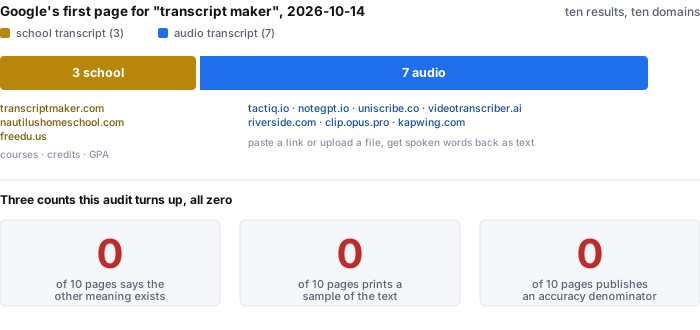
So before anything else, say which job this page is. This page is about the audio job. There is no school, no course list, no credit and no GPA anywhere in it. If you came here for a transcript to send to a college, the three pages on the first page that do that job are named and linked in the table below, and this sentence is the only one of its kind in the whole top ten.
- Ten results, ten domains. Search taken 2026-10-14. No domain appeared twice.
- 3 of 10 are the school job (transcriptmaker.com, nautilushomeschool.com, freedu.us). Counted by the presence of the school vocabulary itself — homeschool, GPA, high school transcript, college application — which appears 13, 79 and 20 times on those three pages, and 0 times on the other seven.
- 0 of 10 says the split exists. Not one page, in either half, tells the reader that the phrase also names the other product.
Search results are the first page returned on 2026-10-14, ten results across ten domains, all ten fetched successfully. School-vocabulary counts are from the plain-text extraction of each page. Nothing here is a traffic estimate: we did not look up, and do not print, any search volume for this phrase.
Which of the two jobs each result is actually doing
This is the table that should be on every one of these pages and is on none of them. The left column is what the page is; the right column is what it would say if it decided to be honest about the other meaning.
| result | which job | what it is actually selling |
|---|---|---|
| transcriptmaker.com | school | “Weighted and unweighted GPA”, “Export transcripts to PDF, CSV, XML, and TREx (Texas Records Exchange)” |
| nautilushomeschool.com | school | a homeschool course catalogue whose transcript tool is one page in it; “You may view a sample transcript” |
| freedu.us | school | “Multiple HS Transcript Template with Automatic GPA Calculation”, then send it to Parchment |
| tactiq.io | audio | a YouTube transcript, instantly, without uploading video files |
| notegpt.io | audio | a YouTube transcript you can download as .txt, with or without timestamps |
| uniscribe.co | audio | audio and video to text, exported as txt, docx, pdf, srt, vtt or csv |
| videotranscriber.ai | audio | video to text with an accuracy claim of 99.9% on the front page |
| riverside.com | audio | audio and video transcription with editing, claiming 99% accuracy |
| clip.opus.pro | audio | a YouTube transcript maker; the page returned no readable body text |
| kapwing.com | audio | “the Transcript Maker works with audio and video from 10 seconds to 2 hours long” |
Note the last column of the first three rows: the school pages are the only ones on the whole page that show you what they produce. Nautilus says “You may view a sample transcript” and links one. On the seven audio pages, whose entire product is a document, the sample count is zero.
Nobody prints the text, so print the arithmetic instead
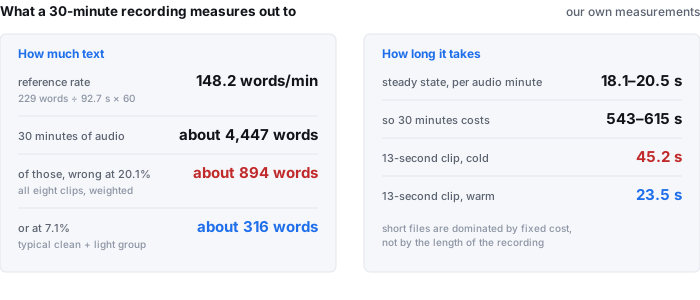
Every audio page on the first page sells a finished document and shows none of it. So here is what the document measures out to on material we actually ran.
- How much text. Our reference text is 229 words over 92.7 seconds — 148.2 words a minute. A 30-minute recording at that rate is about 4,447 words; our three long files total 7,385 words, about 49.8 minutes at the same rate.
- How much of it is wrong. Across all eight clips our base tier is 20.1% weighted by reference words — 46 errors in 229 words, one every 2.02 seconds of audio. On our typical clean-and-light group the same tier is 7.1%. So that 30-minute document arrives with roughly 894 wrong words at 20.1%, or about 316 at 7.1%.
- How long it takes. 18.1 to 20.5 seconds per minute of audio at steady state, so 30 minutes is 543–615 seconds. Short files are dominated by fixed cost: a 13-second clip took 45.2 s cold / 23.5 s warm.
Words a minute is 229 ÷ 92.7 × 60. The 20.1% weighted row and the 7.1% typical group are both from wer-by-condition.csv; the per-clip error counts are from wer-by-sample.csv; long-file word counts are from edit-load-long-files.csv; timings are from timing-live-clipquill-com.csv. All in the public benchmark repository.
The cost a “maker” hides: how many places you have to go and fix
“Maker” implies the fixing is done for you. It is not, and this is the number no page on the first page publishes: how many spots in the returned text a reader has to go and correct. We count them on three long files, 7,385 reference words in total.
| tier | words missing | spots to fix | spots per 1,000 words |
|---|---|---|---|
| default (base) | 82 | 133 | 18.0 |
| small | 45 | 79 | 10.7 |
| reference we paid for | 111 | 592 | 80.2 |
Read the two numeric columns in opposite directions, because they really do disagree. The small tier loses the fewest words relative to the reference; the reference loses the fewest too but leaves 592 spots — more than four times the default tier's 133. A missing word is invisible; a wrong word sitting in the middle of a sentence is a place you have to stop. If your definition of “done” is “nothing to correct”, the paid reference is the worst of the three on the column that matters.
Counts from edit-load-long-files.csv, row ALL (7,385 reference words). Spots per 1,000 words is spots ÷ 7,385 × 1,000. This is one corpus of three files, not a general claim about any service.
What comes back, cue by cue
The word maker suggests a document. What actually comes back from a timed transcript is a list of cues, and the only way to judge it is to look at the geometry of that list, which we measured on our own output rather than describing it.
- 36 cues covering 92.7 seconds, with zero gaps between the end of one cue and the start of the next — the coverage is 1.000. Nothing falls between cues; every second of audio is inside some cue.
- Line length is capped at 42 display-width units, where a full-width character counts as two units and everything else as one, so a single rule covers thirty languages. Our longest line is 47 units before wrapping and 42 after; 30 of 36 cues fit on one line and 6 need two. Written as plain character counts, the same six cues exceed 42 characters without ever exceeding 42 units.
- Zero cues over 17 characters per second on real speech — and 0 of 36 cues need a third line. These are display rules, not reading-fluency claims: we can measure the width of a line, and we cannot measure how fast you read it.
Geometry measured on the live site's own output after the current release, re-fetched from the deployed page rather than a local build. Counts, line widths and gap coverage are from our own measured output; the 42-unit budget is SUB_LINE_UNITS in the site's own wrapping code.
Questions people actually ask about this word
Is “transcript maker” a transcription tool or a school transcript generator?
Both, and nobody on the first page tells you which one they are. Three of the ten results on Google's first page for this phrase on 2026-10-14 are the school job — transcriptmaker.com, nautilushomeschool.com and freedu.us — selling a document with courses, credits and an automatically calculated GPA that you send to a college. Seven are the audio job. Zero of the ten says the other meaning exists. The one page carrying audio-side words in its navigation (transcriptmaker.com) is the school product with a video section, not an audio product. If you searched this word meaning the audio job and landed on a GPA calculator, nothing on that page will tell you that you are in the wrong place.
What is the difference between a transcript maker and a transcriber?
A transcriber is the engine; a maker claims to be the whole outcome — a finished, usable transcript. The seven audio results all claim that outcome, and none of them shows what it looks like: 0 of 10 prints any sample of the text it returns — no opening lines, no punctuation, no paragraph structure, no speaker turn. What we can show instead is what the text measures out to: 229 reference words over 92.7 seconds, 148.2 words a minute, so a 30-minute recording is about 4,447 words. At the error rates we publish, that same 30 minutes comes back with roughly 894 wrong words at 20.1%, or 316 at 7.1%, before anyone edits it.
How many words does it produce, and how many do I have to fix?
On three long files totalling 7,385 reference words (about 49.8 minutes), the default tier left 82 words missing and 133 spots a reader would go and fix — 18.0 spots per thousand words, or one every 90 words. The small tier left 45 missing and 79 spots (10.7 per thousand). The paid reference left 111 missing but 592 spots. The two columns rank in opposite order, which is exactly why a single accuracy headline cannot describe a document you have to edit.
Why does a transcript need a “maker” at all — can't I just read the raw output?
You can, and the raw output is more finished than the word implies. What a maker usually adds is one of two things: formatting the stream into paragraphs and sentences, or letting you edit the text and have the edit cut the matching audio. On the ten pages, formatting is claimed and never shown, and edit-by-text is described without its cost. Our measured cost is time, not money: 18.1 to 20.5 seconds of processing per minute of audio at steady state, so 30 minutes is 543–615 seconds. And the output is returned cue by cue with timestamps — 36 cues over 92.7 seconds with zero gaps, so it is time-aligned end to end rather than a blob of words.
Does a transcript maker upload my recording?
The seven audio pages do not say, in the sense that would matter — we could not find, on any of them, a statement that the file stays on your machine. On this site the recogniser runs inside the browser tab, so the recording is not uploaded, and the numbers that go with that are the ones to ask any provider for: 78.4 MiB downloaded on first visit (77,547,313 bytes of it the model itself, 94.3% of the total), about a gigabyte of RAM, and 30 minutes / 512 MiB per job. The download is the fair criticism of the local approach: it is 78.4 MiB before the first word appears, and at 64 kbit/s a 30-minute recording is only 14.4 MB, so the model is 5.7 times larger than the audio you came to transcribe.
What text formats should a transcript maker return?
It depends on the job, and the pages do at least name formats even when they never show the text. uniscribe names txt, docx, pdf, srt, vtt and csv; riverside returns SRT and TXT and explains that SRT is timestamped for subtitles while TXT is for repurposing into blog posts and show notes; kapwing returns plain TXT on the free account and VTT or SRT from its subtitles editor. The format is not the hard part — the hard part is that a cue has to be readable on screen, which is a rule about characters per line and lines per cue, and no page states one. Our own output holds 42 display-width units per line, counts a full-width character as two units so one rule covers thirty languages, and our longest line is 47 units before wrapping and 42 after.
What our numbers do not cover
- This is one corpus, not a survey. Eight clips of 92.7 seconds and three long files of 7,385 words. It is not a sample of podcasts, meetings or lectures at large.
- The error rates are ours, measured on our own audio. They are not a claim about any service named on this page; we uploaded nothing to any of them, and we did not run them.
- The school/audio split is a reading of one search page on one day. We classified by the vocabulary each page uses, and we have quoted the lines we classified on so you can disagree with the call.
- The cue geometry describes our output only. The 42-unit line budget and the zero-gap coverage are properties of this site's own wrapping code, measured on the deployed page, not of any competitor.
- Search volume is not stated, on purpose. We did not obtain a figure for this phrase and we do not print one.
Try it on your own audio
The transcriber is on the front page of this site. It reads the file in your browser tab, which means the audio never leaves your machine — and the ceiling is 30 minutes of audio and 512 MiB per job. Expect the first run to spend about 78.4 MiB on the model download and roughly a gigabyte of RAM, then 18–20.5 seconds of processing per minute of audio once it is warm. The text comes back with timestamps and wraps at 42 display-width units a line, so it is usable as a document, not just as a wall of words.