Questions this page gets asked
How many words is an Instagram reel transcript?
At the 148.2 words a minute our own reference material runs at - 229 words over 92.7 seconds - a 15-second Reel comes out at 37 words, 30 seconds at 74, one minute at 148 and 90 seconds at 222. That rate is a mean: our own eight clips run 117.9 to 198.0 words a minute, so a 15-second Reel holds 29.5 words at the slow end and 49.5 at the fast end. One wrong word is 2.70 points on the 37-word transcript and 1.35 on the 74-word one.
Does it matter how I save the Reel - audio file, screen recording or a downloader?
Not for the words. We cut one 12.485-second recording into three files - the audio-only MP3 at 37,916 bytes, a phone screen recording at 231,487 bytes and a downloader's low-bitrate rendition at 131,904 bytes - and all three came back byte-identical: 174 characters, 32 words, the same SHA-256 prefix 6c759c1b6c2d4429. The files differ by 6.1 times; the transcript does not differ at all.
Can I paste an Instagram link into this site?
No. This page transcribes a file you already have: save the Reel, then drop the file on the front page. All 17 pages we read take a link or a URL, and four of them also take a file you have saved - screenapp, kapwing, elevenlabs and getthescript. What you get here in exchange is that the recognition runs inside your browser tab and the file is never uploaded. The ceiling is 30 minutes of audio and 512 MiB per job.
Why do the tools say private Reels cannot be processed?
Because the link path needs a public fetch: eight of the 17 pages we read state that private, login-walled or follower-only content cannot be processed. Only one of them says what to do instead - screenapp answers 'For a private account, save or screen-record the video first, then upload the file.' A file you already hold has no such wall, which is why this page takes a file.
Does a screen recording lose quality?
Not in the words. A screen recording pushes the audio through one more encoder - the phone's mixer resamples it and re-encodes it - and the transcript came back byte-identical to the direct file: the same 174 characters, 32 words and hash. What it costs is bytes and seconds: 231,487 bytes against 37,916, and 8.1 seconds against a cold 24.2 on the page's own clock.
What bitrate should I save a Reel at?
None of the 17 pages we read prints one. Our three chains - a 24 kbit/s mono MP3, 128 kbit/s stereo AAC and 64 kbit/s mono AAC - all produced the same transcript, so at Reel lengths the recogniser read the audio track the same way in every case. The file you hand it is a copy of a copy either way; what changes is how many bytes that copy costs.
A Reel becomes a file three ways, and the pages describe none of them
◇Between the Reel on the screen and the transcript on the page there is always a file, and there are three ways it gets there. ◇All 17 pages we read take a link or a URL: you copy the Reel's address, the tool fetches the media on its own servers, and what the recogniser reads after that is decided somewhere you cannot see. ◇Four of the 17 also take a file you already saved. ◇And one of the 17 names the third way — recording your own screen — as the answer when the link path is closed.
| way in | who does the fetching | what the 17 pages say about it |
|---|---|---|
| paste the link | the tool's server | ◇all 17 read a link or a URL; the media is fetched server-side and what arrives at the recogniser is invisible to the reader |
| upload a saved file | you | ◇4 of 17 show the path: screenapp, kapwing, elevenlabs, getthescript |
| screen-record it | your phone | ◇1 of 17 offers it as the fallback (screenapp); 1 sells against it (transcriptmagic); 2 of kapwing's hits are its own screen-recorder product |
◇The clearest statement of the upload path is screenapp's, and it is the only one that connects it to the case where the link fails: “paste the link for a public post, or upload the video if the account is private, the post is a Story, or you have already saved the file”. ◇kapwing's step one is “Upload a video file, or paste a URL from Instagram”; elevenlabs' is “Paste an Instagram link or upload a video … or upload a saved Story or Live from your device or cloud storage”; getthescript labels its modes “Single Video | Single Batch Mode | Batch Upload”. ◇The other thirteen take a link and say nothing about a file you already hold.
◇The screen-recording path appears once as an answer, in screenapp's FAQ: “Private accounts: these need a login to view, so no tool can fetch them from a link. Save or screen-record the video, then upload the file.” ◇transcriptmagic runs the same idea backwards, as a speed claim: “This is the fastest way to get an Instagram Reel transcript — no screen-recording, no retyping, and no app install.” ◇None of the 17 says what a screen recording does to the audio, and none of the 17 mentions re-encoding, transcoding or generation loss anywhere on the page.
Eight pages say a private Reel cannot be processed, and one says what to do then
◇This is the whole list, not a selection. ◇Eight of the 17 state that private, login-walled or follower-only content cannot be processed, and the reason is the same in all eight: the link path needs a fetch the tool is not allowed to make.
| page | what it says |
|---|---|
| getthescript.app | “No — only public Reels with audible speech are supported. Close-friends and login-walled posts cannot be processed.” |
| speakapp.com | “Supports public Instagram videos (longer videos trimmed to 2 min)” |
| supadata.ai | “Public Instagram Reels and video posts. Pass the URL and the API returns timestamped text. Private or follower-only content isn't accessible.” |
| tokscript.com | “TokScript only processes publicly viewable Instagram Reels. Content from private accounts is inaccessible to outside systems.” |
| transcriptmagic.com | “Private accounts and Reels you can't view without following cannot be processed.” |
| wayin.ai | “WayinVideo can only access and transcribe videos from public Instagram profiles. If a Reel or post is set to private or restricted, our system cannot retrieve the media.” |
| transcript365.com | “Do not submit private, restricted, login-protected, or unauthorized content.” |
| screenapp.io | “The Instagram transcript generator only reads public URLs. For a private account, save or screen-record the video first, then upload the file.” — the only one of the eight that says what to do instead |
◇A file you already hold has no such wall, and that is the whole reason this page takes a file and not a link. ◇The wall is a property of the fetch, not of the transcript: the same Reel, saved to your device, is the same audio either way.
The test: one recording, three files, one transcript
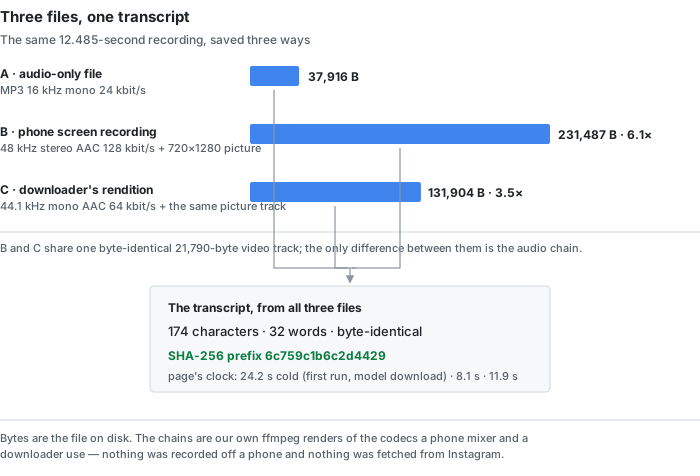
◆One recording, one variable at a time. ◆The source is a 12.485-second clip of real recorded speech with 32 reference words — one of the eight clips behind this site's error-rate work, at 16 kHz mono, 37,916 bytes as an MP3. ◆Everything below was built with ffmpeg, handed to the live page in a real Chrome window with a fresh profile, one file per page load, and the page's own output was read back and hashed. ◆The run is recorded in data/instagram-input-paths-2026-10-22.csv.
- Path A, the audio-only file. ◆The recording as it exists: MP3, 16 kHz mono, about 24 kbit/s, no picture. ◆37,916 bytes.
- Path B, the phone screen recording. ◆What the phone's mixer produces when it records the screen: the audio resampled to 48 kHz, copied onto two channels and re-encoded as AAC at 128 kbit/s, muxed with a 720×1280 picture at 30 frames per second. ◆231,487 bytes.
- Path C, the downloader's rendition. ◆The same picture track — copied byte for byte — with the audio re-encoded as 44.1 kHz mono AAC at 64 kbit/s. ◆131,904 bytes.
◆Paths B and C share one byte-identical video track, so the only thing that changes between them is the audio chain. ◆Path A changes two things at once against them — no picture and the original encode — and that is the point: it is the file a person actually has.
| file | audio chain | picture | bytes | page's clock | output |
|---|---|---|---|---|---|
| a-audio-only.mp3 | MP3 16 kHz mono 24 kbit/s | none | 37,916 | 24.2 s (cold) | 174 chars / 32 words |
| b-screen-record.mp4 | AAC 48 kHz stereo 128 kbit/s | 720×1280 | 231,487 | 8.1 s | 174 chars / 32 words |
| c-downloader.mp4 | AAC 44.1 kHz mono 64 kbit/s | 720×1280 | 131,904 | 11.9 s | 174 chars / 32 words |
◆All three transcripts are byte-identical: the same 174 characters, the same 32 words, the same SHA-256 prefix 6c759c1b6c2d4429. ◆Path A's output also matches the run of the same recording on 2026-10-19, character for character — the page's answer does not move between rounds. ◆The files themselves run from 37,916 to 231,487 bytes: 6.1 times from the screen recording to the audio-only file, 3.5 times from the low-bitrate rendition, and 1.8 times between the two re-encoded ones.
◆Read the cold row carefully. ◆Path A was the first file in a fresh profile, so its 24.2 seconds carries the model the page downloads on a first visit — its own status line reads “Downloading the English speech recognition model (63 MiB, plus the 21.5 MiB runtime — both cached after the first run)”. ◆Paths B and C ran warm, at 8.1 and 11.9 seconds. ◆One run per file, so the 3.8-second gap between B and C is an observation, not a ranking.
What the extra encoders cost: bytes and seconds, not words
◆The screen recording is the heaviest of the three files and the lightest of the three answers. ◆At 231,487 bytes it is 6.1 times the audio-only file, and the picture in it is one 21,790-byte video track — the same track on its own, muxed without audio. ◆The low-bitrate rendition sits between them at 131,904 bytes, 3.5 times the audio-only file and 1.8 times lighter than the screen recording. ◆None of the three size differences reaches the text: the transcript is the same 174 characters in all three.
| at 90 seconds, the longest normal Reel | bytes | against the model |
|---|---|---|
| audio-only file | 273,323 (0.26 MiB) | the model is 324 times it |
| downloader's rendition | 950,850 (0.91 MiB) | the model is 93 times it |
| phone screen recording | 1,668,709 (1.59 MiB) | the model is 53 times it |
◆The 90-second column is arithmetic, not a measurement: the 12.485-second files multiplied by 7.209, because fixed-bitrate audio and a fixed picture scale linearly. ◆The picture in all of them is one flat colour, so the video half of the screen-recording row is a floor — a real Reel frame with a face and a moving background is heavier, never lighter. ◆The model column uses the page's own two numbers, 63 MiB plus a 21.5 MiB runtime, which is 84.5 MiB against a file you can hold in one hand.
◆The seconds tell the same story from the other side. ◆Warm, the page reported 8.1 seconds for the screen recording and 11.9 for the low-bitrate rendition on 12 seconds of audio — one run each, and a 12-second clip carries the fixed cost of a whole job, so neither number is a rate. ◆For longer files the published steady state on this site is 18.1 to 20.5 seconds per audio minute, measured on files of 13 to 1,610 seconds. ◆A 90-second Reel is 27 to 31 seconds of work at that rate, and the ceiling is 30 minutes and 512 MiB per job — the clock binds long before the size does.
The numbers none of the 17 pages prints
◇This is the whole list, not a selection. ◇We scanned the raw HTML of all 17 pages — body text, FAQ blocks and structured data alike — for the numbers that decide what a transcriber receives.
| number | pages that print it | what is there instead |
|---|---|---|
| a bitrate kbps / bitrate / bit rate | 0 of 17 | nothing — the words do not appear on any of the 17 |
| a sample rate kHz / sample rate | 0 of 17 | wayin.ai's page code carries the error string “The audio sample rate exceeds the allowed limit.” without printing the limit; screenapp.io ships strings for a separate audio-quality checker — “{channels}, {rate} Hz, {duration}.” and “Audio quality score: {score}/100” — which is a different tool on the same site |
| a file size N MB / N GB | 0 of 17 | the only size anywhere on the 17 is apify's “OpenAI's 25 MB file size limit”, about an API, not about your Reel |
| a re-encode, a transcode, generation loss | 0 of 17 | nothing — no page mentions that the file has been through another encoder |
◇Three of the 17 use the phrase audio quality, and all three leave it in words: speakapp's FAQ says “Accuracy depends on audio quality, background music, and speaker clarity”; reccloud says “Accuracy depends on the tool and the audio quality of the Instagram video”; kapwing's mention is a feature of its editor, “Enhance audio quality and remove background noise”. ◇None of the three attaches a number to it, and none of the three says which file the quality belongs to.
◇Two pages make claims about the file you would save, both without a measurement: tokscript advertises “Full HD download, no watermark” and “No compression or quality loss”; transcriptmagic offers to “Save the Reel in HD without any burn-in watermark”. ◇Neither prints a resolution, a bitrate or a size, so neither claim can be checked from the page.
◇The one page that describes any part of the chain is an API's actor page. ◇apify's listing says the actor “automatically extracts the audio from the .mp4 video and compresses it to an .mp3 to avoid OpenAI's 25 MB file size limit” — a server-side re-encode, described in a sentence, with no numbers attached to either side of it.
What the link-paste tools fetch is invisible from here
◆We did not run any of the 17 pages, and we could not have: all 17 of them take a link, and the file a link-paste tool hands its recogniser is produced on its own servers, after our clipboard ends. ◆What we measured instead is the side of the chain a reader controls — the three files a person can actually hold. ◆Those are the only files whose bytes we can print.
◆We did not fetch anything from Instagram either: no account, no link pasted, no scraper run. ◆Paths B and C are our own audio pushed through the codecs a phone mixer and a downloader use, exactly as the run of 2026-10-20 pushed one render through eight meeting-platform chains. ◆They reproduce the settings, not any vendor's pipeline, and a real phone's mixer and a real downloader's renderer will differ in detail from our ffmpeg commands.
◆The honest reading of the table is therefore narrow and still useful: at Reel lengths, on this page, with this recording, three very different files produced the same transcript. ◆That is a statement about what the recogniser reads — the audio track, not the container, not the bitrate — and not a promise about any file you will ever save.
What this page cannot do
- Take an Instagram link. There is no URL box. Save the Reel, then drop the file on the front page. ◇All 17 pages we read take a link or a URL; four of them also take a file you have saved.
- Fetch anything from Instagram. Nothing was pasted, no account was used, no page of Instagram's was read for this page.
- Read the words on the screen. The picture is never decoded — seven words drawn on a frame reached the transcript 0 times out of 7 on our instagram transcript page.
- Fetch the caption under the post. The caption is stored with the post, not inside the video file, so a file-based tool never sees it.
- Label the speakers. No cue carries a speaker tag, so a two-person Reel comes back as one voice.
- Translate. The model transcribes the language it is told is spoken; it does not convert one language into another.
What our numbers do not cover
- One clip, one run per file. ◆Three files, three runs, one 12.485-second recording with 32 reference words. ◆That is enough to show that two very different re-encodes did not move the text; it is not a sample of Reels, of phones or of downloaders.
- The chains are simulations. ◆We pushed the audio through those codecs ourselves with ffmpeg — resampled to 48 kHz and copied to two channels for the screen recording, re-encoded at 64 kbit/s for the downloader. ◆A real phone mixer and a real downloader will differ in detail; nothing here was recorded off a phone.
- The frame is a flat colour. ◆A 720×1280 block of one colour, not a Reel frame with a face, a caption bar and a moving background. ◆A real frame is heavier, so the video bytes in the 90-second table are a floor, not an estimate.
- The 90-second column is arithmetic. ◆The 12.485-second files multiplied by 7.209. ◆Fixed-bitrate streams scale linearly; a real recording's size still depends on its content.
- The clock numbers are not rates. ◆Path A carried the first-visit model download; B and C are single warm runs of a 12-second clip, where the fixed cost of a job dominates. ◆The 18.1 to 20.5 seconds per audio minute is from longer files measured on other days.
- ◇Not one of the 17 pages was run. ◇The quotes are what the pages print, quoted. ◇We uploaded nothing to them and we are not saying their tools lose quality — only that none of the 17 prints a number for the file.
- ◇Some results were not readable. ◇The Reddit threads the three searches returned answered HTTP 403 to both a Chrome and a Safari user agent, and the YouTube links in the results are videos, not pages. ◇All fractions on this page are over the 17 pages we could read.
- The search volumes are printed as supplied. instagram reel transcript 1,000 and instagram transcript 2,400 are US monthly averages given to us. ◇We did not measure them and we did not estimate any figure that was not given.
Try it on a Reel you already have
Save the Reel to your device — or record your screen while it plays — and drop the file on the front page. ◆Pick the language that is spoken; the recognition runs in your browser tab, so the file never leaves the machine, and any of the three files above comes back the same way. ◆What you will not get is the text drawn on the frame or the caption under the post; those are two other jobs, measured on our instagram transcript page.