Eight of the twenty-eight pages export both formats. None of them counts the bytes.
◇We fetched 30 URLs on 2026-11-08 with three user agents and read the 28 that answered HTTP 200 with a body. ◇Two did not answer and are excluded from every count on this page: one returned 500 with a 2-byte body and one returned 503 with a challenge page. ◇The pool is the fourteen URLs from the earlier audit of this family, which already include the five rivals named for it, plus sixteen more tool and guide pages found around the same searches.
◇Here is every count this page makes, with the denominator spelled out.
| what we counted | pages | reading |
|---|---|---|
| offers both SRT and VTT | 8 of 28 | ins-transcript, subgrab, videototextai, video2text, getthescript, transcript365, reeltranscript, transcriptmagic |
| prints the words “sequential numbering” | 1 of 28 | ins-transcript, describing SRT: no byte count follows |
| prints the string “WEBVTT” | 1 of 28 | ins-transcript, inside a sample caption: no byte count follows |
| prints a byte count, KB figure or file size for a subtitle file | 0 of 28 | the two size hits are an 80 MB model download and a note that speed depends on upload file size |
| compares the sizes of SRT and VTT | 0 of 28 | no hit for a difference, a delta, or one format being larger |
| says the difference depends on the cue count | 0 of 28 | the seven “depends on / constant” pattern hits are about accuracy, network speed, availability and download time, or unrelated prose |
| explains the comma-to-period change in the timecode | 0 of 28 | the one comma hit is a follower count in an unrelated analytics panel |
◇The eight that export a subtitle file, quoted. This is the whole list.
| page | what it says about the two formats |
|---|---|
| https://ins-transcript.com/ | “export your transcript as TXT, SRT, or VTT files”; “Standard subtitle files with sequential numbering and timecodes ( 00:00:01,200 --> 00:00:04,500 )”; a sample caption beginning “WEBVTT” |
| https://subgrab.com/ | “Download the timestamped transcript as TXT, SRT or VTT”; “Plain text for notes and blogs, SRT for video editing subtitles, or VTT for web players” |
| https://videototextai.com/ | “Refine the text, translate it, use AI chat, and export as text, SRT, or VTT” |
| https://video2text.net/ | “Export options for TXT, SRT, VTT, and CSV”; “SRT VTT Standard subtitle formats, perfect for adding captions” |
| https://getthescript.app/ | “Download plain text, timestamped text, SRT, or VTT”; “Download pristine SRT, VTT, Word, and Excel files ready for editing suites” |
| https://transcript365.com/ | “Export clean text, SRT, and WebVTT in 100+ languages”; “SRT Timestamped subtitle files for video editors”; “WebVTT Web-ready subtitle files for online players” |
| https://reeltranscript.com/ | “Timed SRT/VTT exports are available with a minute pack or Pro”; “A minute pack or Pro unlocks SRT and VTT exports for captioning and editing workflows” |
| https://transcriptmagic.com/ | “Export SRT, VTT, TXT, PDF, or JSON for your pipeline”; “Word-level timing accurate to the frame” |
◇None of the eight attaches a number to either file, and none of the 28 says what changes between the two exports. ◇The closest any page comes is ins-transcript, which names “sequential numbering” and shows a timecode with a comma in it — the two ingredients of the difference — and then stops. ◇That same page prints a sample caption beginning “WEBVTT”, which is the fixed-cost half of the formula; it appears as example content, not as a measured size. ◇The other seven of the eight present SRT and VTT as two entries in a list of download options, with a use case attached to each: video editors get SRT, web players get VTT.
The two exporters differ in exactly three places
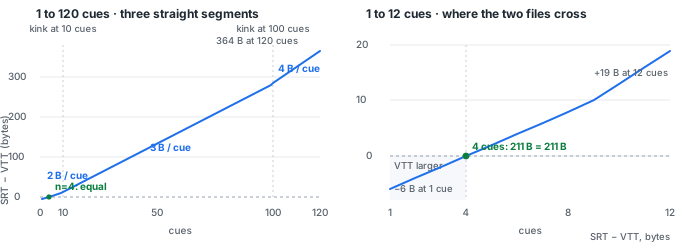
◆We read the two functions out of this page’s own script at /assets/app.js, lines 289–298 and 407–416.
function fmtSrt(sec) {
  return `${hh}:${mm}:${ss},${mmm}`;
}
function fmtVtt(sec) {
  return fmtSrt(sec).replace(',', '.');
}
function buildSrt() {
  return lastChunks
    .map((c, i) => `${i + 1}\n${fmtSrt(c.start)} --> ${fmtSrt(end)}\n${wrapCue(c.text)}`)
    .join('\n\n') + '\n';
}
function buildVtt() {
  return 'WEBVTT\n\n' + lastChunks
    .map((c) => `${fmtVtt(c.start)} --> ${fmtVtt(end)}\n${wrapCue(c.text)}`)
    .join('\n\n') + '\n';
}- One numbered line. ◆Each SRT cue begins with
${i + 1}and a newline; the VTT cue begins with its timecode instead. - One 8-byte header. ◆The VTT starts with
WEBVTT\n\n, which is 8 bytes, and the SRT has no header. - A comma for a period. ◆
fmtVttisfmtSrt(sec).replace(',', '.'): one byte swapped for one byte, so the timecode is the same length in both files. - Everything else is shared. ◆Both call the same
wrapCue()on the same text, use the same-->separator, join cues with two newlines and end with one.
◆So the difference is Σ(len(str(i)) + 1) − 8 over the cue numbers, and nothing in that expression reads the audio, the words or the timings.
The gap is three straight lines, with a kink where the numbers get longer
◆Cue numbers from 1 to 9 are one digit, so each adds 2 bytes including its newline; 10 to 99 add 3 bytes each; 100 to 999 add 4. ◆Subtract the fixed 8-byte header once and the sum collapses to three straight lines.
| cues | bytes per cue number line | SRT minus VTT | worked values from the rebuilt pairs |
|---|---|---|---|
| 1–9 | 2 | 2n − 8 | n=1 −6 n=2 −4 n=3 −2 n=4 0 n=9 10 |
| 10–99 | 3 | 3n − 17 | n=10 13 n=12 19 n=13 22 n=20 43 n=99 280 |
| 100–999 | 4 | 4n − 116 | n=100 284 n=120 364 |
◆The rebuilt files cross at exactly four cues: four one-digit numbers with their newlines add 8 bytes, cancelling the header, and both files come to 211 bytes. ◆Below the crossing the VTT is the larger file, by 6 bytes at one cue, 4 at two and 2 at three — a short transcript is the one case where the format with a header costs more. ◆From the tenth cue the slope is 3 bytes per cue, and from the hundredth it is 4; the two kinks in the chart are the points where a cue number gains a digit, not anything the audio did. ◆We checked the closed form against a brute-force sum of the digit widths for all 120 cue counts and found zero disagreement.
145 file pairs, zero residual
◆The run is recorded in data/instagram-srt-vtt-delta-2026-11-08.csv, 145 rows with the observed difference, the predicted difference and the residual in separate columns.
| part | rows | what was compared | result |
|---|---|---|---|
| A — rebuild | 120 | a synthetic transcript of 1 to 120 cues, written out by both functions in Python with identical cue text, then byte lengths subtracted | 120 of 120 match, residual 0 |
| B — published | 25 | the SRT and VTT byte counts already printed in three earlier benchmark CSVs, read as given and not recomputed here | 25 of 25 match, residual 0 |
◆Part A holds the cue text constant so that only the cue count moves, from 1 to 120, and the observed byte difference follows the three segments exactly: 52 vs 58 bytes at one cue, 211 vs 211 at four, 1,070 vs 1,027 at twenty, 6,491 vs 6,127 at 120. ◆Part B is the independent check: those 25 pairs were produced by earlier runs of the live page and published with their byte counts before this page existed, so the formula had to predict numbers it was not fitted to. ◆A second script re-derived the closed form and re-tested all 145 rows against both the closed form and a brute-force digit sum; zero rows disagreed.
Seven bytes of word drift, one gap of 43
◆The published pairs also answer the obvious objection: if the recognised words change, do the two files stop matching the formula?
| earlier CSV | rows | cues | SRT bytes observed | gap observed | gap predicted |
|---|---|---|---|---|---|
| mp3-delivery-2026-11-08.csv | 8 | 20 | 1,390 – 1,397 | 43 in all 8 | 3×20−17 = 43 |
| srt-track-2026-11-01.csv | 10 | 13 | 895 – 904 | 22 in all 10 | 3×13−17 = 22 |
| container-track-2026-11-03.csv | 4 | 13 | 895 | 22 | 3×13−17 = 22 |
| container-track-2026-11-03.csv | 3 | 12 | 852 | 19 | 3×12−17 = 19 |
◆The eight MP3 rows are one recording delivered at different bitrates; their SRT sizes range over seven bytes because the words the model returned are not identical, and their VTT sizes move with them, but the difference stays at 43 because each file has 20 cues. ◆Ten rows of a second clip in different wrappers keep 13 cues and a 22-byte gap even as their SRT sizes range from 895 to 904 bytes. ◆Seven rows of a third CSV split by cue count: four with 13 cues and a 22-byte gap, three with 12 cues and a 19-byte gap. ◆Bitrate, container, soft subtitles, burned-in subtitles and wrong words move the two files together; only a change in the cue count moves the gap. ◆These are single observations from earlier runs, not a new experiment: this page did not re-transcribe any audio, and small differences in the recognised words are inside the ±2-word jitter band this material shows on our call page.
◆One consequence is practical: from the two exported files alone, the cue count can be recovered by inverting the formula, without opening either file, as long as the counts are in the range we measured. ◆Another is that choosing SRT or VTT is not an accuracy decision on this page: both are written from the same cue list, with the same text and the same timing, by two functions that differ only in their framing.
What this page cannot do
- Take an Instagram link. There is no URL box. Save the Reel, then drop the file on the front page and export SRT and VTT from the result.
- Fetch anything from Instagram. Nothing was pasted, no account was used, no page of Instagram’s was read for this page, and no Reel was downloaded.
- Claim a fresh browser run. ◆This measurement is offline: part A rebuilds the two functions from the source in Python, and part B reuses byte counts published by earlier runs of the live page. ◆We opened no browser, pressed no export button and downloaded no recognition model for this page.
- Run any of the 28 pages. ◇We uploaded nothing to them. ◇The quotes are what those pages print; we are not saying their exporters behave the same way, only that none of the 28 prints a byte count or a size comparison.
- Say anything about other exporters. ◆The formula describes the two functions in this page’s script. ◆A tool that adds speaker labels, voice tags or metadata to VTT would have a different difference, and we did not measure one.
- Say anything about non-Latin cue text or very long transcripts. ◆The rebuilt cues used one fixed ASCII line of text. ◆Both functions call the same wrapping function, so wrapping should cancel, but we did not measure cue text in Chinese, Japanese or Korean here. ◆We measured 1 to 120 cues; the four-digit cue numbers beyond 999 cues were not tested.
- Translate. The model transcribes the language it is told is spoken; it does not convert one language into another.
What our numbers do not cover
- One exporter, one build. ◆Every number here comes from the two functions in the copy of
/assets/app.jsshipped with this page, and from three CSVs already in our benchmark folder. ◆A change to either function changes the formula. - The search volumes are printed as supplied. instagram transcript 2,400 and instagram reel transcript 1,000 are US monthly averages given to us, both marked low competition. ◇We did not measure them and we did not estimate any figure that was not given.
- Index coverage, clicks, ranking and analytics are not reported here. Those four figures are left blank for the site owner to fill in; this page carries no estimate for them.
- Small differences are not effects. ◆The seven-byte spread in the MP3 rows is word drift, not a bitrate effect, and no claim on this page rests on it.
- ◇Two URLs are missing from the denominator. ◇One answered 500 and one answered 503; we did not read them and we did not count them among the 28.
Try it on a Reel you already have
Save the Reel to your device and drop the file on the front page. ◆Export SRT and VTT from the same result, count the cues, and the difference in bytes should be 3n − 17 for any transcript of 10 to 99 cues. ◆If it has four cues the two files will be the same size; if it has fewer, the VTT will be the larger one. ◆The recognition runs in your browser tab, so the file never leaves the machine. ◆The ceiling is 30 minutes of audio and 512 MiB per job.
Questions this page gets asked
What is the byte difference between the SRT and VTT this page exports?
It depends only on the number of cues. For n cues the SRT is larger by the total width of the cue numbers plus one newline each, minus the 8-byte WEBVTT header: 2n-8 bytes for 1 to 9 cues, 3n-17 for 10 to 99, and 4n-116 for 100 to 999. We rebuilt both exporters byte for byte for 1 to 120 cues and checked 25 already published file pairs from three earlier runs; all 145 differences matched with zero residual.
At how many cues are SRT and VTT the same size?
At four cues. The four one-digit numbers plus their newlines add 8 bytes, exactly cancelling the 8-byte WEBVTT header: the rebuilt pair is 211 bytes for each file. Below four cues the VTT is larger, by 6 bytes at one cue, 4 at two and 2 at three. From five cues on the SRT is larger, and the gap grows by 2 bytes per cue until the numbers reach two digits, then 3, then 4.
Does the audio change the difference?
Not in the material we measured. Eight MP3 exports of the same recording at different bitrates produced SRT files from 1,390 to 1,397 bytes, because the recognised words differed, yet each VTT was exactly 43 bytes smaller, because each file had 20 cues. Ten exports of a second clip in different wrappers all had 13 cues and a 22-byte gap while their SRT sizes ranged from 895 to 904 bytes. Seven rows from a third CSV split by cue count: four with 13 cues and a 22-byte gap, three with 12 cues and a 19-byte gap. Bitrate, container and wrong words move the two files together; the cue count moves the gap.
Why does the gap grow by 2, 3 or 4 bytes per cue?
Each SRT cue starts with its number on its own line. A one-digit number plus its newline costs 2 bytes, a two-digit number costs 3 and a three-digit number costs 4. The VTT has no such line, and its timecodes are the same length because the page builds them by replacing the SRT comma with a period. The cue text and the wrapping function are shared, so the numbered lines are the whole of the difference apart from the fixed 8-byte header.
Do any Instagram transcript tools describe this?
None of the 28 pages we read does. Eight of the 28 offer both SRT and VTT as download formats, one prints the words sequential numbering in a description of SRT and one prints a WEBVTT sample caption, but none of the 28 gives a byte count for a subtitle file, none compares the sizes of the two formats, and none says the difference is a function of the cue count. Two further URLs we tried did not answer and are left out of that count.
Can I paste an Instagram link into this site?
No. This page transcribes a file you already have: save the Reel, then drop the file on the front page and export SRT and VTT from the result. What you get in exchange is that the recognition runs inside your browser tab and the file is never uploaded. The ceiling is 30 minutes of audio and 512 MiB per job.